

 vercel
ENOENT when executing bundled binary asset
What version of pkg are you using?
5.5.1
What version of Node.js are you using?
16.13.1
What operating system are you using?
Windows
What CPU architecture are you using?
x86_64
What Node versions, OSs and CPU architectures are you building for?
latest-win
Describe the Bug
I'm trying to spawn a bundled .exe, but I get ENOENT. I'm including the bin folder:
"pkg": {
    "assets": ["bin"]
  }
And in my code I use the following (as instructed by the pkg readme):
let bin = path.join(__dirname, '../bin/pg_dump.exe')
spawn(bin, ['--version'])
Also there are dll's in the bin folder required to run pg_dump.exe
Expected Behavior
To spawn the bundled .exe
To Reproduce
Try to bundle an .exe and execute it

Binaries are excluded from the package by default.
The same goes for native node modules and dynamic require()s.
To include your binaries (or native modules, or dynamic requires):
Define the "assets" section of the PKG config with paths to the files you want to include. I'm doing this in my package.json file as follows:
...
"pkg": {
    "assets": [
      "./api/package.json",
      "./api/resources/*",
      "./api/migrations/*",
      "./node_modules/youtube-dl-exec/bin/youtube-dl",
      "./node_modules/youtube-dl-exec/bin/youtube-dl.exe",
      "./node_modules/ffmpeg-static/ffmpeg",
      "./node_modules/ffmpeg-static/ffmpeg.exe",
      "./node_modules/sqlite3/lib/binding/**/*",
      "./node_modules/electron-logger"
    ]
  }
Additional debug note:
You can inspect the your compiled packages filesystem after packaging to ensure your assets were included.
- Build your package with the --debug flag
- Set an environment variable DEBUG_PKG=1
- Run your package.
This will output the file structure included in your package. It's ordered by size (not alphabetically) so you'll probably have to search (ctrl+f) to search for the asset in the list.
Hope that's helpful.

I have tried of everything, still no success. Yes, my pg_dump.exe and the dll's are packaged. Is there something wrong with trying to spawn a child_process like this?
spawn(path.join(__dirname, '../bin/pg_dump.exe'), ['--version'])
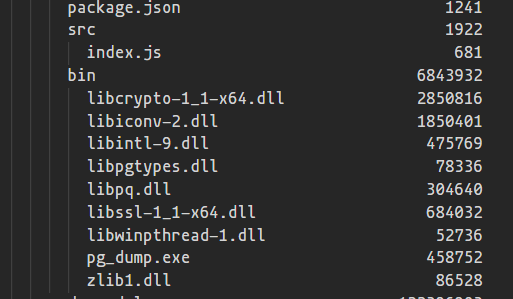

Any ideas?
Thanks in advance.
Same issue, the .exe file is packaged, but calling spawn throws "pkg": "5.5.1"
console.log(__dirname);

fs.readdirSync(__dirname).forEach((file) => {
  console.log(file);
});

const ffmpegPath = path.join(__dirname, "ffmpeg.exe");

const cp_ffmpeg = spawn(
  ffmpegPath,
  [
    "-f",
    "mpegts",
    ...
C:\snapshot\streamer_2\dist
main.js
ffmpeg.exe
webapp
node:events:368
      throw er; // Unhandled 'error' event
      ^

Error: spawn C:\snapshot\streamer_2\dist\ffmpeg.exe ENOENT
  "pkg": {
    "assets": [
      "dist/**/*",
      "node_modules/**/*.node"
    ],
    "targets": [
      "node16"
    ]
  }

Just ran into this when attempting to use esbuild inside of a pkg'd binary, which relies on platform-specific builds of esbuild (e.g. esbuild-darwin-64 for macOS). esbuild happens to allow an ENV override which I can point at my own installed version of esbuild, though that does defeat a bit of the purpose of packaging up the binary. Going to spend a little time looking into this, and I'll give #1532 a try to see if it fixes. @robertsLando is this something you are still working on or has life taken you in a different path 😃 ?

@nickhudkins I started that but it has been picked up by another user then and I dunno if him or @jesec will end it soon

i met the same problem but on macos system。
follow some discussion,i successfully copy the binary from snapshot system to actual file system,
but when i call the binary which pkg generated, some error happend.
stderr: mybinary: mybinary: cannot execute binary file
mybinary is embed into the main binary. i check the mybinary executable privilege,it's right.
-rwxrwxrwx 1 tom staff 46M Jun 2 10:37 mybinary

This issue is stale because it has been open 90 days with no activity. Remove the stale label or comment or this will be closed in 5 days. To ignore this issue entirely you can add the no-stale label
![github-actions[bot] avatar](https://avatars.githubusercontent.com/in/15368?v=4 "Published by a pub.dev verified publisher")
This issue is now closed due to inactivity, you can of course reopen or reference this issue if you see fit.
