

 ventoy
Vanilla OS dev builds cannot mount /dev/loop0
Official FAQ
- [X] I have checked the official FAQ.
Ventoy Version
1.0.82
What about latest release
Yes. I have tried the latest release, but the bug still exists.
Try alternative boot mode
Yes. I have tried them, but the bug still exist.
BIOS Mode
UEFI Mode
Partition Style
GPT
Disk Capacity
16gb
Disk Manufacturer
Patriot Memory
Image file checksum (if applicable)
None
Image file download link (if applicable)
https://vanillaos.org/download
What happened?
Vanilla OS cannot mount /dev/loop0 in squashfs.

P.S: This USB works with the other ISOs on the stick. I know that this stick isn't faulty.

Please checksum the ISO file as follows: https://www.ventoy.net/static/img/filechecksum.gif to make sure that the ISO file was not corrupted during copy to the USB stick.
Refer: #1971 #1955

The checksum is valid (I ran sha256 on it while the ISO was on the USB.)
I also tried burning that exact ISO to another stick (with dd) and it worked.
When you drop into the initramfs shell, run the following commands:
cat /ventoy/log
blkid
dmsetup ls
ls -l /dev/mapper/
ls -l /dev/dm-0
/ventoy/busybox/md5sum /dev/dm-0
Hello, @tejasraman I am part of the Vanilla OS Docs team and contributors. ~I used the latest build and it works fine with Ventoy~. Make sure your USB stick is in the latest version of Ventoy and inside Ventoy select Boot in normal mode. If this still fails start a discussion in #testers channel in our Discord server.
Edit: Seems like there are issues using Ventoy with the most recent ISO will look into it.

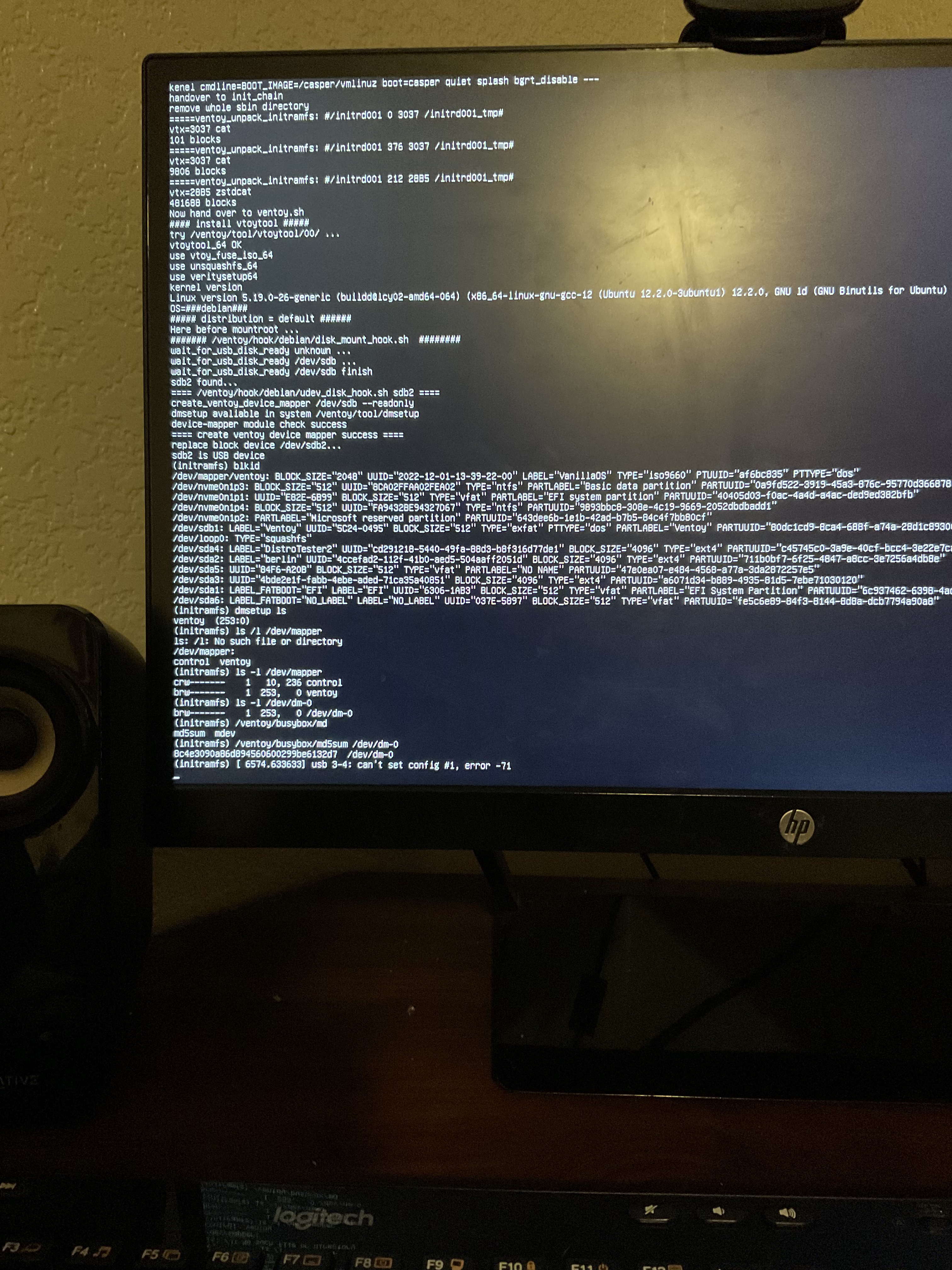

Obviously the ISO file was corrupted during you copy to the USB. You should have checksumed the file as what I said before (In Ventoy menu, not in the OS)
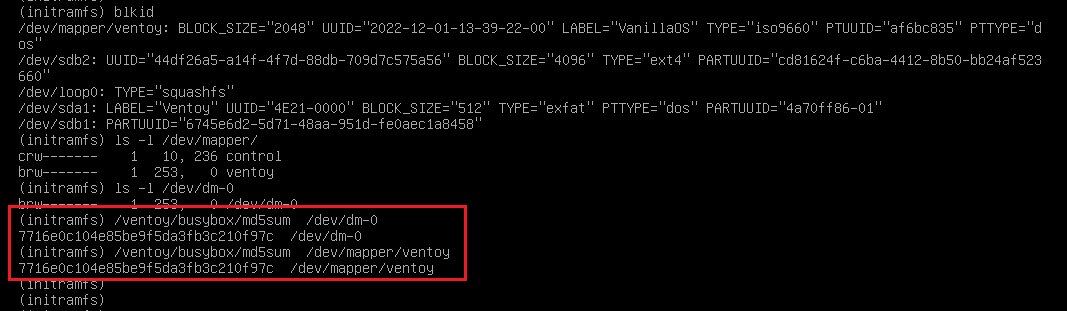
The correct MD5 is
7716e0c104e85be9f5da3fb3c210f97c VanillaOS-22.10-unstable.20221201.iso
That's what I get: (In your picture above you get an incorrect MD5)
Update: new build is out and this issue is fixed and it isn't replicable anymore.
Did you checksum the ISO file as follows? Please upload your result screenshot here.

Then why you get different MD5 value when you run /ventoy/busybox/md5sum /dev/dm-0 ?
I didn't notice that...
Also, I redownloaded the iso 2 times and tried a different iso (mint) to make sure it wasn't the USB.
I'll check once I'm at home
Tejas
So was it due to ISO file corrupted?
No, there was an issue with grub from what I remember. But the issue wasn't due to a corrupted ISO file
Anyway, the checksum value should match.
If you boot fail and drop into the initramfs shell you can run /ventoy/busybox/md5sum /dev/mapper/ventoy
If you boot OK, then open the terminal and run md5sum /dev/mapper/ventoy
Both should get the correct MD5 value for the ISO file.