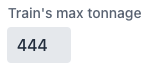
vaadin
[vaadin-custom-field] Custom field's "inputs-wrapper" should be defined as "part" to be accessible for shadow dom styling
Describe your motivation
All our input fields contain a vaadin-input-container, that is marked as part="input-field", through which a theme-for css import can style that part.
Custom field is an exception from that "rule", since it only provides a simple div, that has a class="inputs-wrapper" but no part attribute. With that a custom theme is required to apply any custom styles to this part of the shadow dom.
Background
In our project we want to make the input parts of our fields set to a specific size, while the labels may take a larger width. Setting the width of the input element is not enough, therefore we have to access the shadow parts to set the vaadin-input-container to a specific size. With the custom field, that does not work and thus require a custom theme to be applied (or some other hacks or custom solutions for each custom field).
Describe the solution you'd like
The custom field shadow dom should follow the rules of the normal vaadin input fields by applying at least an part="input-field" attribute to the input containing div.
Ideally the div is replaced with a vaadin-input-container as all other fields have. But this is optional for my request, as the part attribute is enough to access it from the outside.
Describe alternatives you've considered
In my case using a custom theme or modify the custom field content to fulfill the needed functionality.
Additional context
Vaadin 23.1.3

The main reason against using a part was described here: https://github.com/vaadin/web-components/issues/727#issuecomment-676308079
Ideally the div is replaced with a vaadin-input-container as all other fields have
Please note that vaadin-input-container provides styles for a single <input> or <textarea>, so we can't use it here.
In our project we want to make the input parts of our fields set to a specific size, while the labels may take a larger width.
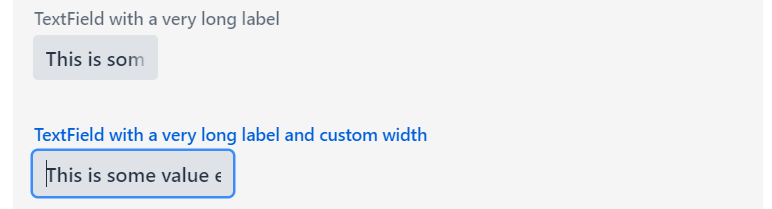
Could you please clarify this use case e.g. with a code example? Based on the screenshot, it looks like you are trying to use vaadin-custom-field with a single input, which does not make much sense to me.

The comments on the given issue and the there referenced ones do not really make sense to me, since the vaadin-input-container and the inputs-wrapper do affect the visuals and therefore need to be accessed via styling in our case.
My use case is as described above. We want to allow fields to have a wider label than the field itself. Since the label will be cut off at the end of the field with a narrow width, it makes it more or less impossible when using the out of the box fields to have a small field with a long label.
In our case we have for instance a field asking for "Train's max. tonnage". The field itself only allows to enter 3 digits. The screenshot shows 3 potential examples:
- The field has to be as wide as the label. For a 3-digit field this is visually too long.
- The field has the width to fit the 3 digits. The label is cut off.
- This is our custom solution. Using the part styling, we can shorten the input container and allow the label to be as long as necessary.
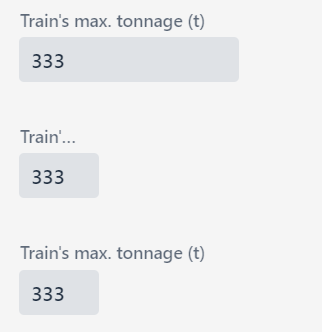
And this is what we also want to allow for custom fields. The field shown is just a normal text field to simply show the use case. We have different custom fields, that combine for instance a text field and multiple buttons or show additional inputs.
We want to allow fields to have a wider label than the field itself
Actually, with a custom field it's possible to have wider label when setting width on the nested field. For example:
<vaadin-custom-field label="Train's max tonnage">
  <vaadin-text-field
    maxlength="3"
    style="width: 4rem"
  ></vaadin-text-field>
</vaadin-custom-field>
Result: