

 userfront
Problem with localhost login when `tenant.cookieOptionsSetDomain=true`
For tenants with cookieOptionsSetDomain manually set to true, the library will explicitly set the domain attribute when setting cookies.
This appears to lead to inconsistent behavior between chrome/firefox and safari when on localhost.
From an admin:
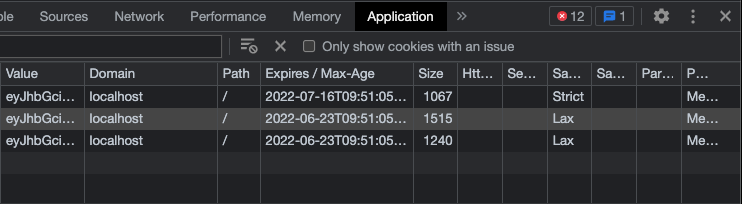
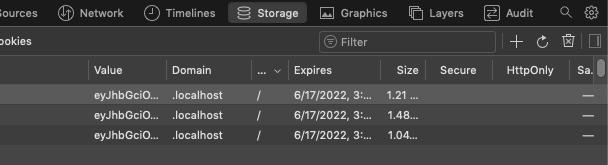
I saw an interesting behaviour that the dot domain cookie only works with safari. But on chrome and firefox, the domain name is "localhost" only without a dot. The behaviour of the application is affected on chrome and firefox. More specifically, there is no user session for subdomain on localhost on chrome and firefox. For example - if I visit "subdomain.localhost:3000" there is no Userfront user session because cookies domain name is "localhost" But in case of safari - if I visit "subdomain.localhost:3000" then I can access Userfront session because the cookies domain name starts with dot (".localhost")
Chrome
Cookie domain is set without a . prefix
Safari
Cookie domain is set with a . prefix
Post-deploy tasks
- [ ] Notify the admin (convo 378)

Hello @tyrw. I have found a temporary fix for the issue. Before that, I will just summarise the main issue. The issue is if I log in to the site using chrome/firefox (localhost) then the cookie domain name will be set as "localhost" because of which the userfront session will not work on a sub-domain. But the same thing is working on safari (localhost) and deployed site (azure).
So to fix the sub-domain session on chrome (localhost) I have updated the hosts file. And this is resolving the cookie domain name issue on localhost.
The below are steps (macOS)
- Run
sudo vim /etc/hosts
127.0.0.1       example.com
127.0.0.1       subdomain.example.com
- And in the NextJs app update the dev script
"scripts": {
  "dev": "sudo next dev -H example.com -p 80",
}
(update domain "example.com" according to your requirement)
This way the cookie domain name is set as ".example.com" and I am able to access the user session on a subdomain.

