

 udecode
Table: Firefox deletes wrong contents for multiple cell selections
In Chrome and Safari, when selecting multiple table cells and pressing delete/backspace, the contents of the currently selected cells get deleted.
In Firefox, the last cell in the selection has its contents deleted, as well as any additional cells beyond that cell in a table row.
Also of note, Chrome and Safari do not allow vertical cell selections without selecting entire rows between the selected cells in a column, whereas Firefox shows just the vertically selected cells. (Note, this is due to Firefox supporting multiple selections which was never implemented by other browser vendors).
I'm taking a look at the former issue now.

As a quick note, left is firefox, right is Chrome in the screenshot, for selecting and deleting what should be the same cells (2nd and 3rd cells in the third row of a table, or the path should be 0,2,2,1 and 0,2,2,2, not 0,2,2,2 and 0,2,2,3).
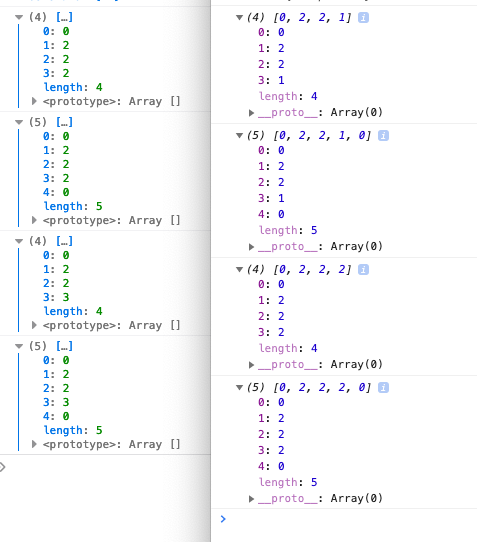
Ok, to summarize the oddness of Firefox with selection and deletion:
- Multiple cells in a single row: Firefox reports the path with a cell index one larger than reality
- Multiple cell selection in a column: Our code deletes content two cells (last cell selected and the one after it), regardless of how many cells are selected.
The former is "fixed" by counting differently in Firefox, but it would be much better to know why this behavior occurs. The latter appears to be a function of slate-plugins or slate getting confused by a range containing multiple selections.
Similarly for Firefox, copy/paste of a selection only copies the last cell. Chrome and Safari copy all the cells, but lose the start of the selection (e.g. the contents of the first cell are copied, but forget that it was part of the table.
I'm reviving this old issue as I face a very similar issue in Firefox. I can't seem to select multiple table cells no matter what. It always moves the selection to the last cell. See the demo below:
https://user-images.githubusercontent.com/12673605/160805765-3322a451-8365-4d6a-a3f2-2255a7ce6788.mp4
@dylans Do you have an idea of how to fix the root cause?

The underlying issue is how DOM Range was implemented in Firefox vs. other browsers. Firefox's native implementation actually supports multiple ranges whereas Chrome+Safari do not.
So the Plate implementation generally assumes you can only have one range item. Which leads to confusion when working with Firefox.
I think the solution is that we need to generally find a way to represent a selection across multiple ranges, but not rely on native DOM Range behavior.

~~💎 $100 bounty created by zbeyens~~
~~🙋 If you start working on this, comment /attempt #560 to notify everyone~~
~~👉 To claim this bounty, submit a pull request that includes the text /claim #560 somewhere in its body~~
~~📝 Before proceeding, please make sure you can receive payouts in your country~~
~~💵 Payment arrives in your account 2-5 days after the bounty is rewarded~~
~~💯 You keep 100% of the bounty award~~
~~🙏 Thank you for contributing to udecode/plate!~~
| Attempt | Started (GMT+0) | Solution |
|---|---|---|
| 🟢 @WcaleNieWolny | Jul 18, 2023, 9:51:40 AM | #2538 |
![algora-pbc[bot] avatar](https://avatars.githubusercontent.com/in/275896?v=4 "Published by a pub.dev verified publisher")
I am able to reproduce the issue on my machine. I would like to attempt this.
/attempt #560

After some investigation I have found out that with JavaScript disabled (In both browsers) firefox still behaves differently.
(Left is firefox, right is brave, chromium based browser)
Firefox after highlighting 2 cells removes the text selection and chromium does not.
However please note that the plate depends on that text selection and not Firefox cell selection.
A potential solution could be to disable this table editing all together as we do not need it. (I still have to figure out which CSS or HTML tag is responsible for this editing behavior)
If such tag could be found our table would behave like the one in the second video. If removing this tags removes the ability to destroy cells by pressing backspace we could add a event listener that would destroy said cells
https://github.com/udecode/plate/assets/50914789/a074d256-c2db-4e8e-ae19-ddd3666e941d
https://github.com/udecode/plate/assets/50914789/7123678e-8aba-4286-a05c-77ada21bc9dd
Plate normalizes the selection here https://github.com/udecode/plate/blob/6908674582d89f6d4bdc5d23b14608b3ccf0cc03/packages/table/src/withSelectionTable.ts#L25
Your example is showing a row selection, but we also support column selection which does not work in Firefox:
https://github.com/udecode/plate/assets/19695832/e2ea9ba6-bc17-455f-ab46-fc95e1ab2f3f
Well... It does. It is our app that breaks it (No javascript example again). I am going to investigate this further. Thank you for your input
https://github.com/udecode/plate/assets/50914789/012f3d87-fcbd-4eea-aaa7-1c6bcf287971
Currently awating https://github.com/ianstormtaylor/slate/pull/5486 to be merged so we can close this
💡 @WcaleNieWolny submitted a pull request that claims the bounty. You can visit your org dashboard to reward.
Thanks for the hard work @WcaleNieWolny, you deserve more than the initial bounty, so I've doubled it.