

 tyron12233
Crashes whole time
Note that Issues are for bugs only. Use the discussions tab for feature requests.
Describe the bug A clear and concise description of what the bug is.
To Reproduce Steps to reproduce the behavior:
- Go to '...'
- Click on '....'
- Scroll down to '....'
- See error
Expected behavior A clear and concise description of what you expected to happen.
Screenshots If applicable, add screenshots to help explain your problem.
Smartphone (please complete the following information):
- Device: [e.g. iPhone6]
- OS: [e.g. iOS8.1]
- Version [e.g. 22]
Additional context Build version: 0.2.9 ALPHA Build date: 1981-01-01 01:01:02 Current date: 2022-12-04 23:04:06 Device: Samsung SM-G780G
Stack trace:
java.lang.NullPointerException: Attempt to invoke virtual method 'java.io.File com.tyron.code.ui.file.tree.model.TreeFile.getFile()' on a null object reference
at com.tyron.code.ui.file.tree.TreeUtil.updateNode(TreeUtil.java:38)
at com.tyron.code.ui.file.action.file.DeleteFileAction.lambda$actionPerformed$0(DeleteFileAction.java:69)
at com.tyron.code.ui.file.action.file.DeleteFileAction$$ExternalSyntheticLambda4.run(Unknown Source:8)
at android.os.Handler.handleCallback(Handler.java:938)
at android.os.Handler.dispatchMessage(Handler.java:99)
at android.os.Looper.loopOnce(Looper.java:226)
at android.os.Looper.loop(Looper.java:313)
at android.app.ActivityThread.main(ActivityThread.java:8751)
at java.lang.reflect.Method.invoke(Native Method)
at com.android.internal.os.RuntimeInit$MethodAndArgsCaller.run(RuntimeInit.java:571)
at com.android.internal.os.ZygoteInit.main(ZygoteInit.java:1135)
User actions: 2022-12-04 22:51:13: MainActivity created 2022-12-04 22:51:13: MainActivity resumed 2022-12-04 23:01:52: MainActivity paused 2022-12-04 23:01:52: SettingsActivity created 2022-12-04 23:01:52: SettingsActivity resumed 2022-12-04 23:02:19: SettingsActivity paused 2022-12-04 23:02:19: MainActivity resumed 2022-12-04 23:02:19: SettingsActivity destroyed

My friend, the layout viewer does not appear completely, as only the right half appears from it, and there is another problem related to not saving the layout. I will attach a screenshot As there are other things missing such as video view and other things , please solve the problem. My Android device : LTpi LTp9 . Android version : 9.0 .
One last note... I am using alpha version. Is there a stable version of this app?
في الاثنين، ٥ ديسمبر ٢٠٢٢ ١٢:٠٥ ص DJ-PUG @.***> كتب:
Note that Issues are for bugs only. Use the discussions tab for feature requests.
Describe the bug A clear and concise description of what the bug is.
To Reproduce Steps to reproduce the behavior:
- Go to '...'
- Click on '....'
- Scroll down to '....'
- See error
Expected behavior A clear and concise description of what you expected to happen.
Screenshots If applicable, add screenshots to help explain your problem.
Smartphone (please complete the following information):
- Device: [e.g. iPhone6]
- OS: [e.g. iOS8.1]
- Version [e.g. 22]
Additional context Build version: 0.2.9 ALPHA Build date: 1981-01-01 01:01:02 Current date: 2022-12-04 23:04:06 Device: Samsung SM-G780G
Stack trace: java.lang.NullPointerException: Attempt to invoke virtual method 'java.io.File com.tyron.code.ui.file.tree.model.TreeFile.getFile()' on a null object reference at com.tyron.code.ui.file.tree.TreeUtil.updateNode(TreeUtil.java:38) at com.tyron.code.ui.file.action.file.DeleteFileAction.lambda$actionPerformed$0(DeleteFileAction.java:69) at com.tyron.code.ui.file.action.file.DeleteFileAction$$ExternalSyntheticLambda4.run(Unknown Source:8) at android.os.Handler.handleCallback(Handler.java:938) at android.os.Handler.dispatchMessage(Handler.java:99) at android.os.Looper.loopOnce(Looper.java:226) at android.os.Looper.loop(Looper.java:313) at android.app.ActivityThread.main(ActivityThread.java:8751) at java.lang.reflect.Method.invoke(Native Method) at com.android.internal.os.RuntimeInit$MethodAndArgsCaller.run(RuntimeInit.java:571) at com.android.internal.os.ZygoteInit.main(ZygoteInit.java:1135)
User actions: 2022-12-04 22:51:13: MainActivity created 2022-12-04 22:51:13: MainActivity resumed 2022-12-04 23:01:52: MainActivity paused 2022-12-04 23:01:52: SettingsActivity created 2022-12-04 23:01:52: SettingsActivity resumed 2022-12-04 23:02:19: SettingsActivity paused 2022-12-04 23:02:19: MainActivity resumed 2022-12-04 23:02:19: SettingsActivity destroyed
— Reply to this email directly, view it on GitHub https://github.com/tyron12233/CodeAssist/issues/533, or unsubscribe https://github.com/notifications/unsubscribe-auth/AYFRSPLGFDQBVZEIXEWYMNTWLUBS3ANCNFSM6AAAAAASTSJSQI . You are receiving this because you are subscribed to this thread.Message ID: @.***>

Go to perview layout
Add items and save it .
Error 1. You can't back to the source code.
Error 2. The layout not saved.
Error 3. Perwiew layout Only half of it is shown from the right.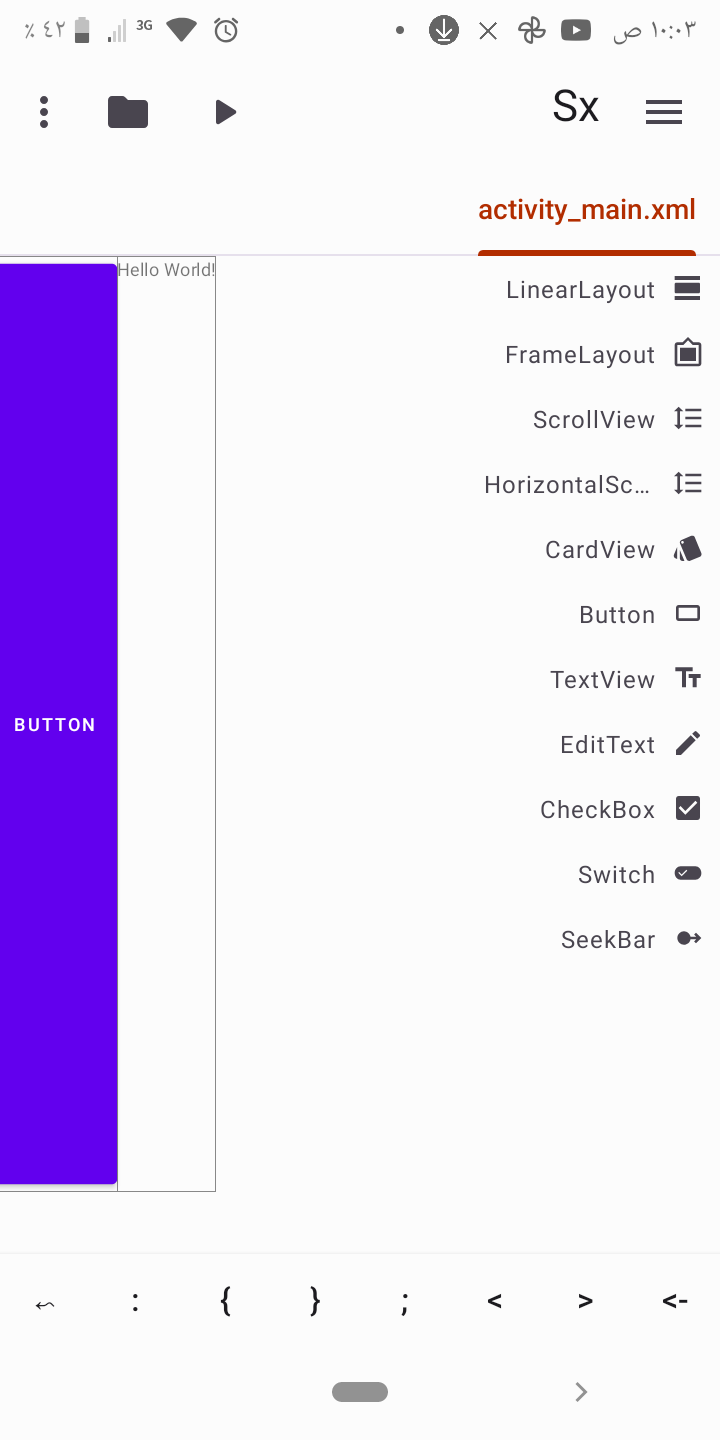
@The-Plumber101 that is an internal error. It doesn't affect your project. All you have to do is restart the app😅😅

@Adnan1996ali what I think it the LTR support is the issue as regards to the the layout preview showing that way
For the lay out not saving all you have to do is this:
After editing the layout using the layout preview, exit it by pressing the back button of your phone or navigate back if using gesture. A dialogue will show then select save. After that press a random key on your keyboard then delete it. Finally save the file using the traditional save button from the topbar 😉
in priview editor, image is not taking full screen when it should. The apk works as intended.[did cupcake android tutorial]
Also, if drag and drop a button in the editor. Then to delete it, drag it outside of editor it disappear, which is expected. However, when i save and return to preview editor, the button re-appears.
