

 typicode
DELETE request will delete all data
Version: 0.14.0
{
  "layers": [
    {
      "id": "7d-UXfgmm",
      "componentId": "aaa"
    },
    {
      "id": "HXf8PkKl7",
      "componentId": "aaa"
    },
    {
      "id": "kNJ083om1",
      "componentId": "aaa"
    },
    {
      "id": "DYPg3hl5s",
      "componentId": "aaa"
    }
  ],
  "components": [
    {
      "id": "K8iv0hJaQ",
      "label": "component"
    }
  ]
}
http DELETE :3000/layers/HXf8PkKl7
The will delete all layers 。


I'm having the same issues...multiple instances of the same element randomly deleted when DELETE request to one single element

Hi! This is not a random error. I found that if there is some kind of connection between elements, then DELETE request will erase both of them: I have a "database":
{
    "users":[
        {"id":1, "name": "Bob", "email":"bob@gmailcom", "age": 35},
        {"id":2, "name": "Sue", "email":"sue@gmailcom", "age": 32},
        {"id":3, "name": "Cloe", "email":"cloe@gmailcom", "age": 19},
        {"id":4, "name": "Jane", "email":"jane@gmailcom", "age": 26}
    ],
    "comments":[
        {"id":1, "message1": "Here should be some comment", "userId": 2},
        {"id":2, "message2": "Here should be many comment", "userId": 4},
        {"id":3, "message3": "Here should be more comment", "userId": 1}
    ]
}
and I run this from console:
let fetchOpt = { method: "delete", mode: "cors", cache: "no-cache" }; fetch("http://localhost:3000/users/4", fetchOpt);
then server will delete "Jane with id:4" from users, and "message2 with userId: 4" from comments
Try it. Then I changed "userId" to "usr" and there is no more "strange delete"

Expected behaviour: https://github.com/typicode/json-server/blob/master/tests/server/plural-with-custom-foreign-key.js#L110
default value: https://github.com/typicode/json-server/blob/574cb817dc0bb2a67cd5ed38a0fc3211d4058804/src/server/router/index.js#L16
logic: https://github.com/typicode/json-server/blob/7ce599c50290e5c3a2336fd5b0bd84c3508df236/src/server/router/plural.js#L329


I debugged the source code and found that the logic is: delete all data that are not related to each other (through xxId as the association flag).
When we delete data, it is equivalent to cleaning the entire db.json once, regardless of whether it is the currently operating table.
Here are some relevant test cases: plural.js#L628
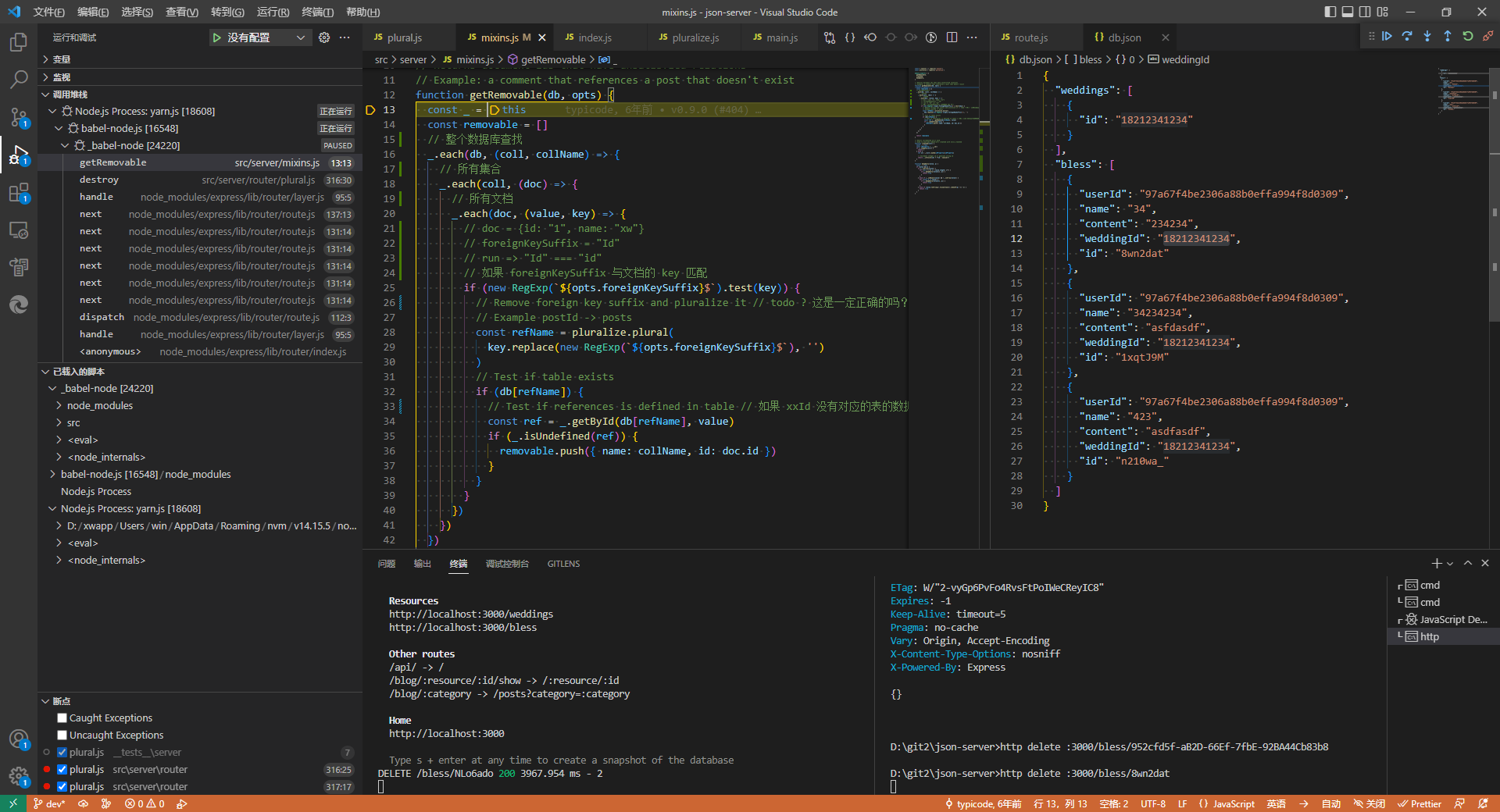
This is a huge looking db.json file, However, when we run the http delete :3000/xxxs/1 command, we will find that a lot of data is deleted.
Before deleting a piece of data:
View Collapsed Data
{
  "weddings": [
    {
      "id": "xw",
      "name": "hello"
    },
    {
      "id": "xw2",
      "name": "hello"
    }
  ],
  "dels": [],
  "users": [
    {
      "id": "1",
      "readme": "This data will be deleted because it has delId and the dels table exists, but they have no dependencies",
      "delId": "about to be deleted",
      "ua": "chrome"
    }
  ],
  "bless": [
    {
      "id": "1",
      "name": "李莫愁",
      "content": "风雨同舟,任他沧海桑田",
      "userId": "a",
      "weddingId": "xw"
    },
    {
      "id": "2",
      "name": "宋静",
      "content": "Kxkben Egwv Ixwdflns Qbvec Jbngto Iidqyh",
      "userId": "b",
      "weddingId": "xw"
    },
    {
      "id": "3",
      "name": "林超",
      "content": "Vxoeft Vjh Bhp Exbgevz Xhgsyabf Ljindxdylk Kqiowkmrdb",
      "userId": "c",
      "xxxId": "deletedelete",
      "weddingId": "xw"
    }
  ],
  "xxxs": [
    {
      "id": "1",
      "img": "https://dummyimage.com/750x1334.jpg",
      "weddingId": "xw"
    },
    {
      "id": "2",
      "img": "https://dummyimage.com/750x1334.jpg",
      "weddingId": "xw"
    }
  ]
}
http delete :3000/xxxs/1
After deleting a piece of data, Too much data was cleaned up.:
{
  "weddings": [
    {
      "id": "xw",
      "name": "hello"
    },
    {
      "id": "xw2",
      "name": "hello"
    }
  ],
  "dels": [],
  "users": [],
  "bless": [],
  "xxxs": [
    {
      "id": "2",
      "img": "https://dummyimage.com/750x1334.jpg",
      "weddingId": "xw"
    }
  ]
}
So how do we avoid this (assuming the program has no bugs)?
- Create data that maintains a reference relationship
- Don't arbitrarily use key names like
...Id, unless they have a reference relationship, they may be deleted - Use avoidable options _noRemoveDependents
For example the following data will not be cleaned:
View Collapsed Data
{
  "weddings": [
    {
      "test": "一些数据",
      "id": "l2MIvPE"
    },
    {
      "test": "一些数据",
      "id": "G-v2Ert"
    },
    {
      "test": "一些数据",
      "id": "Bt2hQhG"
    },
    {
      "test": "一些数据",
      "id": "9sntAZw"
    },
    {
      "test": "一些数据",
      "id": "gJx_MAK"
    },
    {
      "test": "一些数据",
      "id": "VS3qmLL"
    },
    {
      "test": "一些数据",
      "id": "UMUkam_"
    },
    {
      "id": "18212341234",
      "text": "一些业的发展"
    }
  ],
  "users": [
    {
      "id": "1",
      "ua": "chrome"
    }
  ],
  "bless": [
    {
      "test": "一些数据",
      "weddingId": "UMUkam_",
      "id": 2
    },
    {
      "test": "一些数据",
      "weddingId": "UMUkam_",
      "id": 3
    },
    {
      "test": "一些数据",
      "weddingId": "UMUkam_",
      "id": 4
    },
    {
      "test": "一些数据",
      "weddingId": "UMUkam_",
      "id": 5
    },
    {
      "test": "一些数据",
      "weddingId": "UMUkam_",
      "id": 6
    },
    {
      "test": "一些数据",
      "weddingId": "UMUkam_",
      "id": 7
    },
    {
      "text": "一些业的发展",
      "weddingId": "18212341234",
      "id": 8
    },
    {
      "text": "一些业的发展",
      "weddingId": "18212341234",
      "id": 9
    },
    {
      "text": "一些业的发展",
      "weddingId": "18212341234",
      "id": 10
    },
    {
      "text": "一些业的发展",
      "weddingId": "18212341234",
      "id": 11
    },
    {
      "text": "一些业的发展",
      "weddingId": "18212341234",
      "id": 12
    },
    {
      "text": "一些业的发展",
      "weddingId": "18212341234",
      "id": 13
    },
    {
      "text": "一些业的发展",
      "weddingId": "18212341234",
      "id": 14
    },
    {
      "text": "一些业的发展",
      "weddingId": "18212341234",
      "id": 15
    }
  ],
  "photos": []
}

If you are trying to delete aome object with unexisting foreign key, the delete request will delete all data

@loosq
This is the solution: https://github.com/wll8/json-server#options_noremovedependents
Run json-server with the flag --foreignKeySuffix SomeValue.
SomeValue can be whatever you want, it just needs to be different from the default Id and, of course, from whatever suffix you usually write when estabilishing a relationship between objects.
Overall, @wll8 solution is the best to handle this issue.

