

 twibiral
Cannot execute Javascript using path returned from "which node"
Python works fine, but having issues executing node using either zsh or bash. Have tried adding arguments, but to no avail. Is there something I might be missing?

Are you trying to execute Node from a JavaScript code block or from a shell code block?
Post a minimal working example of the bug so I can understand what's going wrong, please.

-
Disabled all other community plugins,
-
block tagged with backticks ( ` vs ' )
'''javascript {code here} '''
- node path set correctly.
OS:
VERSION="20.1 (Ulyssa)"
ID=linuxmint
ID_LIKE=ubuntu
PRETTY_NAME="Linux Mint 20.1"
VERSION_ID="20.1"
HOME_URL="https://www.linuxmint.com/"
SUPPORT_URL="https://forums.linuxmint.com/"
BUG_REPORT_URL="http://linuxmint-troubleshooting-guide.readthedocs.io/en/latest/"
PRIVACY_POLICY_URL="https://www.linuxmint.com/"
VERSION_CODENAME=ulyssa
UBUNTU_CODENAME=focal
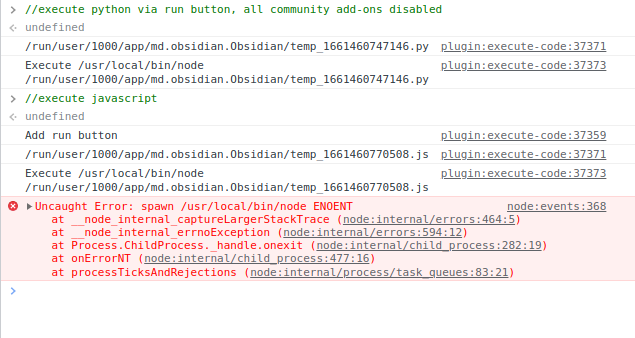
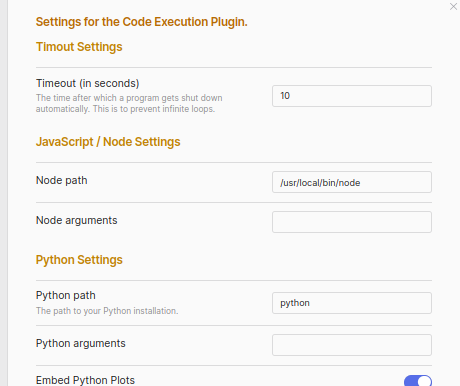
Was navigating via keyboard and accidentally closed, reopening. Thank you for your attention on this
ITS WORKING! :+1:
It's hard to say how or why, there's the possibility that the update may have helped. It may be another issue I was experiencing.
I should have remembered this sooner, I was executing via an integrated .AppImage (TheAssassin/AppImageLauncher), this may or may not have been the cause, but a reinstall helped resolve the issue, I even reintegrated the new AppImage -- The same Obsidian version as before :eyes: -- aaaand it's working great! :+1: Very happy!
Tests:
- Updating the add-on itself (did nothing) :x:
- reinstall Obsidian .AppImage (same version --latest) (add-on working!) :heavy_check_mark:
- reintegrate .AppImage through same means (add-on still working) :heavy_check_mark:
Conclusion
- Latest update works
- Rebuild of same version resolves issue
- Integrated .AppImages should work
By the way, this is an awesome tool and I appreciate the time you've put into it! :partying_face: