

 tstack
Ability to show show/hide/shorten/widen JSON columns with hotkeys
Is your feature request related to a problem? Please describe.
I was looking for a tool to comfortably view our NGINX JSON access logs (sample log and my improvised format file attached) and discovered lnav. It fits my requirements reasonably well, but there are some things that I think could be better:
-
These JSON logs contain a lot of fields; many of these usually aren't important when examining the logs, so I've marked them as
hiddenin my format. Unfortunately this means that if these fields are necessary during an investigation, I would need to edit the format file to make them visible. -
The access_log format would lend itself very well to strictly aligned columns, e.g. instead of this:
 LOG ❭2023-04-19T14:55:37.000❭nginx_access_log_json❭access.log.json[2]❭
│2023-04-19T14:55:37.000 4d0b:7c3f:6fa7:7f11:324b:29fc:d326:4074 martin GET /iserv/user/api/notif│
│2023-04-19T14:55:42.000 127.0.0.1  GET /iserv/notification/api/v1/notifications?since=2023-04-19│
│2023-04-19T14:55:42.000 127.0.0.1 martin GET /iserv/notification/api/v1/notifications?since=2023│
│2023-04-19T14:55:42.000 4d0b:7c3f:6fa7:7f11:324b:29fc:d326:4074 martin GET /iserv/user/api/notif│
│2023-04-19T14:55:47.000 127.0.0.1  GET /iserv/notification/api/v1/notifications?since=2023-04-19│
│2023-04-19T14:55:47.000 127.0.0.1 martin GET /iserv/notification/api/v1/notifications?since=2023│
│2023-04-19T14:55:47.000 4d0b:7c3f:6fa7:7f11:324b:29fc:d326:4074 martin GET /iserv/user/api/notif│
│2023-04-19T14:55:48.000 127.0.0.1  POST /update?hostname 200 4776  r 25    s 0.009              │
I would prefer this:
│2023-04-19T14:55:37.000 4d0b:7..6:4074 martin         GET  /iserv/user/api/notifications?since=2│
│2023-04-19T14:55:42.000 127.0.0.1                     GET  /iserv/notification/api/v1/notificati│
│2023-04-19T14:55:42.000 127.0.0.1      martin         GET  /iserv/notification/api/v1/notificati│
│2023-04-19T14:55:42.000 4d0b:7..6:4074 martin         GET  /iserv/user/api/notifications?since=2│
│2023-04-19T14:55:47.000 127.0.0.1                     GET  /iserv/notification/api/v1/notificati│
│2023-04-19T14:55:47.000 127.0.0.1      martin         GET  /iserv/notification/api/v1/notificati│
│2023-04-19T14:55:47.000 4d0b:7..6:4074 martin         GET  /iserv/user/api/notifications?since=2│
│2023-04-19T14:55:48.000 127.0.0.1                     POST /update?hostname                     │
This is kinda doable with
min-widthandmax-width:field": "remote_addr", "min-width": 14, "max-width": 14, "overflow": "dot-dot"But this has several disadvantages:
- I don't know the actual column width from the data, so I have to hardcode a specific width. If I hardcode e.g. 14 characters, and the column is empty in every line, I just waste 14 characters of screen space.
- The IPv6 address that I've shortened to 14 characters might not be important when I'm just scrolling through the log and looking for patterns, but then I might want to copypaste it, and now the shortening becomes a problem. As far as I know, there is no way in
lnavto show the overflow, not even in the lo-fi view.
-
I would like to see the column headers so that I know which column is which. This becomes especially necessary for the numeric columns -
200 73 169 0.176means in that order: HTTP response code, bytes received from client, bytes sent to client, duration of the request. Currently, you need to know this by heart to make sense of the numbers.I tried to work around this by postfixing some numbers with identifiers:
"field": "request_length", "min-width": 6}, "r ",
"field": "body_bytes_sent", "min-width": 6}, "s ",
I had hoped to display the numbers as e.g. "200 73r 169s 0.176", but instead the numbers are aligned to their width first, and only then are the characters affixed (
73 r 169 s). There is apparently no way to mangle a field before it is aligned. -
A detail view that can show all fields, even those that are hidden, and without any shortening applied to the overview, might be useful.
Describe the solution you'd like
-
The ability to show and hide arbitrary columns during runtime with hotkeys. E.g. if I need the
remote_portcolumn which is hidden by default in my format, I would like to be able to open a list of columns that are defined by the format, and the ability to choose which are displayed. Similar to howhtopdoes it (F2 -> Columns). -
The ability to define aligned columns in the format that are automatically aligned to an automatically determined max-width, optionally with a hardcoded max-width. E.g. if the
iserv_usercolumn is empty in all lines, the column shouldn't take up any space at all; if the biggestiserv_uservalue in a line 32 characters, the column should align to 32 characters; if amax-widthof 20 is specified in the format, it should align to 20 characters. -
The ability to disable field shortening with a hotkey. E.g. if I usually shorten IP addresses to 14 characters but now I need to be able to see a specific IPv6 address in full, I want to be able to press a hotkey to disable the shortening. It might even be useful to be able to configure this per-column, so that I could disable the shortening for IP addresses, but not for user agents.
-
I would like a header bar that shows the names of all columns, that is always visible, so that I know which column contains what information.
-
A detail view where I could select a certain row and press a hotkey, that shows all fields that are available for this row, even ones that are usually hidden, might be useful.
Describe alternatives you've considered
- Hardcoding
min-widthandmax-widthis a passable workaround to get aligned columns. - Pre- or postfixing certain columns with short identifiers like
randsfor received and sent kinda works around the missing column headers. - Defining several formats with different columns might be a workaround when different scenarios require different columns, but I don't know if its possible to force
lnavto use a certain format. #454?
nginx_access_log_json.json.txt access.log.json.txt

First, I want to thank you for doing this writeup, that's a lot of work!
These JSON logs contain a lot of fields; many of these usually aren't important when examining the logs, so I've marked them as hidden in my format.
I think there's a technical limitation that prevents fields not in the line-format from being hidden since lnav needs to compute how many display lines a log message has. So, toggling them between being shown/hidden would change the number of lines that they take up and would require recomputing a bunch of stuff.
You should've been able to put the fields in the line-format and have them hidden by default, but there seems to be a bug there and they are shown. I'll fix that.
The access_log format would lend itself very well to strictly aligned columns, e.g. instead of this:
I think when I wrote the min-width stuff I wasn't keeping track of stats for the fields. But, now we are, so I can probably track the max length found for a field and add an option to default to that.
I would like to see the column headers so that I know which column is which.
I can experiment with this, there is already functionality to overlay column headers in the display.
I had hoped to display the numbers as e.g. "200 73r 169s 0.176", but instead the numbers are aligned to their width first, and only then are the characters affixed (73 r 169 s).
You can add "align": "right" to the value definition so that you get 73r. I should probably have the default for numbers to be right aligned anyhow...
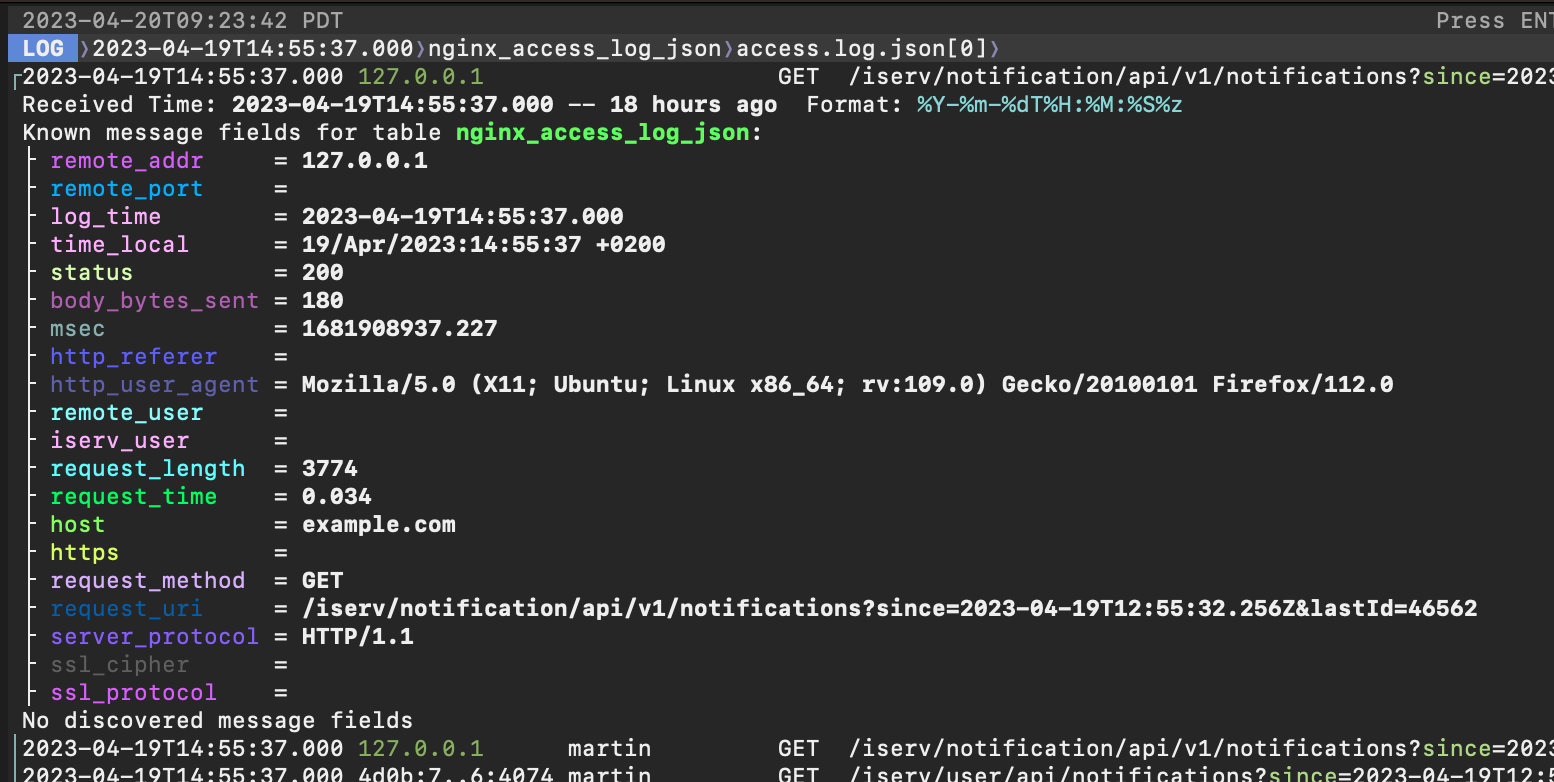
A detail view that can show all fields, even those that are hidden, and without any shortening applied to the overview, might be useful.
Pressing p will display what the parser knows about a log message:
I'll get to looking into these changes soon, thanks again!
