
lnav
 lnav copied to clipboard
 tstack
Log file navigator
**lnav version** Version: lnav 0.10.1-dirty **Describe the bug** ``` [root@remote1 ~]# kubectl logs -f pod1 | ssh -t root@remote "lnav" Authorized uses only. All activity may be monitored and reported....

Installing from HEAD is currently failing. It just hangs at this step at the end: ``` Unlinking /usr/local/Cellar/lnav/0.10.1... 2 symlinks removed. mmashwani@MLC02CC0HQMD6V ~ % brew install --HEAD lnav ==> Cloning...

**lnav version** lnav 0.10.1-211-gc17046b-dirty **Describe the bug** I have the following text in a log entry: Executing command (cwd .): chcp 65001 >NUL && echo C:\Program Files (x86)\Google\Chrome\Application\new_chrome.exe Pretty print...
Crash

Don't know why. NB: this SQL, in the log below, looks suspicious? ``` "mod_rewrite.c(483" TEXT COLLATE 'naturalnocase', ``` From log below, seems crashed in `command_executor.cc:127 Executing SQL`, caught by `lnav_log.cc:502...

**lnav version** 0.10.1 **Describe the bug** Remote logs aren't reloaded/updated `lnav db1-57:/var/log/mysql/error.log` ssh config: ``` Host db1-57 HostName 10.22.19.33 User root ``` 


**lnav version** 0.10.1 **Describe the bug** Gentoo's QA system found that lnav does not build with lto enabled. **To Reproduce** The following `CFLAGS` were used: ``` CFLAGS="-O2 -pipe -march=x86-64 -frecord-gcc-switches...

**lnav version** v0.10.1 **Describe the bug** I am unable to tail remote files. **To Reproduce** I can confirm the following: - SSH into a remote host without any interaction -...

**lnav version** 9d590836f35c6192598dc4538c7ba558f1225474 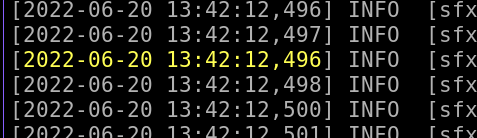

First time install lanv and bit shocked it cant show very simple log format: ```json {"time":"2019-04-11 15:13:17", "level":"alert", "msg":"Hello"} {"time":"2019-04-11 14:33:58", "level":"error", "msg":"Connection failed"} ``` I think it's an omission...
