
cli

cli copied to clipboard
 treehouses
`treehouses services novnc` (fixes #1779)
To do:
- [x] main functions
- [x] add icon
Set up:
In order to test novnc, we have to change the VNC authentication to VNC password, by default is UNIX password.
There are two ways to do it:
First way:
NOTE: reboot if necessary, there is a bug in treehouses vnc off #1780, run following commands exact once
- if vnc already on, turn off the vnc
treehouses vnc off; else go to 2 - set up a password for vnc service mode
vncpasswd -service - add the config by the following command
echo "Authentication=VncAuth" >> /root/.vnc/config.d/vncserver-x11
- turn on the vnc
treehouses vnc on
Second way:
- turn on the vnc
treehouses vnc on - access vnc via a realvnc viewer
- click the icon on right top
 open the option tab
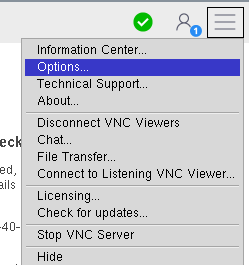 change the authentication to VNC password and create a password

How to test:
-
./cli.sh services novnc install -
./cli.sh services novnc up - open a broswer and go to:
<ip address>:6080/vnc.html?host=<ip address>&port=6080

#1786 Now set up can be done with
./cli.sh vnc passwd				#create vnc password for 'vnc passward' authentication
./cli.sh vnc auth vncpasswd		#change authentication to 'vnc passward'