

 transistorsoft
Stop detection on iOS is enabled although it was disabled
Your Environment
- Plugin version:
4.7.0 - Platform:
iOS - OS version:
15.5 - Device manufacturer / model:
iPhone 13 pro max - Plugin config:
{
  activityRecognitionInterval = 5000;
  activityType = 3;
  authorization = {
  };
  autoSync = 1;
  autoSyncThreshold = 0;
  batchSync = 0;
  debug = 1;
  desiredAccuracy = "-2";
  desiredOdometerAccuracy = 70;
  didDeviceReboot = 0;
  didLaunchInBackground = 0;
  didRequestUpgradeLocationAuthorization = 1;
  disableAutoSyncOnCellular = 0;
  disableElasticity = 1;
  disableLocationAuthorizationAlert = 0;
  disableMotionActivityUpdates = 0;
  disableStopDetection = 1;
  distanceFilter = 10;
  elasticityMultiplier = 1;
  enableTimestampMeta = 0;
  enabled = 1;
  extras = {
    warmup = 1;
  };
  geofenceInitialTriggerEntry = 1;
  geofenceProximityRadius = 2000;
  geofenceTemplate = "";
  headers = {
  };
  heartbeatInterval = 10;
  httpRootProperty = location;
  httpTimeout = 60000;
  iOSHasWarnedLocationServicesOff = 0;
  isFirstBoot = 0;
  isMoving = 0;
  lastLocationAuthorizationStatus = 3;
  locationAuthorizationAlert = {
    cancelButton = Cancel;
    instructions = "To use background location, you must enable '{locationAuthorizationRequest}' in the Location Services settings";
    settingsButton = Settings;
    titleWhenNotEnabled = "Background location is not enabled";
    titleWhenOff = "Location services are off";
  };
  locationAuthorizationRequest = Always;
  locationTemplate = "";
  locationTimeout = 60;
  locationsOrderDirection = ASC;
  logLevel = 5;
  logMaxDays = 3;
  maxBatchSize = "-1";
  maxDaysToPersist = 0;
  maxRecordsToPersist = 0;
  method = POST;
  minimumActivityRecognitionConfidence = 75;
  odometer = 0;
  params = {
  };
  pausesLocationUpdatesAutomatically = 0;
  persistMode = 0;
  preventSuspend = 0;
  schedule = (
  );
  schedulerEnabled = 0;
  showsBackgroundLocationIndicator = 0;
  startOnBoot = 0;
  stationaryRadius = 25;
  stopAfterElapsedMinutes = "-1";
  stopDetectionDelay = 0;
  stopOnStationary = 0;
  stopOnTerminate = 1;
  stopTimeout = 1;
  trackingMode = 1;
  url = "";
  useSignificantChangesOnly = 0;
}
- Flutter info (
flutter doctor) [✓] Flutter (Channel stable, 3.0.5, on macOS 12.3.1 21E258 darwin-x64, locale en-US) [✓] Android toolchain - develop for Android devices (Android SDK version 29.0.2) [✓] Xcode - develop for iOS and macOS (Xcode 13.4.1) [✓] Chrome - develop for the web [✓] Android Studio (version 2021.2) [✓] Android Studio (version 2021.2) [✓] Connected device (2 available) [✓] HTTP Host Availability • No issues found!
Expected Behavior
Since we disabled the stop detection in the configuration we expected that the app is continiously tracking, even if the app is in the background.
Actual Behavior
Based on our collected data on the serverside it seems that as soon as somebody stops (only on iOS) (even for a couple of seconds) it seems that the tracking is disabled and won't come back for quite a while.
An example of this can be found in this screenshot.
The full run can be found in this (interactive) map where you can see all properties of each single point (including accuracies, etc.)
https://live.tractalis.com/wfl/2021/showcsv/#file=https://stdbhistoryg.blob.core.windows.net/history/b69622c9-1208-4216-8a3f-b47bd11b61ab/77ac1599-3035-4def-8031-dcce73b2ee3f/(20220802125852).csv
On a sidenote: I'm aware that the plugin is field-tested since over 10 years and has proven to work in various projects for us as well (especially for cordova-based ones) so I unterstand that there is something wrong with the way we configured it. But after digging through the configuration for quite some time we still weren't able to figure out any issues.
Steps to Reproduce
- Start a GPS Tracking Session1
- Put app to sleep (switch to another app and lock phone)
- Drive somewhere and make sure to include multiple stops which are from 20seconds upwards
Context
We are building a fitness-based app where users have to manually start a "run" (e.g. a half marathon for 21km) and as soon as they reach that distance the app stops tracking. In addition the user has a stop run-button to stop as well.
This should also explain why we have some very "high energy consumption"-settings enabled within the app, since the highest priority is the accuracy of the data. Battery consumption is rather secondary.
Debug logs
Unfortunately the Logs are too long to attach here, so I put them into a pastebin here: https://pastebin.com/hvhXYFF3

Why are you using stopTimeout: 1? You should be using a minimum of 15 minutes.

Is disableStopDetection: true in combination with pausesLocationUpdatesAutomatically: false not going to "ignore" that setting?
Based on our server data the last point before the big stop was recorded at 2022-08-02T13:27:42.040Z which translates into 3:27 pm local time. Screenshot of it.
Unfortunately the last logged item before that time is:
2022-08-02 14:58:48.339 🎾-[TSLocationManager startMonitoringSignificantLocationChanges]
which is followed by:
2022-08-02 15:39:00.734 ℹ️-[TSConfig persist]
which is basically AFTER that point x. Really confusing.
In addition, just to be sure: Based on the documented description of stopTimeout a value of 1 means that (even if the system is enabled) would mean that there would be a 60seconds span before the stop detection kicks in and stops the tracking service. In those test-cases most of the stops were between 10 and 30seconds.
From you screenshot, there is reported a Latitude: 47.7016xxx.
How come I cannot find any text in your logs containing 47.7016?
Every location that the plugin records is printed to the logs:
2022-08-02 14:46:03.326
📍<+47.70008757,+8.65303616> +/- 35.00m (speed -1.00 mps / course -1.00) @ 02.08.22, 14:45:29 Central European Summer Time
The text "47.7016" does not exist in those logs.
That's an interesting observation and tbh I don't have an explanation for it. After digging through the logs & the server data there seem to be some mismatches there. Will create a clean test run today.
- App is suspended, plugin told to
.stop()and the app terminated.
2022-08-02 14:52:02.976 🔵-[TSLocationManager onSuspend:] enabled? 1)
2022-08-02 14:52:02.980
╔═══════════════════════════════════════════════════════════
║ -[TSLocationManager stop]
╚═══════════════════════════════════════════════════════════
2022-08-02 14:52:03.240 🔵-[TSLocationManager onAppTerminate] stopOnTerminate? 1
2022-08-02 14:52:03.240 🔵-[TSLocationManager onAppTerminate] Stopping on terminate
- App is relaunched.
2022-08-02 14:58:48.124 ℹ️-[TSLocationManager init]
╔═════════════════════════════════════════════
║ TSLocationManager (build 385)
╠══════════════════════════════════════════════
{
	...
}
- Plugin enters Stationary state.
2022-08-02 14:58:48.338 🔵-[TSLocationManager startMonitoringStationaryRegion:radius:] Radius: 60
if you are making a "Running" app, you should be manually calling .changePace(true) to force the plugin into the moving state.
void startWorkout() {
  await BackgroundGeolocation.start();
  await BackgroundGeolocation.changePace(true);
}

void stopWorkout() {
  await BackgroundGeolocation.stop();
}
Thanks, we are doing the changePace bit already:
Future<void> _startReceivingLocations() async {
    await startPlugin();
    await BackgroundGeolocation.changePace(true);
    stopwatch.start();

    final state = await BackgroundGeolocation.state;

    /// Ensure that positions are fetched no less than the [locationTimeout]
    /// to prevent false speeds of zero
    final timeout =
        max(state.activityRecognitionInterval ?? 0, locationTimeout);
    Timer? $timer;

    BackgroundGeolocation.onLocation(
      (Location location) {
        $timer?.cancel();
        $timer = Timer(
          Duration(milliseconds: timeout),
          fetchCurrentPosition,
        );

        addLocation(location);
      },
      (err) {
        print('[location error] - $err');
      },
    );
  }
From the logs I posted above, why did you tell the plugin to .stop() when your app was suspended?
Those pieces you refered to above were the initial phase of the test where I just started a run and just kept the device stationary for roughly 30minutes. Afterwards I left the house and soon the app picked up tracking again, so this wasn't that big of a problem. Screenshot of this phase.
The size of the dots represent the accuracy of each tracked position.
From the logs I posted above, why did you tell the plugin to .stop() when your app was suspended?
Just to be 100% sure, whenever there is a:
╔═══════════════════════════════════════════════════════════
║ -[TSLocationManager stop]
╚═══════════════════════════════════════════════════════════
In the plugin logs, this always represents a manual stop where the plugins stop() method was called? This is only externally called and never from any internal plugin methods?
If yes that would also be an interesting path to investigate on our end, since there shouldn't be a manual stop before the user (in this case me) stopped the run, which in this case happened roughly at timestamp 15:30 (or a little later I think).
this always represents a manual stop where the plugins stop() method was called?
Yes. Your code told the plugin to .stop()
Hi Chris, thanks for your help so far, we were able to figure out some other issues on the side. In the meantime I did a re-test again where I made sure that the debug-logs and the data on the server matches (basically ensure that i destroy the logs before starting the run).
Now what happened is that those jumps are still there but there is still no real reason and I can't find anything in the logs.
Basically how it can be reproduced now is to stop longer than maybe 5 seconds or 10. (This somehow sounds rather like a Motion-Tracker thingy since GPS can't be that precise that such short stops can be immediately recognized.)
Let's take one particular example.
- First of all the screenshot on our serverside tool
- The data of that particular location can be found below
- In addition the relevant log section can be found below as well, including the retrieval of the location which can be found in the logs as well (this time)
Latitude:
47.68525451521448
Longitude:
8.622268197545607
Altitude:
417.1
Created:
2022-08-02T18:09:00.112Z
Odometer:
0
ActivityType:
in_vehicle
ActivityTypeConfidence:
100
BatteryLevel:
0.4699999988079071
Accuracy:
4.7
OdometerServer:
1654.5167645111014
_ts:
2022-08-02T19:32:52.9577530Z
Speed:
8.66
OdometerCustomClean:
0
OdometerNative:
1676.4
CalculatedAltitude:
415
CalculatedAltitudeSrc:
srtm/swissalti3d_2
CalculatedAltitudeRes:
54060
CalculatedEnergy:
0
And the relevant log section:
╔═══════════════════════════════════════════════════════════
║ -[TSLocationManager locationManager:didUpdateLocations:] Enabled: 1 | isMoving: 1 | df: 10.0m | age: 0.0s
╚═══════════════════════════════════════════════════════════

2022-08-02 20:08:56.028 🔵-[TSLocationManager calculateMedianLocationAccuracy:] Median location accuracy: 4.7

2022-08-02 20:08:56.028 ℹ️-[TSConfig persist]

2022-08-02 20:08:56.029 🔵-[TSConfig incrementOdometer:] 1641.0

2022-08-02 20:08:58.032
📍<+47.68509963,+8.62224634> +/- 4.68m (speed 9.06 mps / course 8.60) @ 02.08.22, 20:08:58 Central European Summer Time

2022-08-02 20:08:58.032
╔═══════════════════════════════════════════════════════════
║ -[TSLocationManager locationManager:didUpdateLocations:] Enabled: 1 | isMoving: 1 | df: 10.0m | age: 0.0s
╚═══════════════════════════════════════════════════════════

2022-08-02 20:08:58.033 🔵-[TSLocationManager calculateMedianLocationAccuracy:] Median location accuracy: 4.7

2022-08-02 20:08:58.033 ℹ️-[TSConfig persist]

2022-08-02 20:08:58.034 🔵-[TSConfig incrementOdometer:] 1659.1

2022-08-02 20:08:59.355
╔═══════════════════════════════════════════════════════════
║ -[TSLocationManager createMotionTypeChangedHandler]_block_invoke | in_vehicle/100 | isMoving: 1
╚═══════════════════════════════════════════════════════════

2022-08-02 20:09:00.031
📍<+47.68525452,+8.62226820> +/- 4.69m (speed 8.66 mps / course 3.71) @ 02.08.22, 20:09:00 Central European Summer Time

2022-08-02 20:09:00.031
╔═══════════════════════════════════════════════════════════
║ -[TSLocationManager locationManager:didUpdateLocations:] Enabled: 1 | isMoving: 1 | df: 10.0m | age: 0.0s
╚═══════════════════════════════════════════════════════════

2022-08-02 20:09:00.031 🔵-[TSLocationManager calculateMedianLocationAccuracy:] Median location accuracy: 4.7

2022-08-02 20:09:00.031 ℹ️-[TSConfig persist]

2022-08-02 20:09:00.032 🔵-[TSConfig incrementOdometer:] 1676.4

2022-08-02 20:12:00.813 🔵-[TSLocationManager onResume:] enabled? 1

2022-08-02 20:12:00.815 🔵-[TSLocationManager getCurrentPosition:]

2022-08-02 20:12:00.816 🎾-[LocationManager startUpdatingLocation] ON

2022-08-02 20:12:00.817 ℹ️+[LocationAuthorization run:onCancel:] status: 3

2022-08-02 20:12:00.825 ℹ️-[TSDBLogger db_save] Log committed

2022-08-02 20:12:00.859
📍<+47.69369439,+8.63139217> +/- 36.00m (speed -1.00 mps / course -1.00) @ 02.08.22, 20:11:58 Central European Summer Time

2022-08-02 20:12:00.859
╔═══════════════════════════════════════════════════════════
║ -[LocationManager locationManager:didUpdateLocations:] Sample 1 of 3
╚═══════════════════════════════════════════════════════════

2022-08-02 20:12:00.859
╔═══════════════════════════════════════════════════════════
║ -[TSLocationManager createMotionTypeChangedHandler]_block_invoke | in_vehicle/100 | isMoving: 1
╚═══════════════════════════════════════════════════════════

2022-08-02 20:12:00.890
📍<+47.69369439,+8.63139217> +/- 36.00m (speed -1.00 mps / course -1.00) @ 02.08.22, 20:12:00 Central European Summer Time

2022-08-02 20:12:00.890
╔═══════════════════════════════════════════════════════════
║ -[LocationManager locationManager:didUpdateLocations:] Sample 2 of 3
╚═══════════════════════════════════════════════════════════

2022-08-02 20:12:00.891
📍<+47.69369439,+8.63139217> +/- 36.00m (speed -1.00 mps / course -1.00) @ 02.08.22, 20:12:00 Central European Summer Time

2022-08-02 20:12:00.891
╔═══════════════════════════════════════════════════════════
║ -[TSLocationManager locationManager:didUpdateLocations:] Enabled: 1 | isMoving: 1 | df: 10.0m | age: 0.0s
╚═══════════════════════════════════════════════════════════

2022-08-02 20:12:00.891 🔵-[TSLocationManager calculateMedianLocationAccuracy:] Median location accuracy: 4.7

2022-08-02 20:12:00.891 ℹ️-[TSConfig persist]

2022-08-02 20:12:00.892 🔵-[TSConfig incrementOdometer:] 2838.2

2022-08-02 20:12:00.895
📍<+47.69368521,+8.63130873> +/- 36.00m (speed -1.00 mps / course -1.00) @ 02.08.22, 20:12:00 Central European Summer Time

2022-08-02 20:12:00.895 🔴-[LocationManager stopUpdatingLocation] OFF

2022-08-02 20:12:00.895
The only interesting thing I can find is this:
2022-08-02 20:12:00.895 🔴-[LocationManager stopUpdatingLocation] OFF
Which appears basically when the "jump" finishes and the positions are starting to track again. But above that I can't find a [TSLocationManager stop] or anything similar.
For full reference I uploaded the full log here, in case that helps: https://pastebin.com/ykDnbbGT
In addition to the recent comment also my question:
If disableStopDetection is set to true and pausesLocationUpdatesAutomatically to false all those other properties like stopTimeout or stopDetectionDelay won't have an effect, right? Or is that the reason why the app stops tracking after a couple of seconds (the mentioned stopTimeout = 1 minutes)?
2022-08-02 20:12:00.895 🔴-[LocationManager stopUpdatingLocation] OFF
This is not interesting at all. This is merely the result of your call to .getCurrentPosition().
2022-08-02 20:12:00.815 🔵-[TSLocationManager getCurrentPosition:]
This plugin uses several independent instances of the iOS CLLocationManager. The .getCurrentPosition() method invokes location updates on its own dedicated instance, separate from the main location-tracking instance.
It is perfectly fine for the .getCurrentPosition() method to turn on location-updates with its dedicated CLLocationManager instance, receive those samples then turn it off when complete, without affecting the main location-tracking instance.
If disableStopDetection is set to true and pausesLocationUpdatesAutomatically to false all those other properties like stopTimeout or stopDetectionDelay won't have an effect, right?
That is correct. With that configuration, once you call .changePace(true), the plugin is going to track that device FOREVER until you explicitly (a) call .stop() or (b) call .changePace(false).
Thanks a lot, your recent comment put os on the right path I think.
This is not interesting at all. This is merely the result of your call to .getCurrentPosition().
TBH it was very interesting, since it seems that those .getCurrentPosition() which we did caused somehow the tracking to stopping in the other CLLocationManager-instance to stop as well. We're still trying to figure out why this has happened, but after removing them (during the runs) those strange stop effects have vanished alltogether! Do you have an idea how this could happen? Could it be that the independent Instance of the CLLocationManager caused the other instance to somehow stop? Do you know about such effects? Thx!
which we did caused somehow the tracking to stopping
No it does not. It’s not related at all.
I suggest install the /example app in this repo and try it for yourself.
the Advanced app has an advanced settings screen where you can set disableStopDetection: true.
it also has a button to call .getCurrentPosition for you to verify that it has absolutely no effect on tracking,
For reference this is the related code which caused it:
Future<void> _startReceivingLocations() async {
    await startPlugin();
    await BackgroundGeolocation.changePace(true);
    stopwatch.start();

    final state = await BackgroundGeolocation.state;

    /// Ensure that positions are fetched no less than the [locationTimeout]
    /// to prevent false speeds of zero
    final timeout =
        max(state.activityRecognitionInterval ?? 0, locationTimeout);
    Timer? $timer;

    BackgroundGeolocation.onLocation(
      (Location location) {
        $timer?.cancel();
        $timer = Timer(
          Duration(milliseconds: timeout),
          fetchCurrentPosition,
        );

        addLocation(location);
      },
      (err) {
        print('[location error] - $err');
      },
    );
  }
That fetchCurrentPosition caused the issue in this case.
Why are you even worried about 2022-08-02 20:12:00.895 🔴-[LocationManager stopUpdatingLocation] OFF?
The plugin reports a motion-activity type of in_vehicle and continues tracking location for another 80 minutes, until 2022-08-02 21:32:38.016 when you told the plugin to .changePace(false) and .stop().
.
.
.
2022-08-02 21:32:38.016 🔵-[TSLocationManager changePace:] isMoving: 0

2022-08-02 21:32:38.016 🔵-[TSLocationManager setPace:] 0

2022-08-02 21:32:38.017 🎾-[TSLocationManager startUpdatingLocation] Location-services: ON

2022-08-02 21:32:38.018 ℹ️+[LocationAuthorization run:onCancel:] status: 3

2022-08-02 21:32:38.018
╔═══════════════════════════════════════════════════════════
║ -[TSLocationManager stop]
╚═══════════════════════════════════════════════════════════
Each recorded location prints this in the logs:
isMoving: 1 shows the plugin is in the moving state (ie: .changePace(true))
╔═══════════════════════════════════════════════════════════
║ -[TSLocationManager locationManager:didUpdateLocations:] Enabled: 1 | isMoving: 1 | df: 10.0m | age: 0.0s
╚═══════════════════════════════════════════════════════════
2022-08-02 21:27:28.027
📍<+47.69930499,+8.63293307> +/- 4.72m (speed 6.73 mps / course 28.81) @ 02.08.22, 21:27:28 Central European Summer Time
Hi @christocracy thanks for the additional informations provided, especially about the logs. This allows for easier debugging in the future for sure.
During the recent tests I had a similar situation where I'm tryint to figure out how a 7 minute gap between the two locations has happened (which is roughly a 0.5 - 0.6km distance). The only thing I did is a brief stop on a parking lot (roughly a minute) get out, walk a couple of meters and get back in.
The full log:
https://pastebin.com/JfnqMYbC
And the log with the focus on the two relevant items:
╔═══════════════════════════════════════════════════════════
║ -[TSLocationManager locationManager:didUpdateLocations:] Enabled: 1 | isMoving: 1 | df: 10.0m | age: 0.0s
╚═══════════════════════════════════════════════════════════

2022-08-07 21:23:29.025 🔵-[TSLocationManager calculateMedianLocationAccuracy:] Median location accuracy: 4.7

2022-08-07 21:23:29.025 ℹ️-[TSConfig persist]

2022-08-07 21:23:29.028 🔵-[TSConfig incrementOdometer:] 10067.3

2022-08-07 21:30:56.529 ℹ️-[TSDBLogger db_save] Log committed

2022-08-07 21:30:56.529 ℹ️-[TSDBLogger db_delete] maxAge: 604800

2022-08-07 21:30:56.532
╔═══════════════════════════════════════════════════════════
║ -[TSLocationManager createMotionTypeChangedHandler]_block_invoke | in_vehicle/100 | isMoving: 1
╚═══════════════════════════════════════════════════════════

2022-08-07 21:30:56.546
📍<+47.69562321,+8.63839431> +/- 35.00m (speed -1.00 mps / course -1.00) @ 07.08.22, 21:30:56 Central European Summer Time

2022-08-07 21:30:56.547
╔═══════════════════════════════════════════════════════════
║ -[TSLocationManager locationManager:didUpdateLocations:] Enabled: 1 | isMoving: 1 | df: 10.0m | age: 0.1s
╚═══════════════════════════════════════════════════════════

2022-08-07 21:30:56.547 🔵-[TSLocationManager calculateMedianLocationAccuracy:] Median location accuracy: 4.7

2022-08-07 21:30:56.547 ℹ️-[TSConfig persist]

2022-08-07 21:30:56.548 🔵-[TSConfig incrementOdometer:] 10646.4

2022-08-07 21:31:00.043
📍<+47.69524011,+8.63832755> +/- 23.20m (speed 8.90 mps / course 185.98) @ 07.08.22, 21:31:00 Central European Summer Time

2022-08-07 21:31:00.043
The configuration is still the same (disableStopDetection = true and pausesLocationUpdatesAutomatically = false), so I don't get why this 7minute break with a rough distance of 600m happens. Since the distanceFilter is set to 10m and both locations have accuracies below 10 I would believe that this can't be solely blamed on the Location service of the Device.
One thing I noticed is this call: [TSLocationManager createMotionTypeChangedHandler ...] which corresponds to the stop I did with the following steps of walking (few of them). But besides that I see no reason why there was no data in this 7minutes / 600m. Even with pausesLocationUpdatesAutomatically = true this shouldn't have happened since it was below the 15minute span of iOS.
Any idea what this was caused by? Or is there anything in the logs which I'm missing? Thanks!
Is there a way to reduce those big jumps when a stop (even if it's a couple of seconds) happens in the background? Even when disabling the stop detection there is still quite some time required until the app starts to receive locations again. An additional preventSuspend didn't help as well.
You can see an additional case of this here:
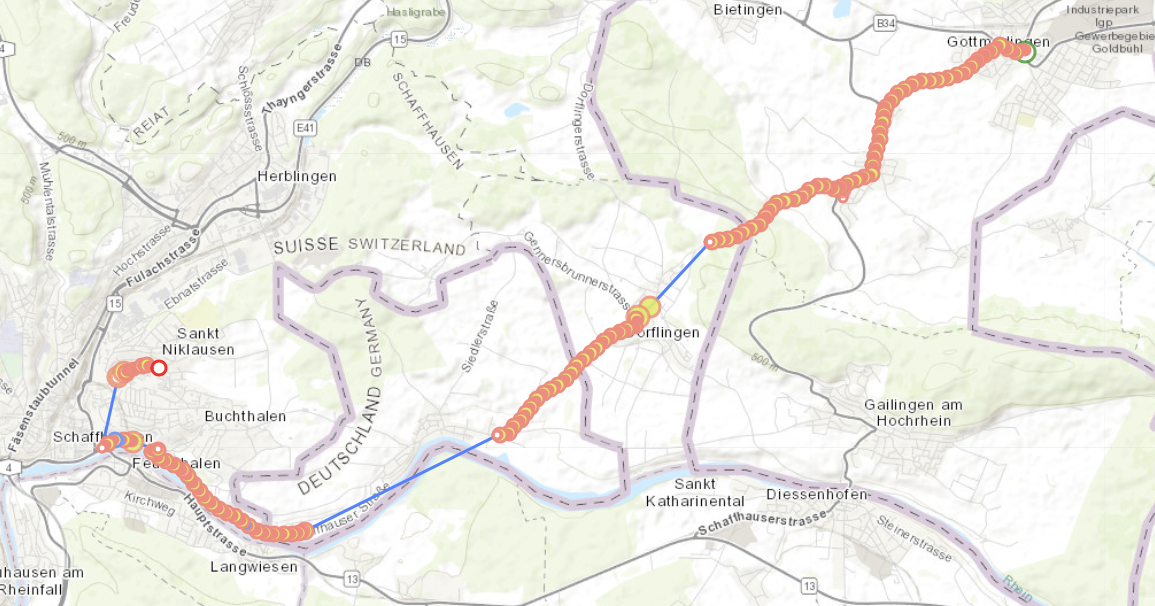
Clearly your device is in the mountains there.
the device is likely losing contact with gps satellites.
preventSuspend has nothing to do with device which are currently in the moving state, where location-services are ON.
preventSuspend is a mechanism for preventing your app from sleeping in the case where the plugin is in the stationary state, where location-services have been turned OFF.
i suggest you do a test in environment clear of environmental obstructions, such as mountains.
I suggest you install the /example app in this repo and compare results.
Hi @christocracy, thanks for the input, will try out same with the example app. But judging on past experiences with the plugin (we built already almost 10 apps with it I think) it's rather an issue of how we configured it than the environement. Allthough I'm based in Switzerland, there are no real mountains or other obstructions here.
During the tracking my accuracies usually are at 4.5/4.6. In addition, that effect of "not firing up the tracking" after starting to move only happens when the app is in the background. When opening it it immediately starts to track and show updates.
So:
- I start a run and wait until the app receives the first couple of positions (leave the app open)
- Then I lock my iPhone
- I continue walking - the updates are coming in (
debug = trueso I see the notifications with theMOVING-Indication) - the accuracies are usually 4.5 - 5.0 - I stop somewhere for a couple of seconds (let's say 30 seconds)
- I start to walk again. It takes wayy too much time until the next updates are kicking in. In addition, the accuracies seem in the first incoming positions are somewhere around 35
When I do the exact same steps as above but OMIT step 2 (lock the iPhone) and keep the app open OR re-open the app after step 4 it takes almost no time until the updates are coming in again. It's really related to the background mode. I checked the configuration multiple times but can't find anything there which seems wrong.
I just did a field-test where I did not open the app at all. I stopped at several points for several minutes. Tracking did not stop.
The plugin's behaviour is not affected by foreground / background when in the moving state with location-services ON (witnessed by the solid location-arrow on top left of iPhone statusbar).
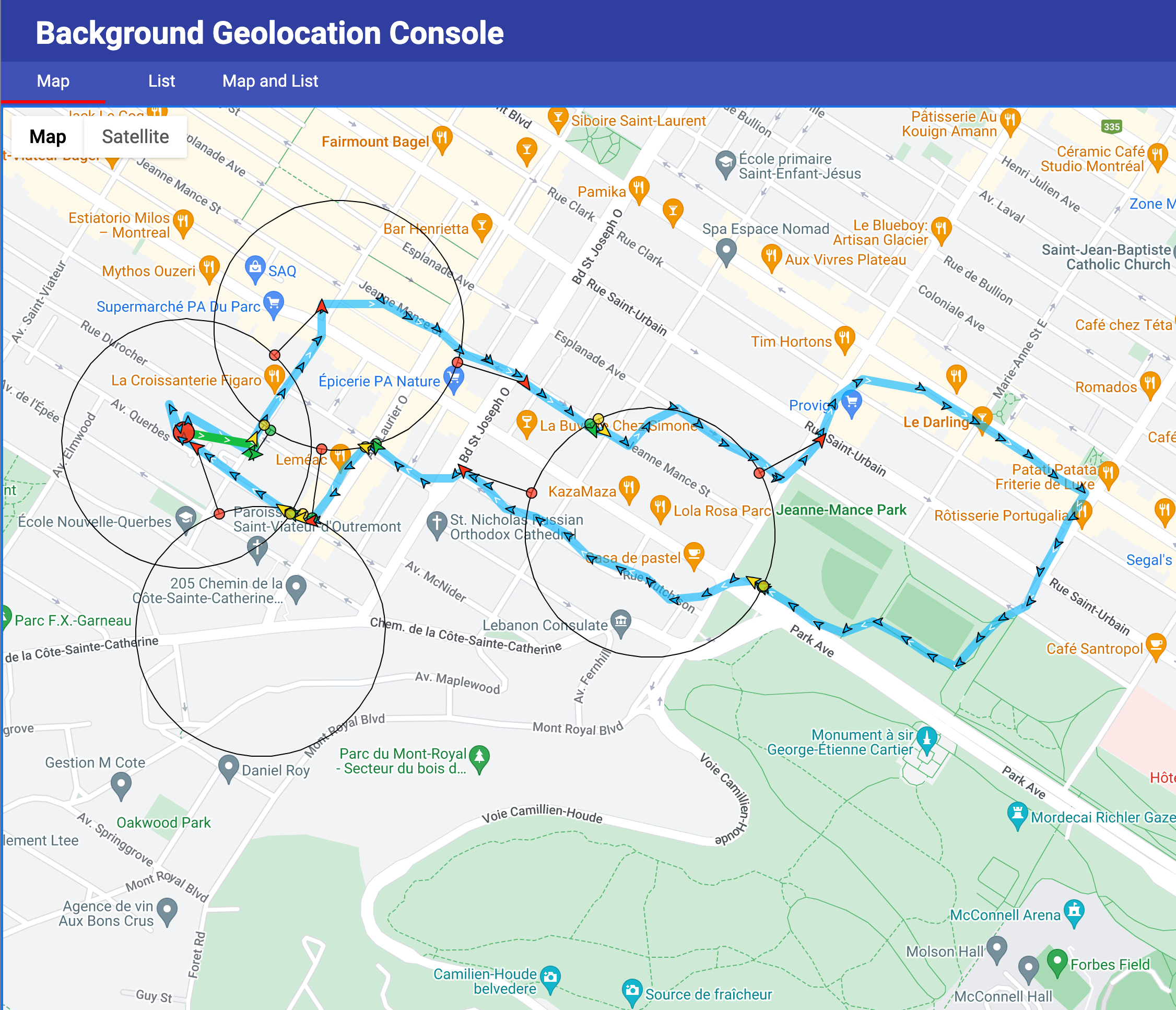
I suggest you install the /example app in this repo and test it. I do not believe this is a problem in the plugin. The problem is most likely in your own code, the environment, or that particular device.
Hi @christocracy , yes, by testing it with the sample app it seems the result is the same. This is why I wanted to understand firsthand if there is something wrong with our configuration of the plugin or anything visible in the logs, since for all other projects it has always worked out properly.
An additional thing we noticed it that after those "stops" the [TSLocationManager init]-call is visible n the logs.
╔═══════════════════════════════════════════════════════════
║ -[TSLocationManager locationManager:didUpdateLocations:] Enabled: 1 | isMoving: 1 | df: 10.0m | age: 0.0s
╚═══════════════════════════════════════════════════════════
2022-08-08 21:43:13.305 🔵-[TSLocationManager calculateMedianLocationAccuracy:] Median location accuracy: 4.7
2022-08-08 21:43:13.305 ℹ️-[TSConfig persist]
2022-08-08 21:43:13.306 🔵-[TSConfig incrementOdometer:] 2001.5
2022-08-08 22:23:08.952 ℹ️-[TSDBLogger db_delete] maxAge: 259200
2022-08-08 22:23:08.953 ℹ️-[TSLocationManager init]
╔═════════════════════════════════════════════
║ TSLocationManager (build 385)
╠══════════════════════════════════════════════
{
    activityRecognitionInterval = 5000;
    activityType = 1;
    authorization =     {
    };
    autoSync = 1;
    autoSyncThreshold = 0;
    batch... // all other properties
}
Is it possible that there is some kind of crash in the background? Which causes the service to restart at some point. We're currently investigating whether didReceiveMemoryWarning is called to proof that.