

 transistorsoft
Flutter background geolocation plug in not working when an "Update" Install is performed in the Device from the Google Play store
Your Environment
- Plugin version: 4.4.0
- Platform: Android
- OS version: Android 11
- Device manufacturer / model: realme RMX1931
- Flutter info (
flutter doctor): Flutter (Channel stable, 2.5.2, on Microsoft Windows [Version 10.0.19044.1706], locale en-IN) • Flutter version 2.5.2 at D:\Flutter_SDK\Flutter_2.5.2_Stable • Upstream repository https://github.com/flutter/flutter.git • Framework revision 3595343e20 (9 months ago), 2021-09-30 12:58:18 -0700 • Engine revision 6ac856380f • Dart version 2.14.3 - Plugin config:
static bg.Config config= bg.Config(
      preventSuspend: true,
      enableHeadless: true,
      desiredAccuracy: bg.Config.DESIRED_ACCURACY_HIGH,
      distanceFilter: 100,
      disableElasticity: false,
      elasticityMultiplier: 4.0,
      stopOnTerminate: false,
      stationaryRadius: 10.0,
      startOnBoot: true,
      debug: false,
      stopTimeout: 5, // min
      reset: false,
      disableStopDetection: Platform.isIOS? true:false,
      pausesLocationUpdatesAutomatically: false,
      heartbeatInterval:60, //1 min
      logLevel: bg.Config.LOG_LEVEL_VERBOSE,
      notification: bg.Notification(
          channelName: AppStrings.get()!.locBgNotificationChannelName,
          title: AppStrings.get()!.locBgNotificationTitle ,
          text:'Tracking location in background',
          priority: bg.Config.NOTIFICATION_PRIORITY_HIGH,
          sticky: true
      ), // Android
      geofenceModeHighAccuracy: true,
      showsBackgroundLocationIndicator: true,
  );

Future<void> startLocationUpdates(bool isFromBegin) async {
      bg.State state=await bg.BackgroundGeolocation.state;
      print('=====STATE===========$state');
      if(!state.enabled || isFromBegin)
        await LocationTrackByTransistor.startLocationTrack();
      else
       LocationTrackByTransistor.resetLocationTrack();
  }

static Future<void>  startLocationTrack() async {
    bg.BackgroundGeolocation.ready(config).then((bg.State state) {
      if (!state.enabled) {
        print('===BACKGROUND LOCATION GOING TO START===');
        bg.BackgroundGeolocation.start();
      }else
        print('===BACKGROUND LOCATION ALREADY STARTED===');
    });

    bg.BackgroundGeolocation.onActivityChange((p0) async{
      print('===ON_ACTIVITY_CHANGE_FOREGROUND===$p0');
    });
    bg.BackgroundGeolocation.onConnectivityChange((p0){
      print('===ON_CONNECTIVITY_CHANGE_FOREGROUND===$p0');

    });
    bg.BackgroundGeolocation.onEnabledChange((p0){
      print('===ON_ENABLED_CHANGE_FOREGROUND===$p0');
    });

    bg.BackgroundGeolocation.onPowerSaveChange((p0){
      print('===ON_POWER_CHANGE_FOREGROUND===$p0');
    });

    bg.BackgroundGeolocation.onProviderChange((bg.ProviderChangeEvent event) {
      print('===ON_PROVIDER_CHANGE_FOREGROUND===$event');
    });

    bg.BackgroundGeolocation.onHeartbeat((bg.HeartbeatEvent heartbeatEvent) async {
      print('===ON_HEART_BEAT__FOREGROUND===$heartbeatEvent');
      if(heartbeatEvent.location!=null){
        await updateDriverStatusByTransistor(heartbeatEvent.location!.coords.latitude, heartbeatEvent.location!.coords.longitude,
            heartbeatEvent.location!.isMoving,heartbeatEvent.location!.activity.type,heartbeatEvent.location!.battery.isCharging,
            heartbeatEvent.location!.battery.level.toString(),heartbeatEvent.location!.coords.speed.toString(),
            heartbeatEvent.location!.event,'Foreground');
      } else{
        print('===FOREGROUND_HEARTBEAT_LOCATION_NULL===');
        bg.BackgroundGeolocation.getCurrentPosition(
          samples: 1,
        ).then((Location location) async{
          print('===GET_CURRENT_LOCATION_FOREGROUND===${location}');
        });
      }
    });

    bg.BackgroundGeolocation.onLocation((bg.Location location) async {
      print('==LOCATION_FOREGROUND==$location');
      await updateDriverStatusByTransistor(location.coords.latitude, location.coords.longitude,
          location.isMoving,location.activity.type,location.battery.isCharging,
          location.battery.level.toString(),location.coords.speed.toString(),location.event.isNotEmpty?location.event:'location','Foreground');
    });


    bg.BackgroundGeolocation.onMotionChange((bg.Location location) async{
      print('===ON_MOTION_CHANGE_FOREGROUND===$location');
    });

  }

void headlessTask(bg.HeadlessEvent headlessEvent) async {
  print('===HEADLESS TASK===: $headlessEvent');
  switch(headlessEvent.name) {
    case bg.Event.BOOT:
      bg.State state = await bg.BackgroundGeolocation.state;
      print("📬 didDeviceReboot: ${state.didDeviceReboot}");
      break;
    case bg.Event.TERMINATE:
      // try {
      //   bg.Location location =
      //   await bg.BackgroundGeolocation.getCurrentPosition(samples: 1);
      //   print("[getCurrentPosition] Headless: $location");
      // } catch (error) {
      //   print("[getCurrentPosition] Headless ERROR: $error");
      // }
      break;
    case bg.Event.HEARTBEAT:
      bg.HeartbeatEvent event = headlessEvent.event;
      print('===HEARTBEAT_FROM_BACKGROUND===$event');
      if(event.location!=null)
        await LocationTrackByTransistor.updateDriverStatusByTransistor(event.location!.coords.latitude,
            event.location!.coords.longitude,event.location!.isMoving,event.location!.activity.type,event.location!.battery.isCharging,
            event.location!.battery.level.toString(),event.location!.coords.speed.toString(),event.location!.event,'Background-Kill State');
      else{
        print('===BACKGROUND_HEART_BEAT_LOCATION_NULL===');
        bg.BackgroundGeolocation.getCurrentPosition(
          samples: 1,
        ).then((Location location) async{
          print('===GET_CURRENT_LOCATION_BACKGROUND===${location}');
        });
      }
      break;
    case bg.Event.LOCATION:
      bg.Location location = headlessEvent.event;
      print('===LOCATION_FROM_BACKGROUND===$location');
      await LocationTrackByTransistor.updateDriverStatusByTransistor(location.coords.latitude, location.coords.longitude,
          location.isMoving,location.activity.type,location.battery.isCharging,
          location.battery.level.toString(),location.coords.speed.toString(),headlessEvent.name.isNotEmpty?headlessEvent.name:'location','Background-Kill State');
      break;
    case bg.Event.MOTIONCHANGE:
      bg.Location location = headlessEvent.event;
      print('===ON_MOTION_CHANGE_BACKGROUND===$location');
      break;
    case bg.Event.ACTIVITYCHANGE:
      bg.ActivityChangeEvent event = headlessEvent.event;
      print('===ON_ACTIVITY_CHANGE_BACKGROUND===$event');
      break;
    case bg.Event.POWERSAVECHANGE:
      bool enabled = headlessEvent.event;
      print('===ON_POWER_CHANGE_BACKGROUND=== $enabled');
      break;
    case bg.Event.CONNECTIVITYCHANGE:
      bg.ConnectivityChangeEvent event = headlessEvent.event;
      print('===ON_CONNECTIVITY_CHANGE_BACKGROUND===$event');
      break;
    case bg.Event.ENABLEDCHANGE:
      bool enabled = headlessEvent.event;
      print('===ON_ENABLED_CHANGE_BACKGROUND===$enabled');
      break;
    case bg.Event.PROVIDERCHANGE:
      bg.ProviderChangeEvent event = headlessEvent.event;
      print('===ON_PROVIDER_CHANGE_FOREGROUND===$event');
      break;
  }
}

void main() {
  // Register your headlessTask:
  bg.BackgroundGeolocation.registerHeadlessTask(headlessTask);
}
Expected Behavior
Heartbeat should start after updating the app.
Actual Behavior
I did the Play store update of our mobile App Version 2.2.0 last evening with the Flutter Background Geolocation plugin for the first time.
Already our mobile App version 2.1.0 is available in the Play store with the background_locator plugin (https://pub.dev/packages/background_locator).
Now upon "Update" install in the Android devices over the older version 2.1.0 with the newer version 2.2.0 we are encountering a problem.
The problem is upon Motion / travelling state the Flutter Background Geolocation plugin is updating lat / long as per the configuration but when the Device comes to Stationery / still state the lat / long are not updated at all and also Heartbeat not getting initialized.
Steps to Reproduce
- Open the old version application which has the background_locator plugin.
- Update the new version application from the play store which has a flutter background geolocation plugin
- Back to application.
- Heartbeat not getting initialized.
Context
Debug logs
Logs
Not found any log

There are several issues with your code.
-
reset: false. Do you know what this does? 99% of use-cases don't need it. I added this option primarily for my own personal use in the/exampleapp, where I don't want.ready()to re-apply the providedConfigeach time the app launches — I want the Settings screen to drive the config and not be "reset", with.readyre-consumingConfigeach time the app launches, wiping out the changes set in the Settings screen.
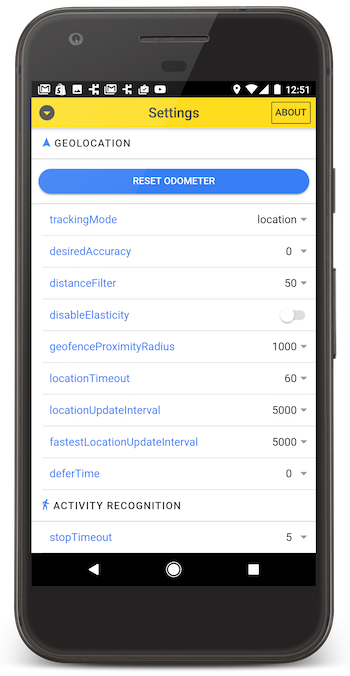
If you don't know exactly what reset: false means, then you don't want to use it. Just delete that line reset: falsae and forget you ever saw it. You likely blindly copy/pasted that code from the /example app.
- Adding event-listeners after
BackgroundGeolocation.ready(config).
Listen to events before calling .ready(config). Calling .ready(config) is a signal to the plugin that your app is launched and the plugin can start firing events. If you don't listen to events before calling .ready(config), you will miss initial events.
Also, it's perfectly safe to add listeners as soon as your app launches, regardless of anything. You don't have to wait until this startLocationTrack () method is called. Listening to events is like wiring up speakers in a stereo system — hooking up a speaker has no effect on the state of the stereo system; they don't cause the stereo to turn on and start playing music.
-
pausesLocationUpdatesAutomatically: false
Do you realize what this iOS-only option does? If you're not careful to explicitly call .changePace(false) or .stop() at some point, , once the iOS device enters the moving state and begins tracking location, it is going to keep location-services on FOREVER and never stop until the battery dies (which will happen rapidly).

Just as a side question: you do recommend keeping reset: true for 99% use-cases, right? After reading docs I thought reset is doing some hard work and is only recommended for debug

you do recommend keeping reset: true for 99% use-cases, right?
Like I said above: “Just delete that line reset: falsae and forget you ever saw it.”
you don’t need to think about Config.reset. Delete it from your thoughts, completely.
it is not for debug. Just completely delete it from your code and forget you ever heard about it.
This issue has been automatically marked as stale because it has not had recent activity. It will be closed if no further activity occurs. Thank you for your contributions. You may also mark this issue as a "discussion" and I will leave this open.
![stale[bot] avatar](https://avatars.githubusercontent.com/in/1724?v=4 "Published by a pub.dev verified publisher")