

 toluaina
incorrect db joins and conditions when using multiple associations to same table
PGSync version: 1.1.28
Postgres version: 13.1
Elasticsearch version: 7.10.1
Redis version: 6.2.1
Python version: 3.7
Problem Description:
Hi. While using pgsync, I found cases which are (according to me) handled incorrectly
We have database like this:
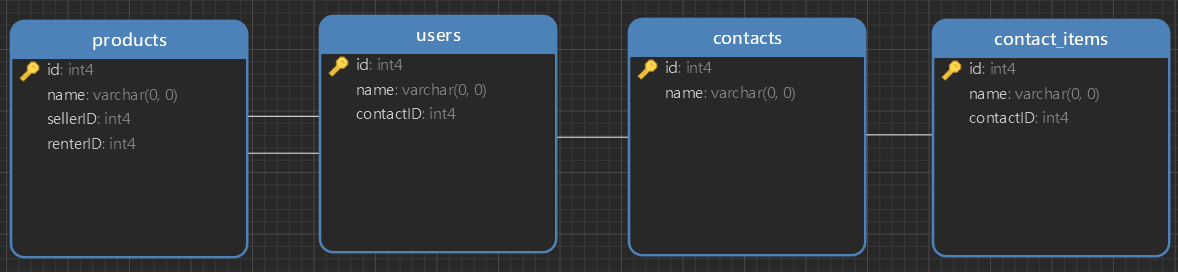
where we have "products" table which have two associations to same table -> "users". "sellerID" has to be set (it is not allowed to be NULL), "renterID" does not have to be set (it is allowed to be NULL)
If for example "contactItem" is added to "contact" of seller, both user subqueries -> seller and renter are joined by INNER JOIN, which will exclude products which do not have set renterID.
Shouldn't it be automatically determined if a foreign key is allowed to be NULL and for those associations always used LEFT OUTER JOIN? Or maybe there could be some flag in schema, which could be set manually to tell querybuilder where to enforce LEFT OUTER JOIN.
Another issue is case, where there is same db/schema (but both sellerID and renterID are not allowed to be NULL) and we add/update/delete some deeper entity (for example "contactItem") of renter. Querybuilder generates WHERE condition which is used in both user subqueries (seller and renter), but only one of them is really related to entity which was manipulated with and since there are INNER JOIN used, product is excluded (and even if it was not excluded, renter subquery would return null since there is WHERE condition with entity not related to renter).
I include fork, where you can find shop example -> pgsync_fork
For 1. issue just run INSERT INTO contact_items ( "id", "name", "contactID" ) VALUES ( 1, 'contactItem1', 1 ) query and look at generated SELECT
For 2. issue you will need to change "rentedID" to not be allowd NULL in "products" table and add data to create valid product (which will have set both seller and renter and they both will have set contact). Then run INSERT INTO contact_items ( "id", "name", "contactID" ) VALUES ( 1, 'contactItem1', 1 ) query and look at generated SELECT
Thank you


Sorry about the delay on this. I have fixed the first issue can you please try off the master branch and let me know.
@toluaina thanks for resolving 1st issue. Did you have a chance to look to 2nd one? It has two different cases, when it hapens:
-
if we have table_a (with entity 1) with oneToMany association to table_b (with entities 1 and 2) and we change entity 2 of table_b, resulting select will contain
WHEREcondition in table_b ->WHERE table_b.id = 2, which will exclude entity 1 from result -
if we have table_a (with entity 1) with any two associations to same table_b (table_ba with entity 1 and table_bb with entity 2) and we change entity 2 of table_b, resulting select will contain
WHEREconditions in both associated table_b (table_ba and table_bb) ->WHERE table_ba.id = 2in table_ba subquery andWHERE table_bb.id = 2in table _bb subquery, which will exclude entity 1 (from table_ba) from result
shouldn't be resulting query be build like this:
- join all associated tables (subqueries) by using
LEFT OUTER - do not use
WHEREconditions in joined tables (subqueries) - select from elasticsearch IDs of all main entities (table_a entities), which are affected by INSERT/UPDATE/DELETE (by using _meta attribute) and use these IDs to build where condition at the end of select
@DanielZavacky I will look into this shortly. Sorry I have been preoccupied with another task. Is this still the 2nd issue described in the original thread?
@toluaina Yes, it is, but in original post, this issue is described only for case when there are two associations to same table. But problem seems to occure even in case when there is only one oneToMany association -> in this case, if there are two records of table_b associated to main table_a and one of them is changed, generated query will contain WHERE condition with ID of changed record, which will select only this record and will exclude second one. I am not sure if I described it understandable enough. If you will need some more explanation, let me know and I will create test case, where this issue could be simulated