

 tinymce
Editor not visible, multiple console errors (expected expression, Node.insertBefore, Mime Type, editor.dom is undefined)
What is the current behavior?
Followed the instructions as best I could, but also looked up other setups for self hosting tinymce for this component. Nothing seems to work.
The editor is invisible, but it is there technically. I get these errors in the console.
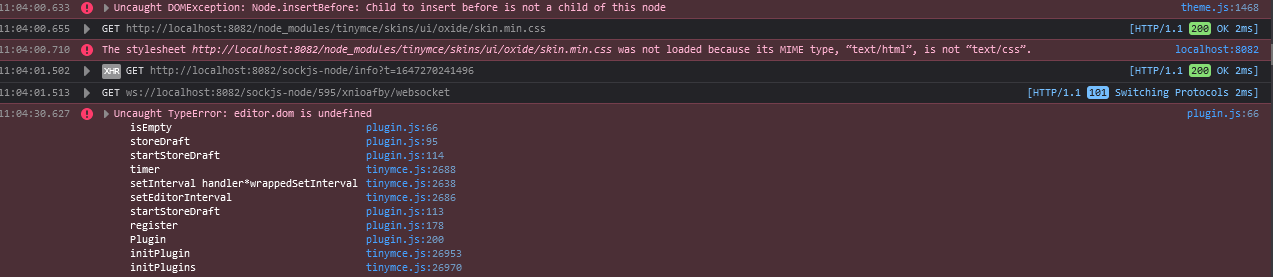

I create a component for the component and this is the code for it:
<template>
    <editor :init="init" />
</template>

<script>
import 'tinymce'
import 'tinymce/themes/silver'
import 'tinymce/icons/default'
import 'tinymce/skins/ui/oxide/skin.min.css'
import 'tinymce/skins/ui/oxide/content.min.css'
import 'tinymce/skins/content/default/content.min.css'
import Editor from '@tinymce/tinymce-vue'

import 'tinymce/plugins/image'
import 'tinymce/plugins/media'
import 'tinymce/plugins/table'
import 'tinymce/plugins/lists'
import 'tinymce/plugins/advlist'
import 'tinymce/plugins/link'
import 'tinymce/plugins/autolink'
import 'tinymce/plugins/charmap'
import 'tinymce/plugins/searchreplace'
import 'tinymce/plugins/visualblocks'
import 'tinymce/plugins/code'
import 'tinymce/plugins/fullscreen'
import 'tinymce/plugins/print'
import 'tinymce/plugins/preview'
import 'tinymce/plugins/anchor'
import 'tinymce/plugins/insertdatetime'
import 'tinymce/plugins/help'
import 'tinymce/plugins/importcss'
import 'tinymce/plugins/directionality'
import 'tinymce/plugins/visualchars'
import 'tinymce/plugins/template'
import 'tinymce/plugins/codesample'
import 'tinymce/plugins/hr'
import 'tinymce/plugins/pagebreak'
import 'tinymce/plugins/nonbreaking'
import 'tinymce/plugins/toc'
import 'tinymce/plugins/imagetools'
import 'tinymce/plugins/textpattern'
import 'tinymce/plugins/noneditable'
import 'tinymce/plugins/autosave'

export default {
  components: {
    editor: Editor
  },
  data () {
    return {
      init: {
        height: 500,
        plugins: [
          'lists advlist',
          'image imagetools',
          'link autolink',
          'table',
          'charmap',
          'searchreplace visualblocks code fullscreen',
          'print preview anchor insertdatetime media',
          'help codesample hr pagebreak nonbreaking toc textpattern noneditable ',
          'importcss',
          'directionality',
          'visualchars',
          'autosave'
        ],
        toolbar:
          'undo redo | bold italic underline strikethrough | fontselect fontsizeselect formatselect | alignleft aligncenter alignright alignjustify | outdent indent |  numlist bullist | forecolor backcolor removeformat | pagebreak | charmap emoticons | fullscreen  preview save print | insertfile image media template link anchor codesample | ltr rtl',
        menubar: true
      }
    }
  }
}
</script>
I also have this weird white board around my page now
 This is the bottom left corner so the top area is white as its part of the page, but the left and bottom sides shouldn't have that white there.
What is the expected behavior?
Render the editor
Which versions of TinyMCE, and which browser / OS are affected by this issue? Did this work in previous versions of TinyMCE or tinymce-vue? TinyMCE v5.10.3 Vue v2.6.11 TinyMCE Vue v3.2.8 Firefox 98.0 Windows 10
Never tried this with other views.

![exalate-issue-sync[bot] avatar](https://avatars.githubusercontent.com/in/18431?v=4 "Published by a pub.dev verified publisher")

@angelicochris The reason bundling is not recommended is because missing import can be a pain. You can easily self-host by copying the extracted TinyMCE folder into your public folder or copying the folder from node_modules. Serving the files is easier than bundling and thus the suggested method for including TinyMCE on self-hosted environments.
