

 thunderclient
Instance settings for environments
Discussed in https://github.com/rangav/thunder-client-support/discussions/610
Originally posted by davinishi June 1, 2022 Something I never seen on any client is a parameter settting for multiple instances environments.
E.g: Some companies have multiple instances running for each system: development, preproduction, prouction, etc. Today, the standard environment variables allow us to set different URL's, usernames, passwords, etc, though we have to create one environment for each instance, in this example, 3 environments at least, each environment with the same amount of variables with different values corresponding to the correct instance of the server.
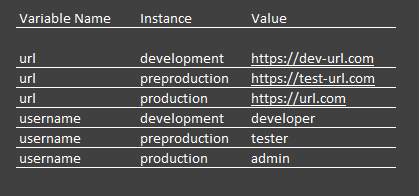
Idea: Instead of having the conventional Environment Variables, it could be easier if a dynamic variable could have multiple values, so when setting the active Environment, we could set also a second parameter like "Instance".
The configuration would look like this but of course there are better ui than that:

@davinishi thanks for the feedback,
this looks more complicated than regular environments setup

I can see a benefit to having this type of UI. ....not that an additional "Instance" field needs to be added necessarily, but just to see multiple Environments in a single view. As described already, with Dev, Test, Prod instances, being able to quickly compare/copy values from one environment to another would be helpful. I envision something closer to the Azure DevOps Release Stage Variables UI...where it's a single grid UI (that can be filtered), and has an indicator if the variable pertains to all or just a single. There are also 2 different views depending on how one is looking to review the values.
