

 thunderbird
Imposible to add multiple recipients
Checklist
- [X] I have used the search function to see if someone else has already submitted the same bug report.
- [X] I will describe the problem with as much detail as possible.
App version
5.807
Where did you get the app from?
Google Play
Android version
11
Device model
No response
Steps to reproduce
- Start creating new email
- Add long recipient
- Click message text field
- Click to field again
- Add one more long recipient do not add space at the end (note adding two recipients without step 3 is less consistent but reproducible)
- Click on message field again
- Click on to field
Expected behavior
Same as after step 3 - I can add new recipient
Actual behavior
Email details of last recipient shows up ( <Unknown Recipient> etc...), and keyboard hides. It is impossible to add new email. Clicking on text field and back to 'to' field yelds same buggy behavior Side note - Why 'x' at top right of this popup deletes recipient? 'x' there means close not 'delete' Side note two - I can't find how to edit recipient email one it is shown as 'bubble'
Logs
No response

I've got the same issue. Can't paste a list of email addresses into the TO/CC/BCC fields.
Pops up an error that can't parse addresses.


I can't reproduce this. Can you provide a screen recording?
This should explain it. But it does not happen 100% of time. took me 3 tries.
https://user-images.githubusercontent.com/1889485/166163102-3319296a-348d-4d05-b314-149691e7b4e3.mp4
I believe you are hitting the X button here:
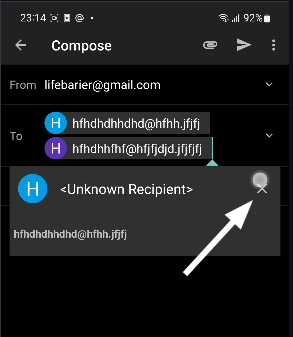
Clicking that X will remove the recipient.
It may be useful to change it to a trashcan icon to make it's purpose clearer?

I believe you are hitting the X button here:
Yes, I hit that to illustrate that when I want to add extra contact it appears preventing addition of any more contacts and obvious 'x' (aka 'close') is deleting, and not closing (as I was hoping it would close and let me add more contacts). Changing icon to trash icon would make it clearer (still bad. add trash icon and leave 'x' which closes this popup) but it does not solve main problem.
Main issue is that it is not possible to add more recipients as shown in my video and described in description because that thing containing 'x' appears when I focus 'To' field and prevents editing. Did you even read bug description?
I see what you mean, sorry for the previous message! I can also reproduce this, where the popup closes the keyboard.