

 teejee2008
Cannot cancel "Parsing log file"
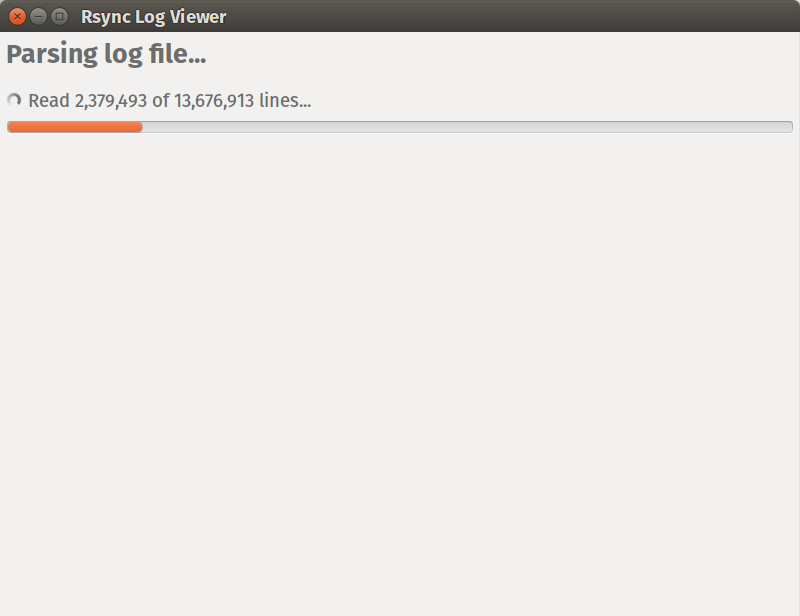
Describe the bug A window "Rsync Log Viewer" with operation "Parsing log file" takes a lot of time to complete the operation. You cannot cancel it: there are no buttons in the window (such as Cancel button) and the click on the Close button is ignored by the application.
I think it is a bug because the log file has 13 million lines and parsing is rather slow (100 thousand in about one minute). So, effectively the GUI of Timeshift is blocked for more than 10 minutes, which is not user-friendly.
To Reproduce Steps to reproduce the behavior:
- Click "Rsync log files" (or something like this)
- Main Timeshift window disappears
- Dialog window "Rsync Log Viewer" appears with operation "Parsing log file..."
- Observe that the operation cannot be canceled.
Expected behavior The window "Rsync Log Viewer" should either have a Cancel button or the click on the Close button should cancel parsing operation.
Screenshots
System (please complete the following information):
- Linux Distribution Name and Version: Ubuntu 16.04
- Desktop Unity
- Application Version 18.8-0~201808261545~ubuntu16.04.1
Paid support is now available for this application. Please make a donation for $10 via PayPal if you need help with an issue.

