
nmap
 nmap copied to clipboard
 tedsluis
scan & visualize subnets
nmap
Scans subnets using nmap and visualizes network topology in a browser.
Table of Contents
- nmap
- Features
- Network diagram
- Help
- Display host properties
- Prerequisites
- Installation instructions
- Install packages
- Test packages
- Clone repo
- Install gojs
- Run nmapscan.pl
- Nmap video
Features
- Performs OS detection and port scanning.
- Tracks subnet(s) gateways and route to internet.
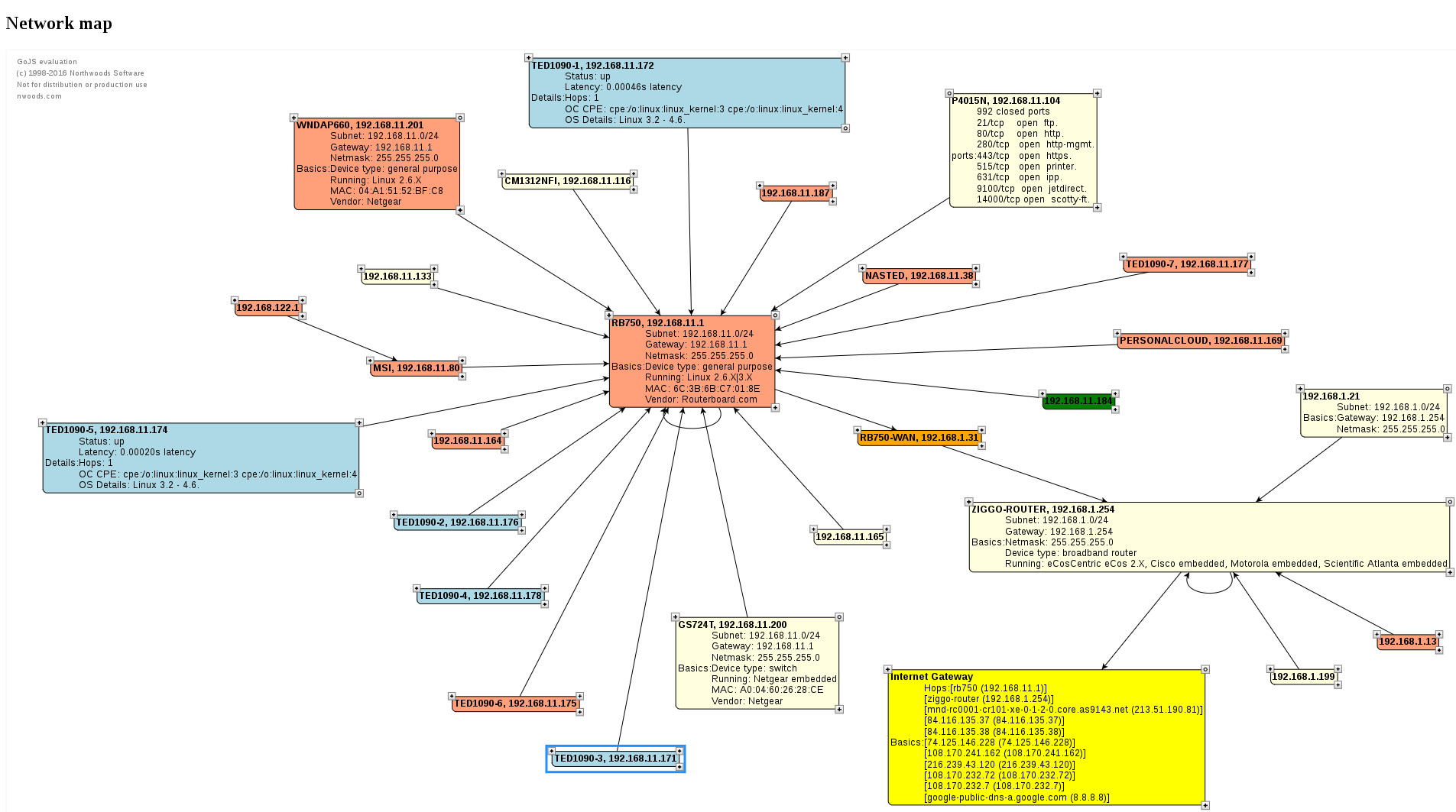
- Shows network diagram of subnets with hosts.
- Use the mouse to drag the host objects around.
- Displays MAC address, vendor type, IP address, hostname, gateway, netmask, OS type, etc.
- Click on the icons in the corners of the host objects to display the host properties.
Network diagram
Help
'nmapscan.pl' is a commandline script written in Perl. It creates 'map.html' which contains html, javascript and the network topology data.
./nmapscan.pl -help
Help

Usage:
       ./nmapscan.pl
Optional:
       ./nmapscan.pl -subnet <cidr>[,<cidr>]                   Subnet(s) in CIDR notation.
       ./nmapscan.pl -debug                                    Display debug info.
       ./nmapscan.pl -help                                     This helptext.

Example:
       ./nmapscan.pl -subnet 192.168.1.0/24,192.168.100.0/24

View result 'map.html' in a webbrowser.

CIDR is <network>/<netbits>.
Lookup your Netbits:
+------+----------+------------------------------------+
| Net  | Number   |                                    |
| bits | of hosts |  Netmask                           |
+------+----------+------------------------------------+
| /8   | 16777214 |  255.0.0.0                         |
| /9   | 8388606  |  255.128.0.0                       |
| /10  | 4194302  |  255.192.0.0                       |
| /11  | 2097150  |  255.224.0.0                       |
| /12  | 1048574  |  255.240.0.0                       |
| /13  | 524286   |  255.248.0.0                       |
| /14  | 262142   |  255.252.0.0                       |
| /15  | 131070   |  255.254.0.0                       |
| /16  | 65534    |  255.255.0.0                       |
| /17  | 32766    |  255.255.128.0                     |
| /18  | 16382    |  255.255.192.0                     |
| /19  | 8190     |  255.255.224.0                     |
| /20  | 4094     |  255.255.240.0                     |
| /21  | 2046     |  255.255.248.0                     |
| /22  | 1022     |  255.255.252.0                     |
| /23  | 510      |  255.255.254.0                     |
| /24  | 254      |  255.255.255.0                     |
| /25  | 126      |  255.255.255.128                   |
| /26  | 62       |  255.255.255.192                   |
| /27  | 30       |  255.255.255.224                   |
| /28  | 14       |  255.255.255.240                   |
| /29  | 6        |  255.255.255.248                   |
| /30  | 2        |  255.255.255.252                   |
| /31  | -        |  point to point links only         |
| /32  | 1        |  255.255.255.255 single IP address |
+------+----------+------------------------------------+
Notes:
   - Number of hosts = usable number of hosts.
   - CIDR = network address + /netbits, for example: 192.168.1.0/24
   - Instead of the network address, any IP within the subnet is accepted.
   - Be sure 'nmap', 'traceroute', 'iproute' and 'gojs' are installed!
   - You may need to do sudo (to become root) to run nmap: $ sudo ./nmapscan.pl -subnet 192.168.1.0/24
Display host properties
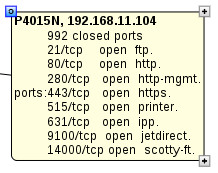
Click on the icons in the corners of the hosts object to display the host properties. There are 3 different types: Basic, detailed and port properties.
Top right corner: Basisc host info.
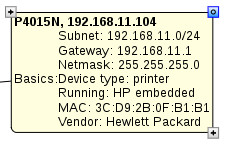
Bottom right corner: Host details:

Top left corner: Port host info:
Prerequisites
- nmap
- traceroute
- iproute
- perl
- gojs (check the license)
- root permissions
note: If your system does not meet these requirements then follow the installation instructions.
Installation instructions
Install packages
Ubuntu/Debian/Raspbian
$ sudo apt-get install nmap traceroute iproute perl git wget
Centos/RHEL
$ yum install nmap traceroute iproute perl git wget
Fedora
$ dnf install nmap traceroute iproute perl git wget
Test packages
To test nmap (specify our own subnet):
$ nmap -O -n 192.168.1.0/24
To test traceroute:
$ traceroute 8.8.8.8
To test iproute:
$ ip add
Clone repo
Clone the repo to your locale host:
$ mkdir ~/git
$ cd ~/git
$ git clone https://github.com/tedsluis/nmap.git
$ cd ~/git/nmap
Install GoJS
To install the GoJS framework:
$ cd ~/git/nmap
$ wget https://gojs.net/latest/release/go.js
Note: read the license info!
Run nmapscan.pl
To run it (specify our own subnets):
$ ./nmapscan.pl -subnet 192.168.1.0/24,192.168.11.0/24

Interface=enp2s0 (ip=192.168.11.80)
Interface=virbr0 (ip=192.168.122.1)
Host gateway=192.168.11.1
  192.168.1.0/24   (subnetwork=192.168.1.0/24,   netbit=24, subnetmask=255.255.255.0, network=192.168.1.0,   broadcast=192.168.1.255),   number of IP's=254
  192.168.11.0/24  (subnetwork=192.168.11.0/24,  netbit=24, subnetmask=255.255.255.0, network=192.168.11.0,  broadcast=192.168.11.255),  number of IP's=254
  192.168.122.1/24 (subnetwork=192.168.122.0/24, netbit=24, subnetmask=255.255.255.0, network=192.168.122.0, broadcast=192.168.122.255), number of IP's=254
Depeding on your system and network scanning will take quite a while! On a raspberry pi it can even take up to an hour!
Ones it is finshed you can view 'map.html' is a web browser.
=======
Nmap video
Watch a video at youtube: https://youtu.be/DMpabcP0r_U
GoJS framework
If you wish to use the GoJS library for your private evaluation, you may do so only under the terms of the Evaluation License Agreement.
- http://gojs.net/latest/doc/download.html
- http://gojs.net/latest/doc/license.html
Ted Sluis
[email protected]
https://www.youtube.com/tedsluis
 tedsluis