

 tcplugins
Protected URL not resolving for "Build Finished" events
Expected Behavior
URL parameterized on a Password variable should resolve to the real URL.
Current Behavior
URL resolution seems to work for some events, but not all. It appears to work for "Build Started" and "Changes Loaded", perhaps others.
Steps to Reproduce (for bugs)
- Create a TeamCity Property containing the URL for the webhook: webhook.slack-url
- Mark said property as "Password" (TeamCity will censor the value in the UI)
- Use ${slack-url} as the URL when configuring a webhook
- Enable "Trigger when build is Successful"
- Run a build that succeeds
Your Environment
- tcWebHooks Version: 1.1.318.391
- TeamCity Version: 2019.1.2
- TeamCity server Operating System: Linux
- Are you using a WebHook Template?: Yes
See screenshot
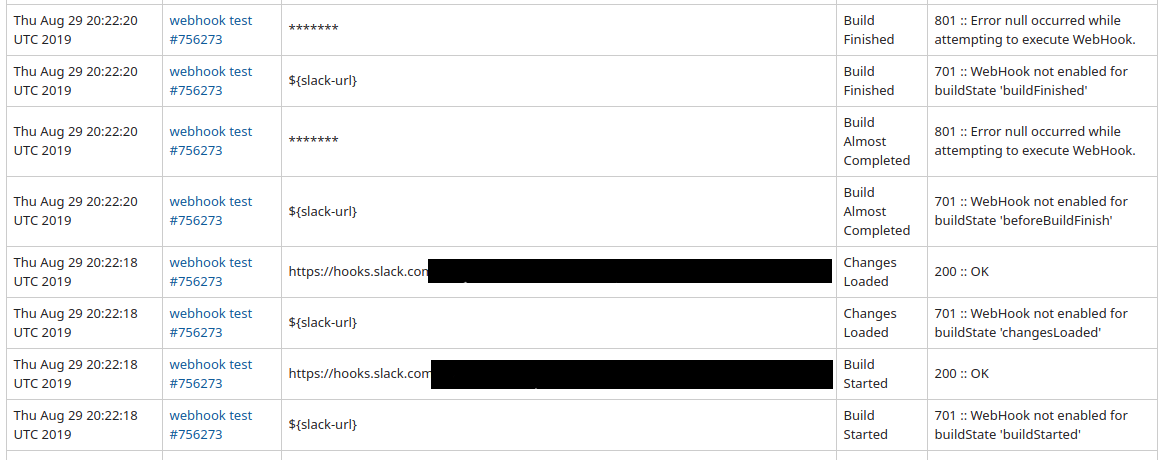

Wow, that's a really neat solution for hiding the token in the URL. I never thought of that.
And thanks for pointing out that it doesn't work for success.
Is it all buildFinished events, or just success?

Also, do you have two webhooks configured in the above screenshot? Or is it trying to process the webhook twice? (all those 701 errors).
Thanks, I can reproduce this. Also the following bugs:
- This type of variable resolution in the URL does not work in Test tab when editing a webhook.
- This type of variable resolution does not work with the Velocity Templates (probably needs a different syntax). Only for users of 1.2.x because the Velocity engine is not available in 1.1
The following is how the events are affected:
- Build Added to queue. This probably is expected. I don't think anything has been resolved at this point, but the actual URL resolves to
UNRESOLVED - Build Started - resolves correctly.
- Changes loaded - resolves correctly.
- Almost finished - resolves to a hidden value in teamcity which is weird.
- Finished (success, failure, fixed, broken) - resolves to a hidden value in teamcity which is weird.
Wow! Thanks for the super-quick response!
Is it all buildFinished events, or just success?
Just tried a failure, it seems to have the same issue.
Also, do you have two webhooks configured in the above screenshot? Or is it trying to process the webhook twice? (all those 701 errors).
I was also wondering what was with the 701; I didn't think it was the other hook. Yes, I had 2 there. The first that I was trying to get working, and then the second as a testbed to identify the bug & report it. I just re-did the test in a dedicated project with only the one webhook and it does not have the 701 errors. So all good there.
This type of variable resolution in the URL does not work in Test tab when editing a webhook.
Fortunately there's a field to override the URL, so that has a workaround. Would be cool for it to work natively, though.
This type of variable resolution does not work with the Velocity Templates.
I'll take your word for it. Sounds like the next version has some fancy goodness, though.
Just following up with this as I see this issue is labeled "awaiting feedback". Was there further feedback you're looking for from me? Something I missed in my previous reply? I just want to make sure this isn't blocked on me.
Sorry, not blocked on you. Blocked on me finding the time to step through the code on that version. That instance of TeamCity doesn't have remote debugging enabled.
I'm not sure I'll be able to fix this. The Map<String,String> of parameters returns the obscured value in the finishing and finished build states.
I've raised a ticket to ask how to get the values. https://youtrack.jetbrains.com/issue/TW-61876
Hi @AndrewFuller The team at teamcity have indicated that we can't solve this using the method you are using. The values are obscured to prevent inadvertently revealing the values.
I'll have a think about how I could support this in future, but I can't see it being solved easily in the short term.
Possible ideas:
- Store value as a
SProjectFeatureDescriptorwithsecure:prefix. - Sort of related to: #82
- Would need to traverse up the project hierarchy to find a declared variable and inject that into the template context.
Thanks for the update, @netwolfuk
The properties marked "password" are really just a poor man's security, anyway. It helps to guard against shoulder surfing, but anyone with permissions to edit a build step and 10min to spare can easily exfiltrate the value.
I googled SProjectFeatureDescriptor and it looks like something to be done within tcWebHooks. This would be a superior solution anyway, as the protected value can then be defined at the global scope but only visible to tcWebHooks and not available to arbitrary build steps.
FWIW in my environment we don't need any ability to segregate URLs between projects. We're happy to define the value once at the global config and use the value in any project on the server. I imagine that's not the case for all your users, though.
I googled SProjectFeatureDescriptor and it looks like something to be done within tcWebHooks.
Yes. It's been available since TC10. tcWebHooks 1.1 is compatible with TC9.
It stores the data in the project config, which can be converted to kotlin and exported and imported. So implementing it requires some care to handle updates outside the UI.
only visible to tcWebHooks and not available to arbitrary build steps
Any plugin can call the getAll method and get any value for any project for any plugin, so not properly secured. 😣
we don't need any ability to segregate URLs between projects
Ok. Yours could be stored in the _Root project. However, based on the popularity of per project templates and permissions (#131), there are certainly plenty with larger installs. The company I just started with have 60+ build agents. I'm not a TC admin, so feeling the pain a bit. 🤣
This might be solved by #82, which is in progress. I'll do some testing when that's done, and maybe this can be resolved in 1.2
FYI. This will be better served by #53
I have scrambled password support working in my local branch. It will be in the next alpha. Also, I have #82 working in my local branch via the REST API, which will also be in the next alpha. I only need to get some UI working, and the alpha7 will be released.
This can now be acheived by using a WebHook Project Parameter marked as "Password". This feature is available in 1.2 alpha 8. See https://github.com/tcplugins/tcWebHooks/wiki/Hiding-Sensitive-Values-In-WebHook-Configuration