

 tannerhelland
Visual Effect Browser
Effects (filters) are dependent on slow, cryptic menu browsing. I doubt they're getting nearly as much use as they should.
Doing some sort of visual UI for browsing effects is not easy, so I am proposing the simplest solution I can come up with.
An effects toolbar button (for better visibility to users) and a "browse..." menu item atop the Effects menu would open a dialogue with a list of thumbnails.
It is important to note that generating previews from the user's image is not practical or even desirable at this time. Attempting to demonstrate a filter using an entire image's thumbnail will not convey the 'idea' of the filter. Instead all thumbnails are static images, pre-filtered and shipped with PD, that are designed to convey the intent of the filter and to convey that intent in a low resolution thumbnail; for example, the parrot picture used in the Wikipedia computer palettes page.
This UI will present a quicker way to 1. ascertain what each filter does and 2. compare and contrast effects before selecting.
Clicking on any of the thumbnails will launch that filter's dialog, where the user will get the preview for their own image.

I think this is a good idea. As a keyboard workflow person, two additions I would like are a keyboard shortcut to open the effects browser, and a "Search" box where you can type an effect name (or partial name) and the effects will get filtered. Pressing Enter will select the first match (I'm a keyboard workflow person).

Thank you for the suggestions, fellas. This has been on my mind for awhile and I have a number of ideas for how to best go about it. I'm glad I now have an issue for tracking it!
@Kroc thank you for thinking through a minimalist implementation. That would indeed be much simpler to implement than what I ultimately have planned. I have a number of serious shortcomings on the primary interface window that I'm preparing to deal with in the immediate future (hence the heavy work on palette stuff recently), but in a few weeks/months I'd like to tackle this next, and ideally have it ready before the next release.
@jbpro the search box is a great idea. Thank you!
If I can, I'd like to at least provide a toggle so the user can switch between pre-built stock images and dynamically generated examples of each adjustment/effect on their current image. I've already tackled the nastiest part of this problem (standardizing all adjustment/effect function signatures against XML strings), but I still need to rewrite many adjustments/effects to specifically operate on arbitrary image targets, instead of assuming that the current main image should be their target. Solving this is on my to-do list, alongside a larger rewrite of the basic adjustment/effect template I've been using.
I'll try to remember to tag this issue as various blockers get resolved. ("Try" being the operative word, haha.)
Try not to take on too much simultaneously; ship iteratively, because this thing could eat up a lot of time.
@tannerhelland Just a thought on this comment of yours: "If I can, I'd like to at least provide a toggle so the user can switch between pre-built stock images and dynamically generated examples of each adjustment/effect on their current image"
What about something like this: when you open the effects browser window, it is populated with stock images of applied effects, but it would start building dynamic images in a separate thread/process and replace the stock images as the dynamic images are computed? This would ensure the window opens quickly and is immediately responsive for those times when you know exactly what effect you want, but for those times when you want to compare effects against your current image it will eventually give you that information.
I believe the issue is that VB6 is not multi-threaded (not without some colossal hacking), so doing many real-image previews are difficult to approach. You can somewhat simulate a background thread by yielding to the OS every so often (DoEvents) but that requires that this is implemented into the filter routines. Tanner will have a much better idea how reasonable this is (or isn't)
Hi Kroc, there are some multi-threading solutions for VB6 out there (third-party library e.g. vbRichClient5, or "The Trick's" approach with source available here: http://www.vbforums.com/showthread.php?788713-VB6-Multithreading-in-VB6-part-4-multithreading-in-Standart-EXE ).
You can also "fake" it using an ActiveX EXE that raises events back in the main EXE, but AX EXEs require registration so I don't think that will work with the portable-app feature of PhotoDemon.
Lastly, separate process(es) might work too with some shared memory space via a memory mapped file. The nice thing about that is that a crash in the separate process won't take down the main app. The worker process(es) could be wrapped in a job object to allow them to be managed as a unit. See https://docs.microsoft.com/en-us/windows/desktop/procthread/job-objects
Thank you for the additional comments, everyone. I apologize that I'm persistently late in replying.
Re @jpbro 's suggestion:
...it is populated with stock images of applied effects, but it would start building dynamic images in a separate thread/process and replace the stock images as the dynamic images are computed?
This would be the ideal implementation. Unfortunately, zero effects in PD are currently built in a way that would make it easy to migrate them to a standalone, multithreading-friendly design. Like so many things in this project, design decisions made in haste 20 years ago continue to haunt me; in particular, every adjustment/effect expects to have total control over things like the primary UI, so it can post progress updates (vs an event-based model, which would be a hell of a lot smarter!).
I have slowly been updating various adjustments and effects to rely less and less on a monolithic project design, but given my current free time, I am probably years out from migrating all adjustments/effects to a design that could be easily multithreaded. (And to be entirely honest, if I decide to go that route, I'm only marginally inclined to stick with VB6 for the external adjustment/effect libraries. If I'm going to the trouble of rewriting them, it would be way easier to just write them in C and get a whole bunch of other perf benefits - e.g. SIMD - while I'm at it.)
/end excuses
All that said, my personal $0.02 is that most effects in PD are already fast enough that thumbnail-sized previews would not need to be multithreaded to provide a good UI experience. I already use single-threaded run-time generated previews in a bunch of list-style UI elements (e.g. the new gradient browser, or the font selection dropdown - both of which have the additional penalty of traveling out to the HDD on each preview) and as long as the run-time previews are produced and cached strategically, they can largely be made to work in a single-threaded VB6 environment. I don't think single-threaded adjustment/effect previews are a deal-breaker.
I intend to attempt (at some point) a single-threaded implementation of this just to see how well it works. If it fails miserably, I'll update this thread with my findings. ;)
At present, the largest barrier to this project is a uniform rendering API across all of PD's adjustments and effects. I haven't designed something I'm happy with yet, and as I don't ever want to rewrite all adjustment/effect APIs again, I'm holding off on a project-wide replacement until an API design is settled.
Sorry again that it's taken me so long to tackle this. :/ Hopefully it won't be another full year before I make meaningful progress on this issue.
Didn't mean to auto-close this via commit; who knew the phrase "addressing issue number" could trigger that??
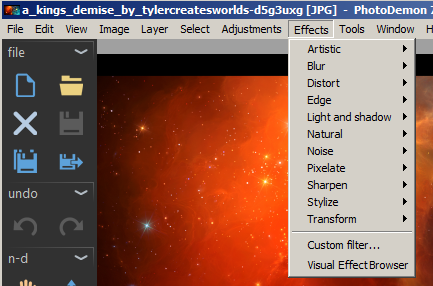
An effects toolbar button (for better visibility to users) and a "browse..." menu item atop the Effects menu would open a dialogue with a list of thumbnails.
I tried to come up with something that embraces the fact that image effects have great variability. This is important as many image editors (especially on mobile) are of the one-size-fits-all variety (e.g. "Old timey" just means a yellowish overlay and then maybe a bar you can drag back and forth for more or less of the effect). I tried to think of a way to break down the options more so that users can see that the visual effects have quite a bit of variability depending on the selections in the submenu ...
Mockup:
Location of the selection screen within the menu system:
Possible image preview selection screen:
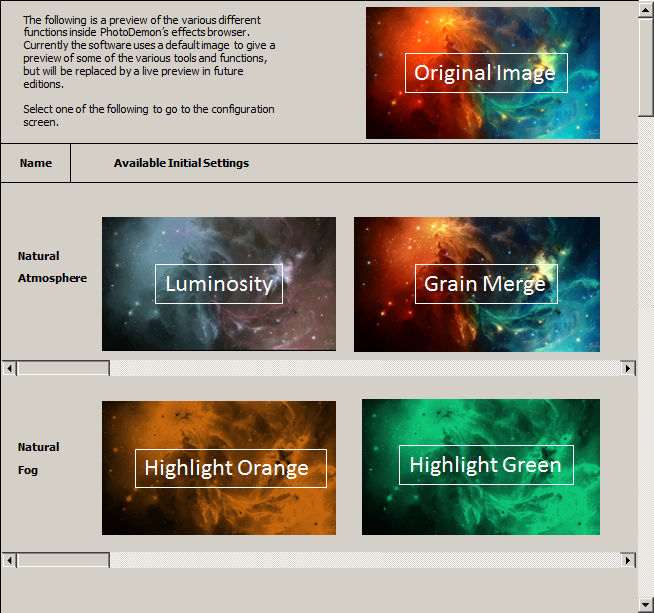
I drafted a disclaimer noting that you might start with an initial view that could then be replaced later by an active and predicted view, or of course just zap the disclaimer and leave it as-is. If the user were to select the Natural Fog: Highlight Green option above, it would open the settings screen (as below) with the default color that can then be modified further:
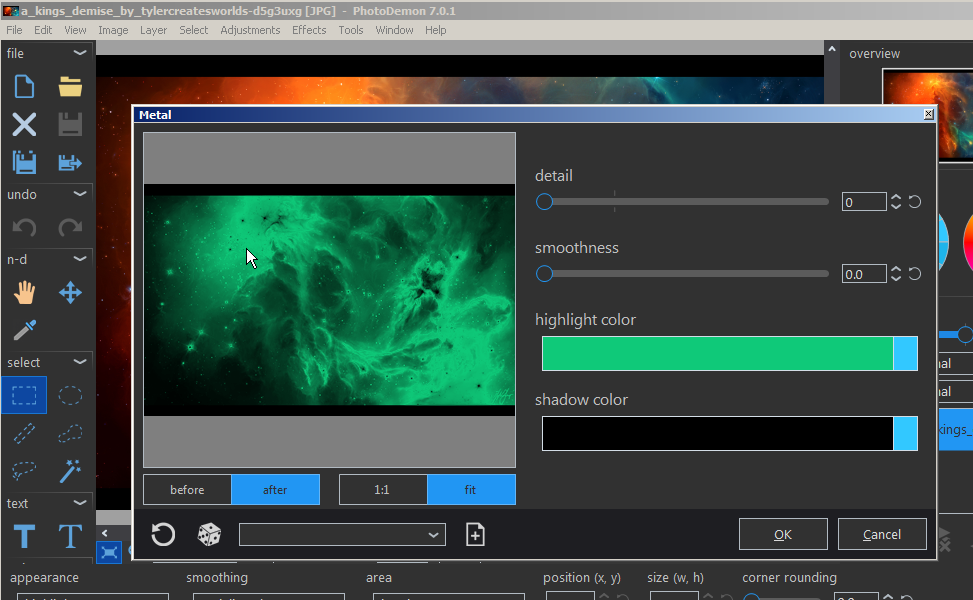
Even someone here on github could suggest a series of initial and edited images, along with the corresponding settings that would get applied after a selection. This wouldn't hinder or slow the addition of more effects to the program as they're developed, since new effects could just have a "TBA" or "NEW" over their preview boxes.
