

 tableau
How to download only extracts from tableau server
Hello, im new with this and i want to know how to download only the extract from the server.

@scarmati I'm having the same issue. I am able to download the .tdsx file but I cannot do anything with the file at the moment. I did see that a .hyper file can be converted to a pandas dataframe.
EDIT: Full solution to download a datasource from tableau server and convert to a pandas dataframe below:
import tableauserverclient as TSC
import numpy as np
import pandas as pd
# import tableauhyperapi
import pantab as pt
import zipfile

tableau_auth = TSC.TableauAuth(username, pw)
server = TSC.Server('myTableauSever.com')

#Download .tdsx file
with server.auth.sign_in(tableau_auth):
    server.datasources.download(datasource_id= mydatasourceid)

#Convert .tdsx file to .hyper
with zipfile.ZipFile('myFile.tdsx', 'r') as zip_ref:
    zip_ref.extractall('test')

#pantab is a wrapper that uses Tableau Hyper API to convert a hyper file into a dictionary.
test = pt.frames_from_hyper(database='myFile.hyper')
test = pd.DataFrame(list(test.values())[0])

@scarmati I figured out the problem. You will need zipfile to unzip the .tdsx file.
import zipfile

with zipfile.ZipFile('myFile.tdsx', 'r') as zip_ref:
    zip_ref.extractall('test')
Hope this helps. I'll edit my original reply for the full code.
Hi @datasurfergtx
I am new to python. In your code when you say myFile.tdsx or myFile.hyper, are you naming the currently downloaded file, or is it a general name, and I need to change it to the right tdsx and hyper file names. If so, how do I identify these names through code dynamically and use them.

Hi @keshavsainik
The file naming is structure consistent. I don't remember 100% but I can share the code I wrote 3 years ago lol
#Connect to Server
tableau_auth = TSC.TableauAuth(os.environ["TABLEAU_USERNAME"], os.environ["TABLEAU_PASSWORD"])
server = TSC.Server('myTableauWebsiteUrl',use_server_version=True)

#Create a list of mtv datasources
def datasources():
    with server.auth.sign_in(tableau_auth):
        all_datasources, pagination_item = server.datasources.get()
        my_datasources = [(datasource.name, datasource.id) for datasource in all_datasources]
        my_datasources = pd.DataFrame(my_datasources,columns= ['datasource','id'])
        return my_datasources

#datasource key generator
def datasource_key(datasource_name):
    my_datasources = datasources()
    ds_key = my_datasources.loc[my_datasources['datasource']== datasource_name, 'id'].values[0]
    ds_name = my_datasources.loc[my_datasources['datasource']== datasource_name, 'datasource'].values[0].replace(" ","_").replace(".","").replace(":","_").lower()
    return (ds_key, ds_name)

#Download a .tdsx file and unzip file
def download_ds(ds_key,ds_name):
    if not os.path.exists(f'../data/{ds_name}/'):
        os.makedirs(f'../data/{ds_name}/')
    with server.auth.sign_in(tableau_auth):
        server.datasources.download(filepath=f'../data/{ds_name}/{ds_name}_T', datasource_id=ds_key, include_extract=True)
    with zipfile.ZipFile(f'../data/{ds_name}/{ds_name}_T.tdsx', 'r') as zip_ref:
        zip_ref.extractall(f'../data/{ds_name}/{ds_name}_T')
    df = pt.frames_from_hyper(database = f'../data/{ds_name}/{ds_name}_T/Data/Extracts/hyper_0.hyper')
    df = pd.DataFrame(list(df.values())[0])
    return df
-
datasources()function will generate a list of data sources in your tableau instance. - Find the datasource you want to download and then use that name in the
datasource_key()function. This will create the key value pair you will need to download your datasource. - The last function
download_dswill download the .tdx file and remove all the extra stuff and leave a clean file. The initial steps are used for automation. You can delete the references to thedatadirectory if you don't need them. This will download the file and extract everything leaving a clean dataframe.
Here's an example of this in use:
ds = "My Tableau Report"
ds_key = datasource_key(ds)[0]
ds_name = datasource_key(ds)[1]
df = download_ds(ds_key,ds_name)
I hope this helps and Good luck.
Hi @datasurfergtx, I am also looking into this and from the documentation (i.e. https://pantab.readthedocs.io/en/latest/api.html), I realised that instead of using "database" in the frames_from_hyper function, we are suppose to use "source"?
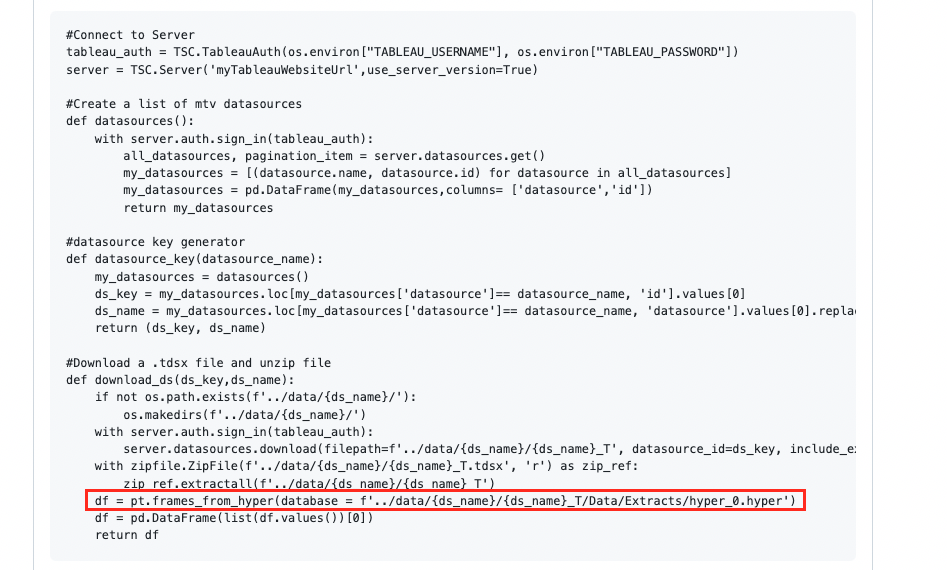
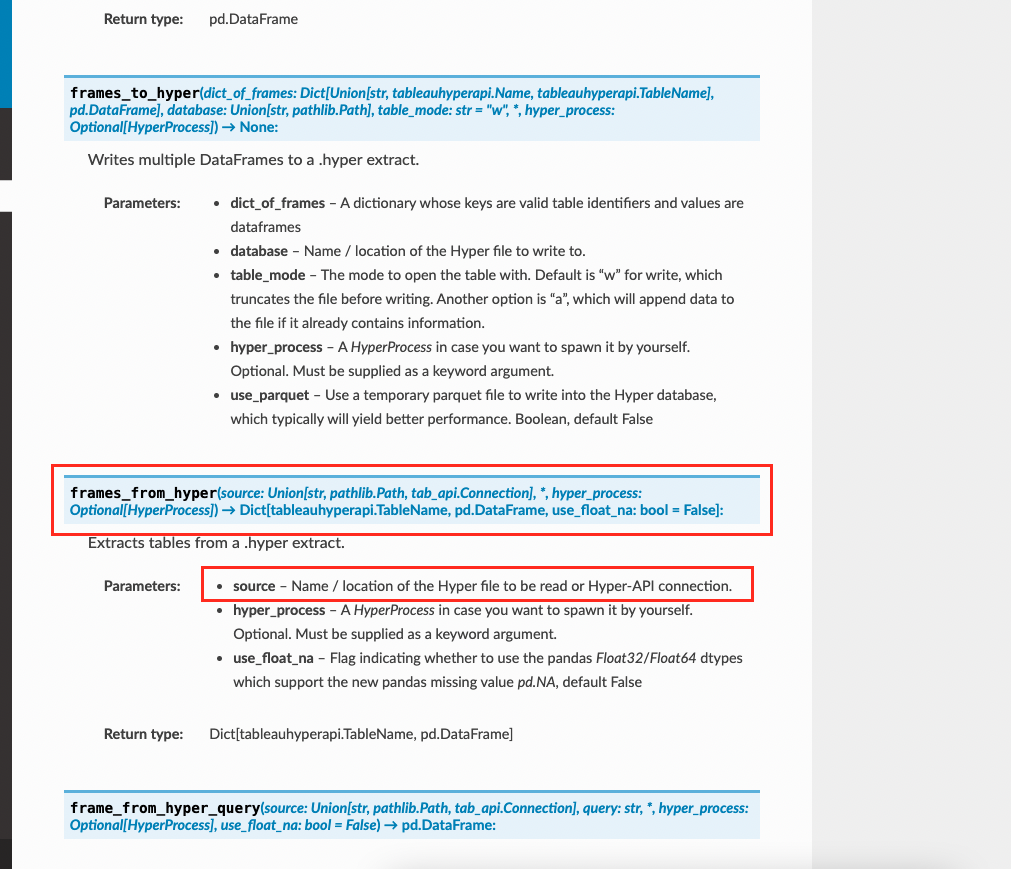
Currently, this is the outcome for using "source" and "database" respectively as shown below for your reference:


This is the approach of how I have downloaded the .tdsx files and converting them into .hyper files as shown below for reference:

Do you know if there's any solution to this? 😅🙏🏻 (cc @keshavsainik, have you tried this out?)

Hi @fatraphael95 ,
You are right, database as a parameter in frames_from_hyper() didn't work, and the source as a parameter worked. I was able to extract data using source keyword and passing the location of the file as the value.