

 tableau
Unable to trigger a virtual connection refresh using tsc package
Request Type
Not sure which type, but I feel like a type 3 cause I tried many different approaches but still not able to trigger a virtual connection.
Type 1: support a REST API: If it is functionality that already exists in the REST API, example API calls are the clearest way to explain your request.
Type 2: add a REST API and support it in tsc. If it is functionality that can be achieved somehow on Tableau Server but not through the REST API, describe the current way to do it. (e.g: functionality that is available in the Web UI, or by using the Hyper API). For UI, screenshots can be helpful.
Type 3: new functionality Requests for totally new functionality will generally be passed to the relevant dev team, but we probably can't give any useful estimate of how or when it might be implemented. If it is a feature that is 'about' the API or programmable access, here might be the best place to suggest it, but generally feature requests will be more visible in the Tableau Community Ideas forum and should go there instead.
Description
In tableau cloud, we use virtual connection as data source. These virtual connections are aimed to be trigger once the underlying data source in data warehouse got trigger in our orchestration tool. I tried server.datasources.refresh() as suggested on this link: https://tableau.github.io/server-client-python/docs/api-ref#data-sources:~:text=CreateNew%27)%0A%0A%20%20%20%20...-,datasources.refresh,-datasources.refresh. But a virtual connection does not belongs to a data sources under tableauserverclient.Server, so this method doesn't work out. I also tried using task id, virtual connection id and workbook id to trigger a task, but I can't find any relationship between these ids in order to trigger a virtual connection.
please see my script below: test.ipynb

I don't understand what you mean by triggering a virtual connection. A virtual connection contains relationships and permissions for accessing data in the underlying database and does not itself persist data on the Tableau Server. If you are trying to refresh extracts that leverage that Virtual Connection, you should refresh the published datasources or workbooks that connect to it. See the below diagram for a visual representation of this:
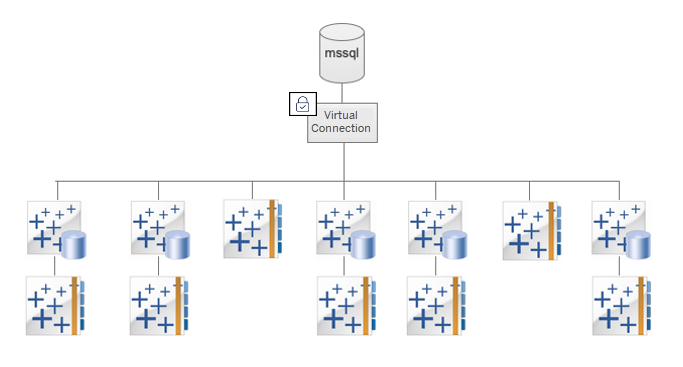
If however, you mean that something in the data model or permissions have changed, from the Use a Virtual Connection documentation
When the underlying schema in a virtual connection changes—for example, a table is added or deleted, or a column is added or renamed—you must edit the virtual connection to reflect the schema changes and then republish the connection. (If the connection has extracts, remember to refresh the extracts.) This way, you can add or edit the tables, columns, and policies in the connection before new data is exposed to everyone.
Technically speaking, TSC does have a publish method for virtual connections, but TSC does not have any tooling to support editing the files that represent the virtual connection.

@jorwoods In a more specific words I mean triggering an extract that leverage the virtual connection. Say I have an extract that refreshes virtual connection daily at 8:30am est. Can i use TSC to trigger that job? If yes, what id should i give to tsc to trigger the job?
@Oliverdong915 Are you saying that you already have everything downstream from the virtual connection on a single schedule on Tableau Server and you want to run all of them? If so, I have a gist for triggering that sort of thing. If however you are saying you don't know in advance everything that uses a virtual connection and you want to kick off their refreshes, that becomes a little more involved.
First, I would use the metadata API to find everything downstream from a virtual connection:
query vconn_dstream($vconn_name:String){
  virtualConnections(filter:{name:$vconn_name}){
    downstreamFlows{
      flow_id:luid
    }
    downstreamDatasources{
      ds_id:luid
    }
    downstreamWorkbooks{
      wb_id:luid
    }
  }
}
Second, I would have to iterate over each of these and and trigger the refresh.
import tableauserverclient as TSC

# sign in logic
server = TSC.Server('http://your-tableau-server')
auth = TSC.PersonalAccessTokenAuth(...)
vconn_name = ""
with server.auth.sign_in(auth):

    # Query the server using the graphql above
    metadata_result = server.metadata.query("vconn_downstream.graphql", parameters={"vconn_name": vconn_name})
    downstream_dict = metadata_result.data['data']
    # Capture the refresh jobs to track them after the loops
    refresh_jobs = []
    # Each of the downstream object types need to be handled separately
    for dflow in downstream_dict["downstreamFlows"]:
        flow_id = dflow["flow_id"]
        # Create a flow item, then populate the id to pass it to the refresh method
        flow = TSC.FlowItem("", "")
        flow._id = flow_id
        # .refresh method queues the refresh and returns a job object. The method does not wait for completion.
        job = server.flows.refresh(flow)
        refresh_jobs.append(job)
    for dsource in downstream_dict["downstreamDatasources"]:
        dsource_id = dsource["ds_id"]
        # Create a datasource item, then populate the id to pass it to the refresh method
        datasource = TSC.DatasourceItem("", "")
        datasource._id = dsource_id
        # .refresh method queues the refresh and returns a job object. The method does not wait for completion.
        job = server.datasources.refresh(datasource)
        refresh_jobs.append(job)
    for dworkbook in downstream_dict["downstreamWorkbooks"]:
        workbook_id = dworkbook["wb_id"]
        # Create a workbook item, then populate the id to pass it to the refresh method
        workbook = TSC.WorkbookItem("", "")
        workbook._id = workbook_id
        # .refresh method queues the refresh and returns a job object. The method does not wait for completion.
        job = server.workbooks.refresh(workbook)
        refresh_jobs.append(job)
What this does not consider however is the order of dependency between flows, datasources, and workbooks.