

 tableau
Summary Data of two Worksheets mixed up when included in a Dashboard
We have a Workbook with two basic Worksheets:

 Those two Worksheets are included in a Dashboard:

Each Worksheet has a single mark in its Summary Data when we download the Dashboard data in the Tableau UI:
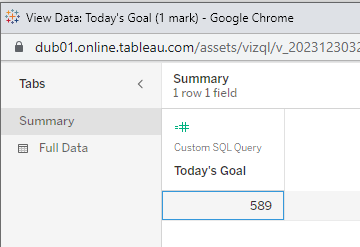

Embedding this Dashboard with the latest version of the Tableau Embedding API and using the Worksheet.getSummaryDataAsync() function doesn't return the expected results: two Worksheets are found but their Summary Data are somehow merged together:

 Each Worksheet has two columns instead of one (they have the other Worksheet's column has well as their own), and thus two marks instead of one.
The issue also happens when using the Worksheet.getSummaryDataReaderAsync() function.
Code to reproduce the issue: https://glitch.com/edit/#!/puzzled-wirehaired-ship
I can't share the Workbook publicly but I'll gladly send it via email/Google Drive share.

Thank you for reporting this @florent-guinard. I have been able to reproduce this issue: https://glitch.com/edit/#!/sordid-bejewled-plutonium
I filed a bug for this one with number W-13040486
Ewald

Looping back here, the internal bug which Ewald referenced was completed, so this issue should be fixed in Tableau Server 2024.1 and newer (including Tableau Cloud).
