

 syscl
syscl
External Display (USB-C to HDMI/VGA) not Working
Dear all,
I have a fully working XPS 13 9350, but I am struggling on the external display connection. I have tried several external USB-C to HDMI/VGA adapters, all of them pretending to be compatible with Mac, but none of them seem to work:
- Cable Matters 201014-BLK-N (USB-C to HDMI+VGA+RJ45+USB3.0+USB-C): only USB 3.0 port works (and Ethernet after installing specific AX88772 driver)
- dodocool 7-in-1 Multifunction USB-C Hub with Power Delivery (USB-C to HDMI+VGA+3xUSB3.0+USB-C): Network and USB 3.0 ports working OOB (plugged before boot)
- KKmoon B01NBIA2ID (USB-C to HDMI+RJ45+USB3.0+USB-C): RJ45 and USB 3.0 working (plugged before boot)
One important point, I have SEEN the Cable Matters working several months ago but the rest of the install was not stable sot I had to start over...
Last to try would be an official Apple adpater, but I am starting to doubt it would change anything, there must be something I am missing (a Kext or some specific pathc in the DSDT ?)
Please help, Feel free to share your experience on similar items... Thx,
My BIOS rev. is 1.4.13, hardware spec is: CPU: Core i7-6560 RAM: 16GB SSD: Toshiba NVME 512GB GPU: Iris 540 Screen: QHD+ Webcam: Sonix Technology


@squash- #46 is more for USB-C to Display Port. @lorenzolamasse I'm having similar problems trying to find an adapter to work with HDMI video and AUDIO especially. I have had 2 single, not multi, usb-c to hdmi connectors that the audio has not worked on. These are the 2 I've tried with no luck with audio, only video worked. - USB Type C(Thunderbolt 3) to HDMI 4K UHD 6 Feet Cable, Benfei USB 3.1 (USB-C) to HDMI Adapter Male to Male Gold-Plated Cord https://www.amazon.com/dp/B01NH500RV/ref=cm_sw_r_cp_api_S490ybJDP7FCP And TechOrbits USB 3.1 Type C (USB-C & Thunderbolt 3 Port Compatible) to HDMI Adapter 4K Resolution USB-C to HDMI Support for MacBook Chromebook Pixel and more (COMPATIBLE with 2016 MacBook Pro) https://www.amazon.com/dp/B01G2OB1AK/ref=cm_sw_r_cp_api_8590ybFFXT3SH
I have heard that the Dell Adapter, USB Type C to HDMI/VGA/Ethernet/USB (470-ABQN) https://www.amazon.com/dp/B012DT6KW2/ref=cm_sw_r_cp_api_C790yb5QZM3WH Has worked for others, on the forums. So I will be ordering that as soon as I get some extra cash. I'll report back here ASAP if it works.
I assume you have tried the new script by @syscl with the FakePCIID_Intel_HDMI_Audio.kext file and in the config file he has included the patch for the Intel port framebuffers, correct?

@R1MnTnA The thing is I don't even have video working... My understanding is that the script you mention is more to get audio working, right ? Else, can you point me to the corresponding thread as I have not seen this anywhere in the repo :/ Thank you...
@lorenzolamasse not sure why the video isn't working for you. It might be the adapters you purchased. Video has always worked with @syscl's setup script for me on my 9350 and 9360. I don't know of any other threads with this specific issue. I would try starting from scratch again. I still haven't purchased the Dell adapter yet, but I will be buying it this Thursday and hopefully get it this weekend.
This is weird indeed, that may be a bit painful but I'll probably follow your advice and start the installation anew...
Yes, I have tried many different cables, and as I dual boot on an external SSD running Windows 10 I can confirm that the whole thing works properly...
@lorenzolamasse @R1MnTnA What's interesting is that the 9550 guys have this patch https://github.com/wmchris/DellXPS15-9550-OSX/commit/74145d0b62b919256103f4d4372972494752e0b6 That could just be that they have a dedicated HDMI port though. Maybe @syscl can confirm.
Full reinstall did the trick, at least HDMI is working (I'll test VGA and HDMI audio later on).
I just had to correct wifi patch, not working on my DW1560 (BCM94352Z), (with the one provided by syscl I had no wifi detected) by this one found on: https://rossfisher.me/2016/12/how-to-bcm94352z-for-hackintosh-including-5ghz-patch-handoff-and-hotspot-macos-sierra/
Working with rehabman on a solution on the forum. Stay tuned. - https://tonymacx86.com/threads/xps-9360-usb-c-to-hdmi-audio-still-not-working.216140/
Hi @R1MnTnA , it the correct framebuffer type fix the HDMI audio issue? I know there's DP vs HDMI, but since I do not have any devices to confirm, thus I need your feedback to fix it.
Thank you, syscl

@R1MnTnA BTW, if you pay attention to config.plist in my git, you will notice that I've already set 0105 from <00 04 00 00> to <00 08 00 00>..
syscl
@syscl , yes thanks for that as well. One less step for me. I'm still trying to get help from rehabman on fixing or trying to make the audio through the USB-C to HDMI to work. So far per rehabman's instructions, I've tried patching HDAS which later turns into HDEF with the clover hotpatch, to inject hda-gfx. I've used this modified patch-
#Maintained by: RehabMan for: Laptop Patches
#audio_HDEF-layout12.txt

#Note: Change your layout ID if you need something different
#Note: "hda-gfx" is not needed with Haswell and should probably be removed

#Inject Audio info
into method label _DSM parent_label HDEF remove_entry;
into device label HDEF insert
begin
Method (_DSM, 4, NotSerialized)\n
{\n
    If (LEqual (Arg2, Zero)) { Return (Buffer() { 0x03 } ) }\n
    Return (Package()\n
    {\n
        "layout-id", Buffer() { 13, 0x00, 0x00, 0x00 },\n
        "hda-gfx", Buffer() { "onboard-1" },\n
        "PinConfigurations", Buffer() { },\n
        //"MaximumBootBeepVolume", 77,\n
    })\n
}\n
end;
NOTE: I used 13 as the "layout-id" because I have the 9360 model and that is what bozma88 had put in his clover config in his guide on the forums, so I'm just following his instructions for that number, which I hope is correct.
Although the hdmi audio is still not working. :(
@syscl rehabman recommended I try different variations of FakePCIID_Intel_HDMI_Audio.kext. Do you know how to make or where to get different variations of it?
I have a Dell DA200 (http://accessories.ap.dell.com/sna/productdetail.aspx?c=sg&l=en&s=bsd&cs=sgbsd1&sku=470-abnl) that works perfectly without fixes or tweaks. HDMI is detected and sound works without problems (detected all as DisplayPort). Also works the USB 3.0 and the ethernet adapter (needs drivers for the RTL8188 chipset). I didn't test the VGA port but hope it works.

Tried the Dell DA200 on my XPS 9360 and still no audio working. :-( Still trying to debug and trying other kexts or configs to get it to work. Haven't had much time though. Will try more this weekend.
You have hotplug working for you on the DA200 with the XPS 9350? I am using the same setup but the DA200 only works when plugged in at boot. Did you do anything specific to get it running?

Yes @rpruden, hotplug worked for me with my XPS 9350 (i7, 8GB RAM, 256GB SSD disk NVMe) without any tweaks for it. The only changes I made was disable in BIOS the wireless and bluetooth because chipset is Intel 8265, so It doesnt works (it enabled for me the sleep function).
Anyway, hotplug works only for HDMI, not for the USB and ethernet integrated on DA200.
Hotplug of DA200 is working for me as well, as least on the HDMI port, I can easily add or remove a second monitor on the fly. (haven’t tried the HDMI audio out yet) I don’t think I did anything special. I have upgraded the BIOS to the latest, but don’t know if it matters.
在 2017年6月22日,上午6:06,rpruden [email protected] 写道:
You have hotplug working for you on the DA200 with the XPS 9350? I am using the same setup but the DA200 only works when plugged in at boot. Did you do anything specific to get it running?
— You are receiving this because you are subscribed to this thread. Reply to this email directly, view it on GitHub https://github.com/syscl/XPS9350-macOS/issues/84#issuecomment-310218732, or mute the thread https://github.com/notifications/unsubscribe-auth/AK1u0uFVbQcrnxsdmmkgch2OOX0M9D7uks5sGZPTgaJpZM4MldmL.

Oh ok, it seems like the video portion of USB-C will work natively using hot plug. I have a USB-C to DP cable which I use to run an external monitor and it works on the fly too. I had thought you indicated that the actual USB portion (including the ethernet port) of that adapter was working as hot plug too. When you run your HDMI monitor, does Mac OS recognize it as a "Display Port" monitor?
On that note, I have a VERY weird issue with my external display, maybe someone else can confirm if it happens to them too. If I am connected for the USB-C port to my display port monitor and the lid of the laptop is CLOSED, I will get screen flicker every time that I click on the wireless icon. This occurs for me in both Windows and OS X Sierra. It's the weirdest thing. Am I the only one?
BTW, I am using the DW1830.
@R1MnTnA, I have finally found a way to enable HDMI audio via USB-C (on XPS 9360). I will post the info soon on TMX on my 9360 LTS thread. Basically, we don't need any manual framebuffer patch in Clover. The 0105 port is polymorphic and, despite being listed ad DP instead of HDMI, will provide HDMI audio. You need 19160002 platform id, and hda-gfx onboard properties injected into HDEF and IGPU. FakePCIID_HDMI_Audio has to be removed, it's made for older systems with HDAU devices. That's all.
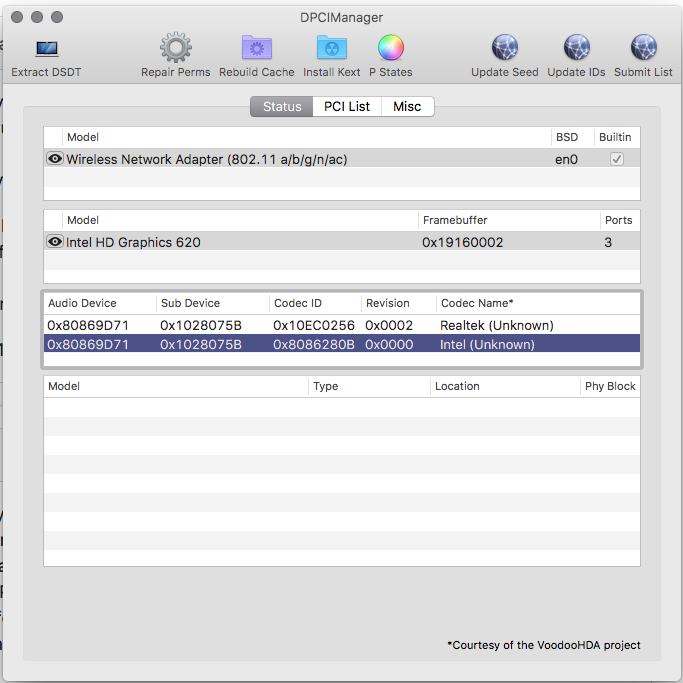

@bozma88 that is awesome news! Thank you so much for your continued commitment to this. I had lost hope and couldn't figure it out on my own. I'll look on the forums for your updated instructions. Thanks Again!