

 swagger-api
Models sections are not rendered if YAML file uses externally $ref.
Q&A (please complete the following information)
- OS: windows
- Browser: chrome
- Swagger-UI version: 3.22.1
Content & configuration
Example Swagger/OpenAPI definition:
openapi.yaml
openapi: 3.0.0
info:
  title: Common Data Types
  version: "1.0"
paths:
  /{appId}/subscriptions:
    get:
      summary: read all of the active subscriptions for the applictaion.
      operationId: getSubscriptionsById
      parameters:
        - name: appId
          in: path
          description: App ID
          required: true
          schema:
            type: integer
            format: int64
      responses:
        '200':
          description: OK (Successful)
          content:
            application/json:
              schema:
                type: array
                items:
                  $ref: 'schemas.yaml#/components/schemas/Category'
        '400':
          $ref: './responses.yaml#/components/responses/E400'
        '401':
          $ref: './responses.yaml#/components/responses/E401'
        '500':
          $ref: './responses.yaml#/components/responses/E500'
schemas.yaml
openapi: 3.0.0
info:
  title: Common Data Types
  version: "1.0"
paths: {}
components:
  schemas:
      Category:
        type: "object"
        properties:
          id:
            type: "integer"
            format: "int64"
          name:
            type: "string"
        xml:
          name: "Category"
      subscription:
        type: string
responses.yaml
openapi: 3.0.0
info:
  title: Common Data Types
  version: "1.0"
paths: {}
components:
  schemas:
    ProblemDetails:
      type: object
      properties:
        title:
          type: string
          description: A short, human-readable summary of the problem
        status:
          type: integer
          description: The HTTP status code for this occurrence of the problem.
  responses:
    E400:
      description: Bad request
    E401:
      description: Unauthorized
    E500:
      description: Server Error
      content:
        application/json:
          schema:
            $ref: '#/components/schemas/ProblemDetails'
Describe the bug you're encountering
I splitted my specs into multiple YAML file using $ref attribute.
Able to successfully generate stubs using command line java -jar openapi-generator-cli-4.0.0-beta3.jar generate -i openapi.yaml -g spring -o ./temp.
However, while rendering on Swagger UI, I see that Models are NOT displayed. And also schema names are not displayed correctly
what's wrong in referencing an external yaml file? If local references are used, UI is rendered correctly with Models section.
To reproduce...
- npm install -g http-server
- cd ...path_to_main_yaml_file/openapi
- http-server -p 3333 -c-1 --cors
- Open swagger ui (i.e. dist/index.html)
- updated
index.htmlwith urlhttp://localhost:3333/openapi.yaml - open the
index.html
Expected behavior
Should see the
Models
section on swagger UI And Schema name should be Category and Not schemas.yamlCategory
Screenshots


Hi,
I also have a similar problem,
My referenced .yaml file is properly requested.
all.yaml

/api/v1/objects:
  get:
    description: Return all objects
    responses:
      200:
        description: Ok
        content:
          application/vnd.api+json:
            schema:
              $ref: 'object.yaml#/components/schemas/Object'
object.yaml

components:
  schemas:
    Object:
      type: object
      properties:
        type:
          type: string
        id:
          type: string
        name:
          type: string
But not parsed correctly, so I have the following error :
Resolver error at paths./api/v1/objects.get.responses.200.content.application/vnd.api+json.schema.$ref Could not resolve reference: Could not resolve pointer: /components/schemas/Object does not exist in document
If I replace object.yaml with the following object.json. Everything work, no problem.
object.json

{
    "components": {
        "schemas": {
            "Object": {
                "type": "object",
                "properties": {
                    "type": {
                        "type": "string"
                    },
                    "id": {
                        "type": "string"
                    },
                    "name": {
                        "type": "string"
                    }
                }
            }
        }
    }
}
I think it's related to swagger-ui requesting the object.yaml file with an accept-header set at application/json . And it'd why when I provide the json file instead, it work.
Thanks
Update : 29/05/2019 My problem is fixed. Just make sure the referenced file (object.yaml in my case) is rendered as application/yaml if you're not accessing it directly.

I think this was fixed by #5334. Or at least the bit to do with the way the schema name is displayed.

Q&A (please complete the following information)
- OS: linux
- Browser: chrome
- Version: 85.0.4183.83 (Official Build) (64-bit)
- Method of installation: npm dist assets
- Swagger-UI version: "swagger-editor-dist": "^3.12.0",
- Swagger/OpenAPI version: 3.0.0
Content & configuration
const path = require('path');
const express = require('express');

const pathToSwaggerUi = require('swagger-ui-dist').absolutePath();

const app = express();

app.use(express.static(pathToSwaggerUi));
// api folder contains api.yml and endpoint.yml
app.use('/api', express.static(path.join(__dirname, 'api'), {
    etag: false
}));

app.listen(3000);
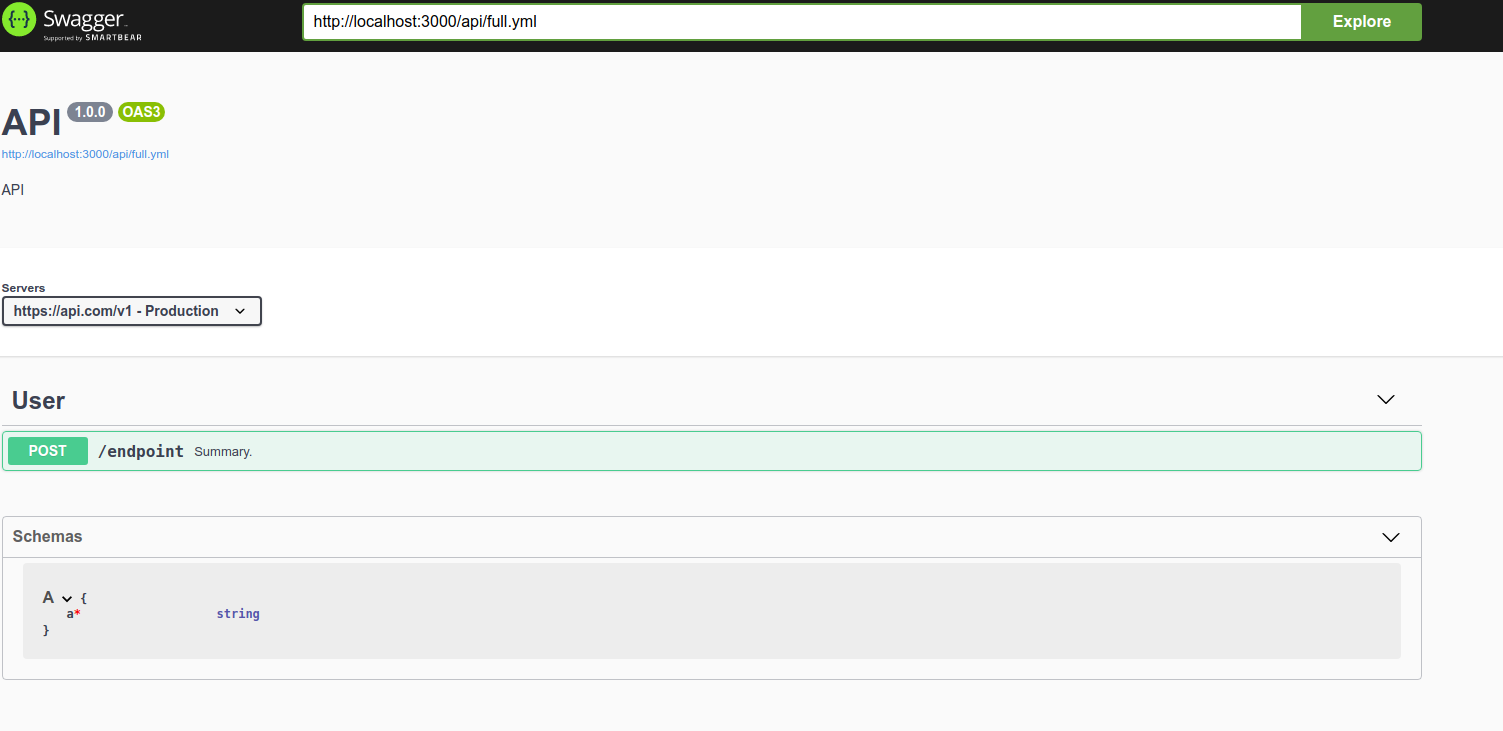
Example Swagger/OpenAPI definition: The following file shows the schema tab
full.yml
openapi: 3.0.0

info:
  title: API
  description: API
  version: "1.0.0"

servers:
  - url: https://api.com/v1
    description: Production

components:
  schemas:
    A:
      type: object
      required:
        - a
      properties:
        a:
          type: string

paths:
  /endpoint:
    post:
      tags:
        - User
      summary: Summary.
      requestBody:
        required: true
        content:
          application/json:
            schema:
              $ref: '#/components/schemas/A'
      responses:
        200:
          description: OK
          content:
            application/json:
              schema:
                $ref: '#/components/schemas/A'
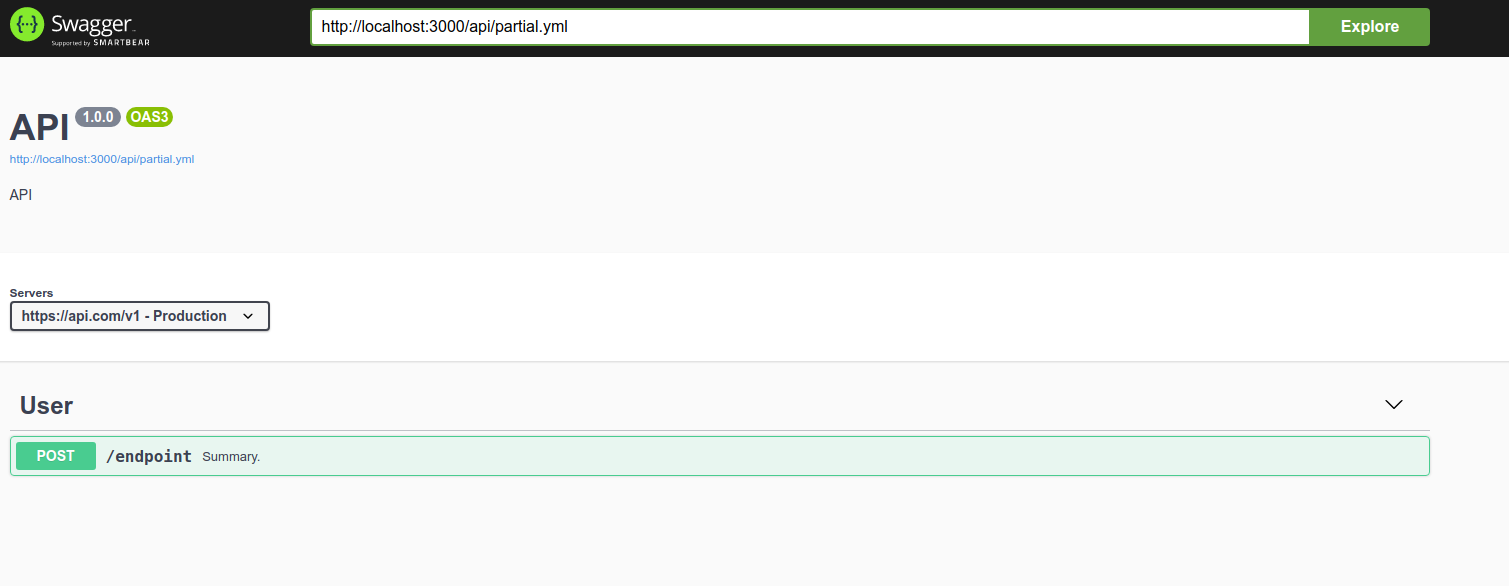
Importing an endpoint as $ref will fail to show the schema tab
partial.yml
openapi: 3.0.0

info:
  title: API
  description: API
  version: "1.0.0"

servers:
  - url: https://api.com/v1
    description: Production


paths:
  /endpoint:
    $ref: './endpoint.yml'
endpoint.yml
components:
  schemas:
    A:
      type: object
      required:
        - a
      properties:
        a:
          type: string

post:
  tags:
    - User
  summary: Summary.
  requestBody:
    required: true
    content:
      application/json:
        schema:
          $ref: '#/components/schemas/A'
  responses:
    200:
      description: OK
      content:
        application/json:
          schema:
            $ref: '#/components/schemas/A'
Swagger-UI configuration options: The UI config is not changed. The script provided in the Content & configuration section will produce the exact config as mine
Describe the bug you're encountering
When using a $ref in the path, the endpoint is shown as part of the API but the schema tab is not being shown. When using a single file approach, the schema tab is shown.
To reproduce...
- Copy the script I've provided in the Content & configuration into a folder
- run
npm initin the script's folder - run
npm install express swagger-ui-dist --savein the script's folder - run
node index.jsin the script's folder - create an
apifolder inside the script's folder create thefull.yml,partial.ymlandendpoint.ymlprovided in the Example Swagger/OpenAPI definition section - open a browser at localhost:3000 and swagger UI will be shown
- load the following URL in swagger UI
http://localhost:3000/api/full.yml. The Schema tab will be shown - load the following URL in swagger UI
http://localhost:3000/api/partial.yml. The Schema tab will be NOT be shown
Expected behavior
When using a $ref: file.yml in the paths property, the schemas used in the imported endpoints should be shown in the Schema Tab
Screenshots

Additional context or thoughts
Notice that the endpoint is detected and the request and response is correctly mapped. But the schema tab may be trying to resolve schemas from within the context of the main file, which would be an error

I "solved" the bug in a very dirty way, I believe the very first code I wrote in Pascal was not as nasty as this.
Anyway I hope this allows you to create a simpler and cleaner solution.
"Solution" in render method in models.jsx
import React, { Component } from "react"
import Im, { Map } from "immutable"
import PropTypes from "prop-types"

export default class Models extends Component {
  static propTypes = {
    getComponent: PropTypes.func,
    specSelectors: PropTypes.object,
    specActions: PropTypes.object.isRequired,
    layoutSelectors: PropTypes.object,
    layoutActions: PropTypes.object,
    getConfigs: PropTypes.func.isRequired,
    // SOLUTION: added spec required
    spec: PropTypes.func.isRequired
  }

  getSchemaBasePath = () => {
    const isOAS3 = this.props.specSelectors.isOAS3()
    return isOAS3 ? ["components", "schemas"] : ["definitions"]
  }

  getCollapsedContent = () => {
    return " "
  }

  handleToggle = (name, isExpanded) => {
    const { layoutActions } = this.props
    layoutActions.show([...this.getSchemaBasePath(), name], isExpanded)
    if(isExpanded) {
      this.props.specActions.requestResolvedSubtree([...this.getSchemaBasePath(), name])
    }
  }

  onLoadModels = (ref) => {
    if (ref) {
      this.props.layoutActions.readyToScroll(this.getSchemaBasePath(), ref)
    }
  }

  onLoadModel = (ref) => {
    if (ref) {
      const name = ref.getAttribute("data-name")
      this.props.layoutActions.readyToScroll([...this.getSchemaBasePath(), name], ref)
    }
  }

  render(){
    let { specSelectors, getComponent, layoutSelectors, layoutActions, getConfigs, spec } = this.props
    let definitions = specSelectors.definitions()
    // SOLUTION: dirty workaround
    let done = false
    const subtrees = spec().get("resolvedSubtrees")
    if (subtrees) {
      const paths = subtrees.get("paths")
      if (paths) {
        const iter = paths.keys()
        do {
          const iterRes = iter.next()
          const { value } = iterRes
          if (value) {
            const c = paths.get(value).get("components")
            if (c) {
              let def = c.get("schemas")
              // nasty...but I made it work
              let hackDef = Im.Map()
              def.entrySeq().forEach((d) => {
                const name = `paths:${value}:${d[0]}`
                const val = d[1]
                hackDef = hackDef.set(name, val)
              })
              definitions = definitions.mergeDeep(hackDef)
            }
          }
          done = iterRes.done
        } while (!done)
      }
    }
    let { docExpansion, defaultModelsExpandDepth } = getConfigs()
    if (!definitions.size || defaultModelsExpandDepth < 0) return null

    const specPathBase = this.getSchemaBasePath()
    let showModels = layoutSelectors.isShown(specPathBase, defaultModelsExpandDepth > 0 && docExpansion !== "none")
    const isOAS3 = specSelectors.isOAS3()

    const ModelWrapper = getComponent("ModelWrapper")
    const Collapse = getComponent("Collapse")
    const ModelCollapse = getComponent("ModelCollapse")
    const JumpToPath = getComponent("JumpToPath")

    return <section className={ showModels ? "models is-open" : "models"} ref={this.onLoadModels}>
      <h4 onClick={() => layoutActions.show(specPathBase, !showModels)}>
        <span>{isOAS3 ? "Schemas" : "Models" }</span>
        <svg width="20" height="20">
          <use xlinkHref={showModels ? "#large-arrow-down" : "#large-arrow"} />
        </svg>
      </h4>
      <Collapse isOpened={showModels}>
        {
          definitions.entrySeq().map(([rawName])=>{
            // SOLUTION: If you thought the above was dirty...well I have news for you dude/dudette
            const splittedName = rawName.split(':')
            const name = splittedName[splittedName.length - 1]
            let fullPath = [...specPathBase, name]
            if (splittedName.length > 1) {
              splittedName.splice(-1,1)
              fullPath = splittedName.concat(fullPath)
            }
            const specPath = Im.List(fullPath)

            let schemaValue = specSelectors.specResolvedSubtree(fullPath)
            let rawSchemaValue = specSelectors.specJson().getIn(fullPath)

            const schema = Map.isMap(schemaValue) ? schemaValue : Im.Map()
            const rawSchema = Map.isMap(rawSchemaValue) ? rawSchemaValue : Im.Map()

            const displayName = schema.get("title") || rawSchema.get("title") || name
            const isShown = layoutSelectors.isShown(fullPath, false)

            if( isShown && (schema.size === 0 && rawSchema.size > 0) ) {
              // Firing an action in a container render is not great,
              // but it works for now.
              this.props.specActions.requestResolvedSubtree(fullPath)
            }

            const content = <ModelWrapper name={ name }
              expandDepth={ defaultModelsExpandDepth }
              schema={ schema || Im.Map() }
              displayName={displayName}
              fullPath={fullPath}
              specPath={specPath}
              getComponent={ getComponent }
              specSelectors={ specSelectors }
              getConfigs = {getConfigs}
              layoutSelectors = {layoutSelectors}
              layoutActions = {layoutActions}
              includeReadOnly = {true}
              includeWriteOnly = {true}/>

            const title = <span className="model-box">
              <span className="model model-title">
                {displayName}
              </span>
            </span>

            return <div id={ `model-${name}` } className="model-container" key={ `models-section-${name}` }
                    data-name={name} ref={this.onLoadModel} >
              <span className="models-jump-to-path"><JumpToPath specPath={specPath} /></span>
              <ModelCollapse
                classes="model-box"
                collapsedContent={this.getCollapsedContent(name)}
                onToggle={this.handleToggle}
                title={title}
                displayName={displayName}
                modelName={name}
                specPath={specPath}
                layoutSelectors={layoutSelectors}
                layoutActions={layoutActions}
                hideSelfOnExpand={true}
                expanded={ defaultModelsExpandDepth > 0 && isShown }
                >{content}</ModelCollapse>
              </div>
          }).toArray()
        }
      </Collapse>
    </section>
  }
}

