

 sveltejs
tailwindcss css output don't being putted inside ./package/
Describe the bug
basically, I was creating a simple library with sveltekit and using tailwindcss. the problem is when I do "npm run build" it creates the files correctly but when i do npm install of the same file. the component don't have any CSS applied to it.
Reproduction
my npm package: https://www.npmjs.com/package/mathview-svelte my GitHub repo: https://github.com/Laaouatni/MathViewSvelte
example of the error: https://svelte.dev/repl/39421699a03f4717a74e6665f7055eff?version=3.55.1
what should output:

what is wrong:

another info is that tailwind works fine in dev mode "npm run dev", but when build don't work fine.
how make also the css being exported with the component library?
System Info
System:
    OS: Windows 10 10.0.22621
    CPU: (8) x64 11th Gen Intel(R) Core(TM) i5-1135G7 @ 2.40GHz
    Memory: 1.04 GB / 7.65 GB
  Binaries:
    Node: 16.14.0 - C:\Program Files\nodejs\node.EXE
    npm: 9.3.1 - C:\Program Files\nodejs\npm.CMD
  Browsers:
    Edge: Spartan (44.22621.1105.0), Chromium (109.0.1518.55)
    Internet Explorer: 11.0.22621.1
  npmPackages:
    @sveltejs/adapter-auto: ^1.0.0 => 1.0.2
    @sveltejs/kit: ^1.0.0 => 1.2.6
    @sveltejs/package: ^1.0.0 => 1.0.2
    svelte: ^3.54.0 => 3.55.1
    vite: ^4.0.0 => 4.0.4
Severity
annoyance
Additional Information
No response

I have not experience with packages, but I think the package needs tailwind to be installed. What happens if you install tailwind as normal dependency and then create the package?
If you look your builded svelte code, you still see references to tailwind classes.

I think the package needs tailwind to be installed
That shouldn't be the case. Svelte files should be preprocessed and it should be converted to just standard CSS: https://kit.svelte.dev/docs/packaging

I think it's because tailwind doesn't really do preprocessing in the traditional way unless you use @apply (sorry about the ping apply person), it emits the classes to a separate file that is then imported in a top level layout or similar.
Having to install tailwind is the "JIT" aspect showing through, I suppose you could somehow make it emit to $lib/something.css and then that would be included with the package, but then the classes will be duplicated if the consumers are also using tailwind.

Have you found a solution to this? All the Tailwind styling of my documentation disappeared after running pnpm run package and I can't figure out why.

@bennymi yes,
- you just have to include it in a svelte-kit project using a simple
import - and then, change this file:
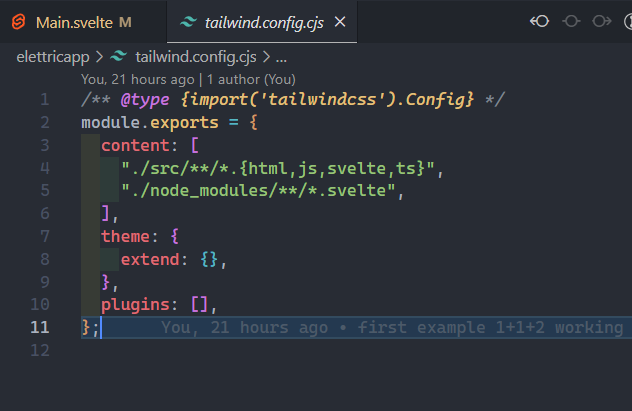
tailwind.config.cjs- by adding the files of your package
(in my case was an npm package
so"./node_modules/**/*.svelte".
- by adding the files of your package
- JIT will read it and compile it.
if you don't change the
.contentin the tailwind's configuration,
even if you have imported the library, tailwind can't read it,
so You just have to add the directory where your component is.
/** @type {import('tailwindcss').Config} */
module.exports = {
  content: [
    "./src/**/*.{html,js,svelte,ts}",
    "./node_modules/**/*.svelte",
  ],
  theme: {
    extend: {},
  },
  plugins: [],
};
is better to use *.svelte with the "*" symbol so you don't have to worry anymore about changing often your configuration (it works fine if all libraries that are in the same directory, so if you are using ./package this is the case)
at the end here is the line that solved it "./node_modules/**/*.svelte"
ℹ️ with this solution, this means that the user must use tailwind or it won't work. we use tailwind JIT functionality so fewer lines of code are shipped to the finished version. (if is your own documentation then isn't a problem, it is an npm library you should add an indication to the customer to do an npm install tailwind...)
I hope it makes sense, and that it was helpful to you.
@Laaouatni thank you for the detailed explanation, that worked great! I'll just have to mention that step in the documentation for people that end up using it, then it won't be a problem. A bit of a hack but hopefully this process will get easier with a future update :)
I don't think @sveltejs/package should do anything automatically here. Packages like skeleton or flowbite both have the contents thing as part of their setup - so if we would change the build process here by somehow always extracting stuff into a CSS file we would prevent such use cases. Therefore the current logic of "do nothing except preprocess @apply styles" is the most flexible to me. We should document that though since Tailwind is becoming such a common use case.

Do we have a proper solution for this? We should tell package to preprocess all the CSS and include it in the final dist folder. @Laaouatni 's answer is far from scalable.
I'm trying to compile an entire design system created with Mitosis to svelte. I have all the components working just fine, but I can't publish a package for other people to use properly without the tailwindcss CSS bundling support from @sveltejs/package.

👋🏼
I ran into this same issue building an external library that our custom Node / Svelte application imports. I really wanted the benefits of SvelteKit to bundle the package, and use tailwind to speed up development.
I was able to come up with a solution that works pretty well for us and doesn't require our production application to install tailwind.
In your Sveltekit application:
Add a script to build your styles in your package.json
"build:styles": "tailwindcss -i ./src/lib/styles/global.css -o ./dist/tailwind-output.css",
Modify the package script to run the new script:
"package": "svelte-kit sync && svelte-package && npm run build:styles && publint",
Note: It's important that your build:styles runs after svelte-package so your dist/ folder isn't overriden and removes the generated tailwind-output.css.
Lastly, make sure to update your exports in `package.json:
  "exports": {
    ".": {
      "types": "./dist/index.d.ts",
      "svelte": "./dist/index.js"
    },
    "./tailwind-output": {
      "default": "./dist/tailwind-output.css"
    }
  }
In the repo that uses your SvelteKit-managed library
You will need to continue importing your Svelte components, but also inject the compiled tailwind styles yourself. You can initialize the styles a couple of ways, depending on how your application is set up.
Non-Svelte project
You can inject the styles purely through javascript (in a vite project):
import tailwindStyles from "<your-library>/tailwind-output?raw";

const style = document.createElement("style");
style.textContent =tailwindStyles;
document.head.appendChild(style);
Svelte project
If your other repository is set up with svelte, you can go the Svelte way and use <svelte:head>
<script>
   import styles from '<yourLibrary>/tailwind-output?raw';
   import YourComponent from '<yourLibrary>';
</script>

<svelte:head>
    {@html '<' + `style>${catStylesStr}</style>`}
</svelte:head>
note: The splitting of '<' + `style> was as a workaround for a post css error I encountered
Hope this helps!
@Rich-Harris, @benmccann - Do you think this is something svelte-package can handle behind the scenes if it detects tailwind is being used?
