

 sumatrapdfreader
Open Files are reopened
Sometimes when a PDF-file is opened, all already open files are opened again in additional windows. (Sumatra is configured to NOT use Tabs) Unfortunately, I have no specific Information, under waht circumstances this happens.

I have/had the same issue since some days (Sumatra user since more than a year). It happened twice so far. I believe the only unusual thing I did and which I never did before was to open other PDFs through links in PDFs. Later on when I opened other PDFs "normally" it triggers the reopening/duplication of the existing PDFs.
Not sure if there is some relationship, I have not done any reproducibility tests (yet).

Are you using 3.3.3? This might be fixed in pre-release (https://www.sumatrapdfreader.org/prerelease). I vaguely remember making a fix for an issue like this.
Also, if it ever happens again please use Taks Manager (Ctrl-Alt-Del and select task manager) to see if there is more than one sumatra process running. In short, it shouldn't but there are ways to get there in which case a session restore logic would re-open the files.

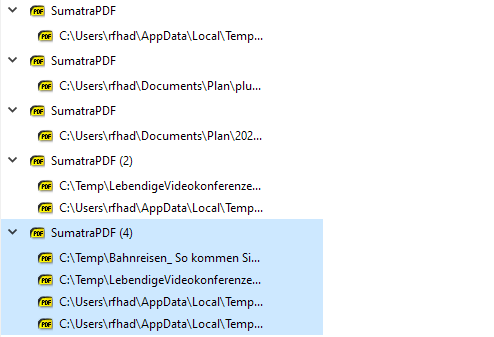
I installed the prerelease (3.4.14424) and retried. I always get one process per Window and per File when I open in Explorer or an appendix in Thunderbird (which is what I do most of the time.) If I open in Sumatra out of the last used file list, it will open in that process (in a separate window, I don't use Tabs) - let's call this process Px. If I then open a file in explorer, it will open in a new process; in addition process Px will open and show some files already open by other processes. Maybe the attached Taskmanager snippet makes it clearer.
Thank you for the quick answer.
Having the same issue with v. 3.4.6. Multiple processes open, all open windows re-opened when opening a new document.

Have same issue with v. 3.4.6, 64-bit, Windows 10.
Currently, I have 3 different instances of SumatraPDF running. That is, in Task Manager, I have 3 separate lines of "SumatraPDF". If I open a new .pdf file from Windows Explorer, sometimes all three open files are re-opened; with the new files, I get a new line in Task Manager saying "SumatraPDF (4)", indicating that instance has 4 windows.

Are those the same Sumatra executables? i.e. if you right-click on Sumatra process in Task Manager and choose "Open File Locations", do they all end up showing the same executable?
Re-opening files is expected if a different Sumatra process starts because it doesn't know what the other process did.
The question is: why there are multiple Sumatra processes? I would need to narrow-down the scenario that causes this to happen, because Sumatra is supposed to only use one process.
Did you change advanced settings? Running Windows Explorer (or sumatra) as an administrator? Any non-standard things you can think of?
Thanks for the reply.
These are the same executables - I checked per your request. I'm also using a new machine, so I'm pretty confident Sumatra was only installed once.
Your reply caused me to investigate more and I think I have more data for you. I use TeXnicCenter to edit/process my LaTeX files, and it uses Sumatra as its viewer. Viewing a .pdf from TeXnicCenter seems to trigger this behavior. An example:
Suppose I have .pdf files A.pdf, B.pdf, etc.
I can open, from Windows explorer, A.pdf, B.pdf, C.pdf, without unusual behavior. After opening these 3 files, suppose I now open D.pdf from within TeXnicCenter (using it's View Output command). File D.pdf opens without problem. If I open E.pdf from Windows explorer, I also get new instances of C.pdf and D.pdf. If I then open F.pdf from Windows Explorer, I get new instances of C.pdf, D.pdf, and E.pdf.
It seems that once I open a file X.pdf from TeXnicCenter, if I open another .pdf from Windows explorer, the last .pdf I opened before X, X.pdf itself, and other files I opened after X.pdf all open again.
The executable I use for TeXnicCenter viewing is C:\Users\hartmangn\AppData\Local\SumatraPDF\SumatraPDF.exe -inverse-search ""C:\Program Files\TeXnicCenter\TeXnicCenter.exe" /ddecmd "[goto('%f','%l')]"
The build profile for the viewer is [image: image.png]
Thanks for your time. Greg
On Sun, Feb 5, 2023 at 7:43 PM Krzysztof Kowalczyk @.***> wrote:
Are those the same Sumatra executables? i.e. if you right-click on Sumatra process in Task Manager and choose "Open File Locations", do they all end up showing the same executable?
Re-opening files is expected if a different Sumatra process starts because it doesn't know what the other process did.
The question is: why there are multiple Sumatra processes? I would need to narrow-down the scenario that causes this to happen, because Sumatra is supposed to only use one process.
Did you change advanced settings? Running Windows Explorer (or sumatra) as an administrator? Any non-standard things you can think of?
— Reply to this email directly, view it on GitHub https://github.com/sumatrapdfreader/sumatrapdf/issues/2477#issuecomment-1418327166, or unsubscribe https://github.com/notifications/unsubscribe-auth/ABT5OF5DUXPPFGN3UCWOVRDWWBCKFANCNFSM5TFVWT5Q . You are receiving this because you commented.Message ID: @.***>
using latex has different calls so you dont need
constant -inverse-search "\"C:\Program Files\TeXnicCenter\TeXnicCenter.exe\" /ddecmd \"[goto('%f','%l')]\"
it is set once on first call however to reuse the one instance you need -reuse-instance and usually its related to newer tabs on configuration.
Look at most recent 2020 setup suggestions https://github.com/GitHubRulesOK/MyNotes/raw/master/AppNotes/SumatraPDF/SumatraPDF%20with%20TeXnicCenter.pdf

I think your suggestions solved my issue. I looked at the linked .pdf instructions and changed settings in both Sumatra and TeXnicCenter. I tried to recreate the issue and it did not appear.
Thanks for your time & help. Greg
On Mon, Feb 6, 2023 at 12:31 PM GitHubRulesOK @.***> wrote:
using latex has different calls so you dont need
constant -inverse-search ""C:\Program Files\TeXnicCenter\TeXnicCenter.exe" /ddecmd "[goto('%f','%l')]"
it is set once on first call however to reuse the one instance you need -reuse-instance and usually its related to newer tabs on configuration.
Look at most recent 2020 setup suggestions https://github.com/GitHubRulesOK/MyNotes/raw/master/AppNotes/SumatraPDF/SumatraPDF%20with%20TeXnicCenter.pdf
— Reply to this email directly, view it on GitHub https://github.com/sumatrapdfreader/sumatrapdf/issues/2477#issuecomment-1419462312, or unsubscribe https://github.com/notifications/unsubscribe-auth/ABT5OF6ZT3D43RQNFLXE2Z3WWEYODANCNFSM5TFVWT5Q . You are receiving this because you commented.Message ID: @.***>
I am having the same problem on a newly installed laptop. I wanted to be able to edit the same file with two views in two different windows (Windows shift-ctrl-N). I set SumatraPDF is the default PDF viewer and opened a few files with two windows / views each. Now whenever I double click on a PDF from Windows Explorer, all open files get re-opened. I now have 9 SumatraPDF processes in Task Manager, all running from the same executable.

@RogerPAlexander First check which version of SumatraPDF you are using. Also check setting like using tabs and reuse instance.
To check a problem the exact version would be needed since as you see above there was a change in behaviours, I would suggest unless you have issues with pre-release ( some people can ) then try that version as current pre-release is as stable as 3.4.6. but there are some other minor quirks.
I was experiencing the same issue as the OP in the current release v3.5.2 64-bit. All currently open PDFs were reopened. Setting RestoreSession = false in the advanced configuration file solved the issue for me. However, as I believe that the option to restore the session is supposed to be working and useful, this should still be fixed. Just ignore RestoreSession if the process is already running.
Here is my configuration with which I was able to reproduce this issue on my Win 10 Enterprise PC.
# For documentation, see https://www.sumatrapdfreader.org/settings/settings3-5-1.html
Theme = Light
FixedPageUI [
	TextColor = #000000
	BackgroundColor = #ffffff
	SelectionColor = #f5fc0c
	WindowMargin = 2 4 2 4
	PageSpacing = 4 4
	InvertColors = false
	HideScrollbars = false
]
ComicBookUI [
	WindowMargin = 0 0 0 0
	PageSpacing = 4 4
	CbxMangaMode = false
]
ChmUI [
	UseFixedPageUI = false
]

SelectionHandlers [
]
ExternalViewers [
]

ZoomLevels = 8.33 12.5 18 25 33.33 50 66.67 75 100 125 150 200 300 400 600 800 1000 1200 1600 2000 2400 3200 4800 6400
ZoomIncrement = 0

PrinterDefaults [
	PrintScale = shrink
]
ForwardSearch [
	HighlightOffset = 0
	HighlightWidth = 15
	HighlightColor = #6581ff
	HighlightPermanent = false
]
Annotations [
	HighlightColor = #ffff00
	UnderlineColor = #00ff00
	SquigglyColor = #ff00ff
	StrikeOutColor = #ff0000
	FreeTextColor =
	FreeTextSize = 12
	FreeTextBorderWidth = 1
	TextIconColor = #ffff00
	TextIconType =
	DefaultAuthor =
]

RememberOpenedFiles = true
RememberStatePerDocument = true
RestoreSession = true
UiLanguage = de
EnableTeXEnhancements = true
DefaultDisplayMode = automatic
DefaultZoom = fit page
Shortcuts [
	[
		Cmd = CmdRotateLeft
		Key = Ctrl + Alt + Left
	]
	[
		Cmd = CmdRotateRight
		Key = Ctrl + Alt + Right
	]
]
EscToExit = false
ReuseInstance = false
ReloadModifiedDocuments = true

MainWindowBackground = #80fff200
FullPathInTitle = false
ShowMenubar = true
ShowToolbar = true
ShowFavorites = false
ShowToc = true
NoHomeTab = false
TocDy = 0
SidebarDx = 359
ToolbarSize = 18
TabWidth = 300
TreeFontSize = 0
TreeFontWeightOffset = 0
TreeFontName = automatic
SmoothScroll = false
ShowStartPage = true
CheckForUpdates = true
WindowState = 2
WindowPos = 2531 -252 976 1030
UseTabs = false
UseSysColors = false
CustomScreenDPI = 0

@samufi this should be fixed in pre-release by https://github.com/sumatrapdfreader/sumatrapdf/commit/26cbe5c1376310391dc169028e363c1636820f6f
@kjk
an interesting point was raised early in this thread that @ch-ey observed "open other PDFs through links in PDFs." which is a potential problem if those in turn may require a separate instance/session different user profile ?
I don't see how this should make a difference, but if there's a reproducible scenario then I'll fix it.
I was having either this issue or a related issue too. The last file I closed would always get re-opened upon opening a PDF. Sometimes the last 2 files were reopened.
To me it's appears to be because the setting "Remember opened files" seems to have been toggled on by itself/through an update. I definitely never changed this myself and I remember it just started happening after a chocolatey update one day. Finally, after finding this setting and unchecking it, the problem has stopped for me.
I notice @samufi 's settings also have this field set to true.

From my tests the three relevant options seem to have the following meanings:
-
RememberOpenedFiles: creates a list of all previously opened files which you can select in the application menu -
RememberStatePerDocument: persists the last selected state like width, height, zoom, landscape, book view etc. -
RestoreSession: this seems responsible for reopening the last document(s) that were open when SumatraPDF was closed.
The first two options can be set in the options GUI, where the second one depends on having the first one enabled. (Without list, there is no state memory of the documents.)
The third option is what causes all the problems of files reopening and seems to be counterproductive for most usecases. Therefore it is only changeable in the extended options. But it seems to be enabled by default after installing SumatraPDF (or in my case, using the portable version), which I consider as … not a bug, but a bad decision. It is not really documented nor can it be selected in the GUI to be an obvious choice to enable/disable.
I am wondering why the issue is closed when the current version (3.5.2) has this issue relevant?
Editing: after searching for more issues in this regard I found #4091, which describes the issue that a session is always restored (which is reported by @robmonte in the previous comment). I will further comment there is this is a more fitting issue.
