

 stride3d
Please Add Simple Game Project that uses Source Code to main solution.
When starting out and trying to really get to know Stride3D, I think it really helps to be able to build against actual source code, instead of just Nuget. After spending several hours trying to get this working, I'm stuck. Currently I can find no projects inside of Stride's solution that are a "sample game that uses Stride Source code".
For example, under Avalonia, there is a sample project called "Controls.Catalog" and you can run/test it freely, directly using source code, which not only gives you a better way to do things like "Search for References" to find things, but also allows you to Edit the base Avalonia code (adding log/console statements, or just stubbing code, etc) -- this is very useful.
It's also useful as I've been able to submit a couple Avalonia fixes directly - by seeing a bug triggered by my code, and then fixing it as I saw fit -- then presenting the fixed-code back to the Avalonia team. Without being able to directly use their source code, I wouldn't be able to do this.
In short, I think Stride should have ONE very basic demo Game sample that works like an "Empty Game" project, but compiles direct from Stride Source Code (includes "Projects" instead of Nuget assemblies). This would help me to make progress a lot faster with our Code-Only effort, as I could do some experimenting when I experience things like the "CLR has detected an Invalid Program".
I believe that most serious Game Devs will find it useful to enable them to convert their Game Project over to using Stride source code, vs. Source Link (which has significant deficiencies by comparison).
FYI, here's where I ended up getting stuck on my own attempt to use Source Code:
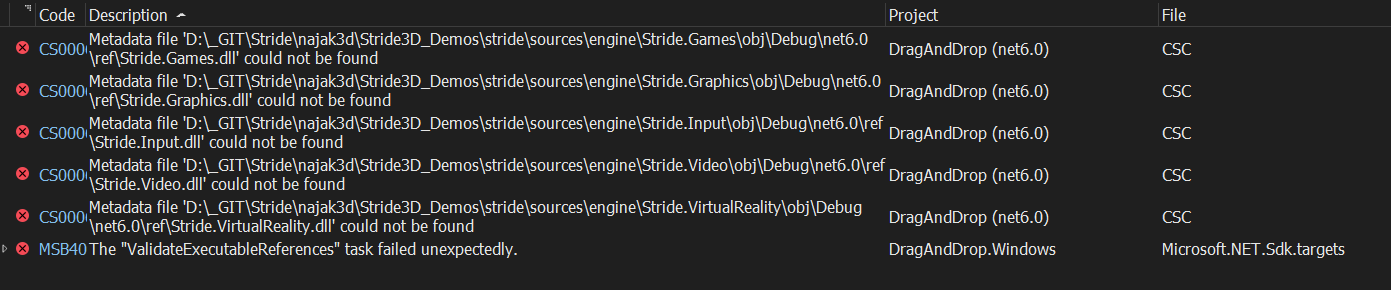
Here is my .csproj file currently:
<Project Sdk="Microsoft.NET.Sdk">
	<!--<Import Project="..\..\..\stride\sources\targets\Stride.props" />-->
	<!-- NuGet resolved needed for StrideDefaultAssetsPlugin.LoadDefaultTemplates() -->
	<Import Project="..\..\..\stride\sources\shared\Stride.NuGetResolver\Stride.NuGetResolver.projitems" Label="Shared" />
	<PropertyGroup>
		<TargetFramework>$(StrideEditorTargetFramework)</TargetFramework>
		<StrideAssemblyProcessor>true</StrideAssemblyProcessor>
		<StrideAssemblyProcessorOptions>--auto-module-initializer</StrideAssemblyProcessorOptions>
		<StrideSkipAutoPack>false</StrideSkipAutoPack>
		<IsPackable>true</IsPackable>
	</PropertyGroup>
	<PropertyGroup>
		<TargetFrameworks>net6.0</TargetFrameworks>
		<Nullable>enable</Nullable>
	</PropertyGroup>
	<ItemGroup>
		<ProjectReference Include="..\..\..\stride\sources\engine\Stride.Engine\Stride.Engine.csproj" />
		<ProjectReference Include="..\..\..\stride\sources\engine\Stride.Navigation\Stride.Navigation.csproj" />
		<ProjectReference Include="..\..\..\stride\sources\engine\Stride.Particles\Stride.Particles.csproj" />
		<ProjectReference Include="..\..\..\stride\sources\engine\Stride.Physics\Stride.Physics.csproj" />
		<ProjectReference Include="..\..\..\stride\sources\engine\Stride.UI\Stride.UI.csproj" />
		<ProjectReference Include="..\..\..\stride\sources\engine\Stride.Video\Stride.Video.csproj" />
	</ItemGroup>

	<ItemGroup>
		<Compile Include="..\..\..\stride\sources\shared\SharedAssemblyInfo.cs">
			<Link>Properties\SharedAssemblyInfo.cs</Link>
		</Compile>
	</ItemGroup>
</Project>

You shouldn't mess around with projects and the solution of your game just to debug the stride source code. Please refer to my answer here: https://github.com/stride3d/stride/discussions/1116#discussioncomment-1208356
We use this workflow since years and it works nicely, also with hot-reload. The good thing is that there is no modification necessary, except changing the referenced stride version. So it works with every stride game, no need for any special setup, you can just switch between source and nuget as you please.

Well it's great to see that I'm not alone on wanting this, and that in some fashion it's been addressed already.
It seems this will work just fine. Thank you!
Can the answers posted here, but put somewhere on the main tutorial page -- under "advanced tutorials - debugging/editing Stride Source Code".
There are many times when editing the source code is ideal/needed. For example, when I found the "null" error, I was able to "add the null check" and then re-run my game to make sure it really worked, or if that was just a symptom of an entirely different issue (which it still might be).
So I'm glad to see that I can edit source, and test it within a few minutes of recompilation time. That seems acceptable, although not ideal, and a bit scary/non-standard.
I will now forge ahead, again. :)