

 stride3d
Code-Only Approach
Hello, this is a summary and a follow up of our discussion https://github.com/stride3d/stride/discussions/1253.
Describe the solution you'd like
Simplifying code-only approach. Literally create a new console app wherever you want to, add Stride NuGet package(s), add your code and run (meaning not running away from the computer 🤣).
There is no need to add every single scenario here as we can evolve this functionality.
This is a collaboration of multiple community members, I just put pieces together.
Additional context, reasons for this feature
- You don't want to install anything on your computer (no Stride installation required?)
- You want to start very quickly
- You want to learn C# programming with a nice visual output instead of console
- You want to learn game programming gradually, in the simplest way, without using the game editor
- You find coding and coding tools very complex to understand and navigate around
- You want to start with game development basics before you even start exploring the game editor
- Easy and quick prototyping
- Easy to learn game development concepts and steps
- Performance and feature evaluation (@najak3d)
- Other I am not aware of (Ping below and I will add it here)
Considerations
- At this stage I am not sure about the game deployment, if this approach has all you need to successfully deploy your application like if you did with the Stride Game Studio, also that is not a purpose of this feature as it can evolve in other stages
- Any other? (Ping below and I will add it here)
Related issues
- https://github.com/stride3d/stride/issues/1290
- https://github.com/stride3d/stride/issues/1258
- https://github.com/stride3d/stride/issues/80
- https://github.com/stride3d/stride/issues/986
Working Prototype https://github.com/VaclavElias/stride-code-only
Basic Usage https://github.com/VaclavElias/Stride3DTutorials/tree/main/Other/Minimal
Plan
- [x] Initial discussions - this was discussed on Discord channel and also #80, #986
- [x] Preview Concepts - a few concepts will be proposed
- [x] Issue Opened
- [x] Collecting a feedback from the community, code review, updates and clean up - inviting others to suggest features and review
- [x] Naming Convention - finalising naming convention for methods, properties, namespaces
- [x] File locations
- [ ] Tests
- [ ] Documentation
- [x] New Repo
- [ ] Release
Changes proposed
- Small Engine updates, actually just one at the moment
- https://github.com/stride3d/stride/issues/1290
- The other is just a convenience not related necessarily to the code-only approach https://github.com/stride3d/stride/issues/1258
- New assembly/NuGet with extensions and boilerplate code
- This is where we can further elaborate
Game Extension
This is the most important extension, which is going to simplify proposed code-only scenarios. Kudos @Eideren. This requires https://github.com/stride3d/stride/issues/1290.
https://github.com/VaclavElias/Stride3DTutorials/blob/c696513a444a0b240f499ddfd3b61579cd879e44/Other/Minimal/Stride.GameDefaults/GameExtensions.cs#L11-L30
public static void Run(this Game game, GameContext? context = null, Action<Scene>? start = null, Action<Scene, GameTime>? update = null)
{
    game.Script.Scheduler.Add(RootScript);

    game.Run(context);

    async Task RootScript()
    {
        start?.Invoke(GetRootScene());
        if (update == null)
            return;
        do
        {
            update.Invoke(GetRootScene(), game.UpdateTime);
            await game.Script.NextFrame();
        } while (true);
    }

    Scene GetRootScene() => game.SceneSystem.SceneInstance.RootScene;
}
Example 1
This one would be encouraging using Components. Using .NET 6, C# 10. Only 16 lines of code (excluding RotationComponentScript)
using var game = new Game();

game.Run(start: Start);

void Start(Scene rootScene)
{
    game.SetupBase3DScene();

    var entity = new Entity(new Vector3(1f, 0.5f, 3f))
    {
        new ModelComponent(new CubeProceduralModel().Generate(game.Services)),
        new RotationComponentScript()
    };

    entity.Scene = rootScene;
}
Example 2
This example is going to use Update() where one can do whatever they need to. Also, you can see I added a profiler and used game.NewDefaultMaterial().
using (var game = new Game())
{
    var entity = new Entity(new Vector3(1f, 0.5f, 3f));
    var angle = 0f;
    var initialPosition = entity.Transform.Position;

    game.Run(start: Start, update: Update);

    void Start(Scene rootScene)
    {
        game.SetupBase3DScene();
        game.AddProfiler();

        var model = new CubeProceduralModel().Generate(game.Services);

        model.Materials.Add(game.NewDefaultMaterial());

        entity.Components.Add(new ModelComponent(model));

        entity.Scene = rootScene;
    }

    void Update(Scene rootScene, GameTime time)
    {
        angle += 1f * (float)time.Elapsed.TotalSeconds;

        var offset = new Vector3((float)Math.Sin(angle), 0, (float)Math.Cos(angle)) * 1f;

        entity.Transform.Position = initialPosition + offset;
    }
}
Example 3
Eeh, I don't want your defaults, let me cherry pick/implement myself.
using (var game = new Game())
{
    game.Run(start: Start);

    void Start(Scene rootScene)
    {
        game.SetupBase();
        game.AddSkybox();
        game.AddMouseLookCamera();
        game.AddGround();

        var entity = new Entity(new Vector3(1f, 0.5f, 3f))
            {
                new ModelComponent(new CubeProceduralModel().Generate(game.Services)),
                new RotationComponentScript()
            };

        entity.Scene = rootScene;
    }
}
What do we need from the community?
Please, let us know your opinion and other suggestions you would like to have included, maybe state which one you think is a must and which one is optional.
Suggestions what else could be done
- SetupBase2DScene()
- AddSplashScreen()
- AddGizmo() - that is my favourite proposal as I get disoriented
- Option to switch on/off Physics (performance evaluation)
- Option to switch on/off Shadows (performance evaluation)

Hi @Kryptos-FR, @rds1983, @CharlesWoodhill, @IceReaper. You have expressed an interest in the code-only approach just pinging you here.
This can be done iteratively. You can dive in now and start building this framework for samples.
I'd suggest it open up to a menu of Samples to choose from. In the end we may have up to 100 samples. Here's what the Urho Samples project looks like; this style works well.
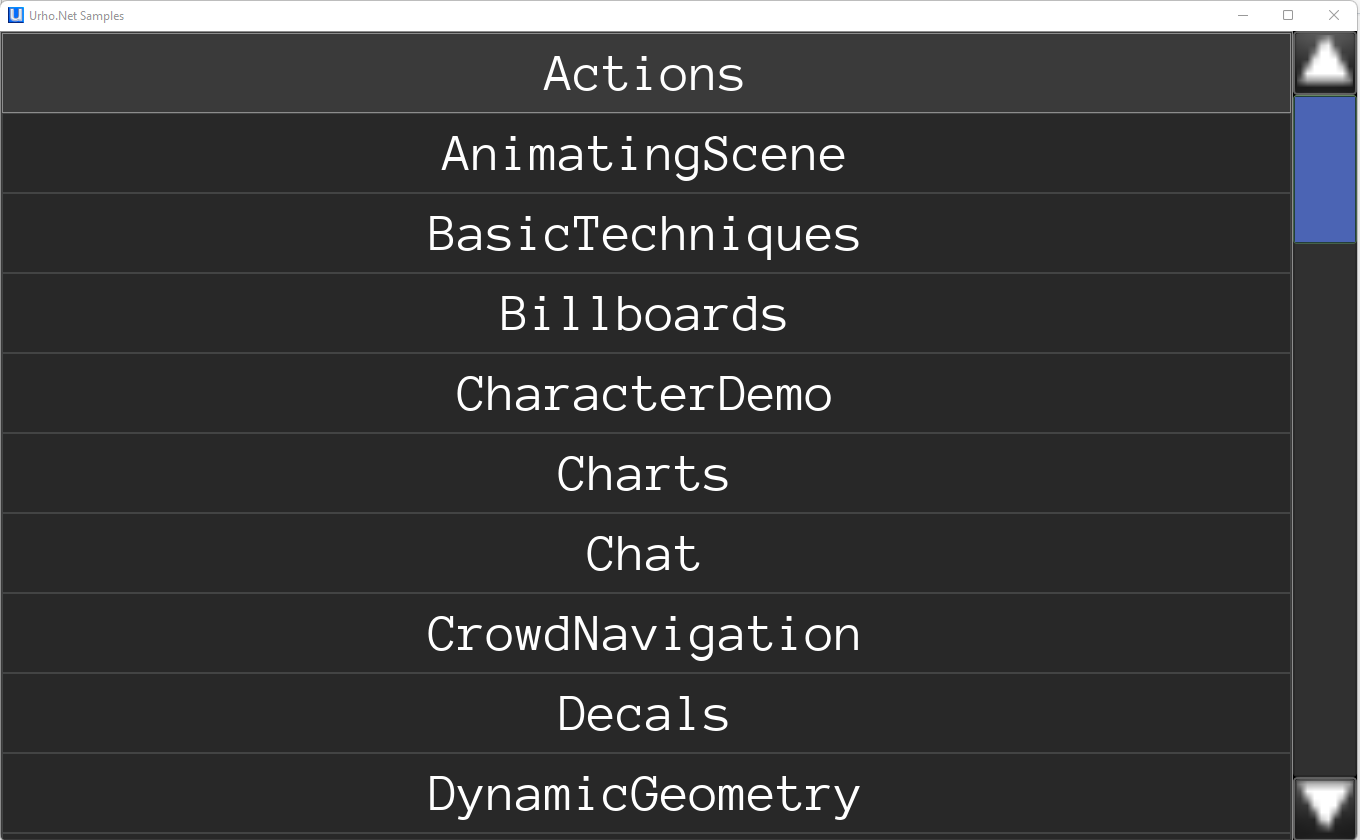
Also, it's vital to have these samples run well on Windows, Android, and iOS, without issue or headache. With the new .NET/VS2022 approach, we can do this all with ONE launcher, and then just define the 3 platforms for deployment. (Previously, you needed one launcher for each platform). So we should structure it to work like that.
Double-click the .sln, Choose a platform, then press F5- - and poof, you have access to 100 samples.
Then there is no real need for "Tutorials" then -- users can see it working, and the code for each sample is simple, and easy-enough to see how it works by tinkering with code. So when you see something you like -- you just snag the source code from the sample.

@najak3d that's not quite related to finishing the basic code-only implementation. The editor provides a couple samples that can be spawned, if you're not satisfied with those or the way in which they are provided better to focus on that specific issue in a new, more specific, issue thread instead

My usecase is building an RTS engine on top of Stride where only the game logics would be hardcoded and assets could be added/loaded dynamically without a need for the editor, so I am interested in no-editor approach too. In particular (may or may not be related to this issue) I would want to have documentation on how to do the stuff that is done in editor (asset importing, YAML reading etc.) via code.

In general, would want a documentation on more in-depth engine parts. Stride advertises itself as highly modular, and that should mean that I am free to take whatever parts I want from the engine, but only the top-level API is currently documented, which complicates this.
@najak3d that's not quite related to finishing the basic code-only implementation. The editor provides a couple samples that can be spawned, if you're not satisfied with those or the way in which they are provided better to focus on that specific issue in a new, more specific, issue thread instead
I'm not sure what you mean by "couple samples that can be spawned"?
I think the code-only approach should allow ALL settings to be set by the dev from code. Could be as simple as setting a static property called "Game.DefaultSettings" or something equivalent, so that when Stride loads up, in the absence of a game settings asset, it just uses the DefaultSettings set in C# code before game.Run() is called.
My post above was suggesting the format of the UI for samples, in that they should all be included into the same master .csproj, each sample in it's own subfolder. So when you are examining the samples, you can see them all in a single run of the Samples project. Try one; back out; try another; back out; and so on.
I've seen some Samples provided as many individual csproj's and those are more tedious to get around, as you keep having to load, unload and reload VStudio with a new .csproj.
Also having one that can launch all, in succession, demonstrates (and tests) Stride's ability to clean up after itself, leaving behind no memory leaks/residue. As you test the various samples, the RAM footprint should not keep growing, but should reduce back close to where it was when you started (generally, but not exactly, as GC sometimes is very latent, and that's fine).
It would be good to demonstrate how to build all basic assets in C# - e.g. materials, planes, cubes, physics hulls, etc. Demonstrate to the user that they'll never have to enter the Game Editor, except maybe to facilitate the importing of advanced assets (like 3D models, terrain, etc). And even then, would be better to have a CLI-based asset importer for the advanced stuff.
NOTE: A caveat to the above, is that some samples might need their own separate project. In these cases, just make sure these projects are included into the Samples.SLN. This way, new dev can choose "Feature Samples" or "Game Demo X".
Also - could imagine that we might have a FEW samples that were created in Stride Editor -- and that's fine too... if this is needed to show off some more advanced stuff.
Idea is that user comes in, using VStudio/VCode alone, and has a great/complete awesome experience seeing all that Stride can do, emphasizing the "Code Only" capabilities, ready to use without hardly any work. If you do this -- get ready for more customers (and contributors) to show up. I hope this is the desire of the Stride team as a whole. (the downside is that you're likely to draw in more annoying people, like me, all making demands, and expecting attention!)
Hello everyone, thank you for you input.
@najak3d I will create a separate issue with your comments, how to improve code-only approach, with examples & documentation. Time wise this should be a next step/phase so we can finish our current basic code-only implementation.
@Metadorius, it is similar to @najak3d, just to add examples and documentation for what you need.
Update 1
https://github.com/VaclavElias/Stride3DTutorials/tree/main/Other/Minimal/Stride.GameDefaults
I have cleaned up my project so you can start giving a feedback / code review (@manio143), maybe let's try to stay in the scope of what is there functionality wise and just talk about simple things which could be added/adjusted/removed.
My initial questions:
- Shall we keep all under this project or you would like to spread it to existing projects?
- If we keep it separate as it is
- Is it ok to use .NET 6/C# 10 syntax (GlobalUsings, File-Scoped namespace, project has Nullable=enabled, ..)?
- What should be the name of the project/namespace
- Should it be a separate NuGet package?
- If so, can this be a beta/preview for some time?
- Can this be released in the faster manner if we would like to add more functionality?
- What names (methods, files, anything..) do we need to change?
GameExtensions.cs
I don't know how far you want to take it with null checks, validation and so on.
Some extensions might be too much or too opinionated but that's why we are here :)
- Run() - Main extension, which does the magic
- SetupBase() - Minimum needed - You can start with this and cherry pick anything else, it contains:
- AddGraphicsCompositor() - Still working on this one, thinking to add Clean UI
- AddCamera() - Finished
- AddLight() - Finished
- SetupBase3DScene() - You can start with this - Adds additional goodies, similar to Game Studio default project, which I took as my source of content
- SetupBase()
- AddSkybox() - Almost finished
- SkyboxGeneratorContext - Need to review what is needed and what is not
- Skybox Generator - Probably finished
- AddMouseLookCamera() - A script taken from one of the Stride samples, not sure if we have got any official location for this, so I could reference it?
- AddGround() - Finished
- AddSphere() - Maybe not needed?
- Optional
- AddGroundCollider() - Adds a collider to the ground - Finished
- NewDefaultMaterial() - Adds basic default material - Finished
- CreatePrimitive() - This helper is similar to Unity CreatePrimitive
- AddProfiler() - Adds profiler from our default script, not sure if I could reference it from the existing project?
- ScreenPointToRay() - Opinionated wrapper for Raycast (Example in Program.cs)
Other Content
- Resources/skybox_texture_hdr.dds used for skybox
- Other cs files which we can discuss
Thanks.
Since this is a new/forward-thinking effort, I think you should move to .NET6/C#10 right off the bat.
In the long run, I would like to see this as something that is "part of Stride", not a separate Nuget add-on. For now, offering the Nuget package seems like a great way to make usage very easy.
Regarding the Drag&Drop demo that drops many many cubes onto the ground. If this is not already using the Instancing technique (implemented by @tebjan in 2020) - I think it should use this technique. Then when you turn off physics, you can see a very high FPS, to demonstrate competitive performance of Stride rendering with thousands of objects.
Yes, I haven't had a chance to use Instancing yet and I think Instancing is the way! 👍😁. I just needed code-only playground so I could play with anything, so that is being done, I can finally play with Stride 🤣.
Sure, as a nugget package, if you want to use nullables and such go ahead, it's your baby.
As for the name Stride.GameDefaults or Stride.Defaults is fine to me.
AddMouseLookCamera() - A script taken from one of the Stride samples, not sure if we have got any official location for this, so I could reference it?
I don't think so either, it's generated with the right namespace and such in editor when the user selects it from what I remember.
In general I would say that most function relying on the name search you do here and there like so:
game.SceneSystem.SceneInstance.RootScene.Entities.SingleOrDefault(x => x.Name == SomeHardcodedEntityName);
should be redesigned to avoid it. Those are not flexible and harder to debug than necessary for users, add a parameter for the entity/component you need in that function.
ScreenPointToRay for example, it's a bit hard to debug if your setup is slightly more complex.
For that function you could extend it from CameraComponent instead of game, that way users already specify which camera they want to test from.
But perhaps that method might be better of as just returning the vectors necessary for the ray instead of doing the raycast itself, that way users can then choose which raytest function they want to use instead of being stuck with just a simple raycast ? And at that point we might want to look into moving it in engine though given how useful and basic it is ...
AddGround should create a collider with the mesh by default, I think it's fair to say that users would expect the ground to be solid, and so have a collider. You could then remove AddGroundCollider.
AddSplashScreen doesn't seem that important to add compared to the rest, I think you can cut it if you don't care too much.
AddSphere seems a bit redundant given the PrimtiveModelType
Small typo PrimtiveModelType => PrimitiveModelType
I think the Add methods, like AddLight, AddCamera, should add them regardless of if it already exists in the scene. It should do what the name of the function implies.
There's a couple of extension methods which don't return the things they create, like AddLight, AddSkybox ...
That line is a bit awkward:
https://github.com/VaclavElias/Stride3DTutorials/blob/60c7f9358f255d9e712325313f45392d61e5fbdc/Other/Minimal/Stride.GameDefaults/GameExtensions.cs#L238-L239
It seems like DefaultMaterial is just bloat, you could remove that class and replace that function with:
public static Material NewDefaultMaterial(this Game game, Color? color = null)
{
    var materialDescription = new MaterialDescriptor
    {
        Attributes =
            {
                Diffuse = new MaterialDiffuseMapFeature(new ComputeColor(color ?? _defaulColor)),
                DiffuseModel = new MaterialDiffuseLambertModelFeature(),
                Specular =  new MaterialMetalnessMapFeature(new ComputeFloat(1.0f)),
                SpecularModel = new MaterialSpecularMicrofacetModelFeature(),
                MicroSurface = new MaterialGlossinessMapFeature(new ComputeFloat(0.65f))
            }
    };

    return Material.New(game.GraphicsDevice, materialDescription);
}
private static readonly Color _defaulColor = Color.FromBgra(0xFF8C8C8C);
Other than that it's pretty great, congrats @VaclavElias
Thanks @Eideren! Let me update the project accordingly and I will be back 😁.
AddGroundshould create a collider with the mesh by default, I think it's fair to say that users would expect the ground to be solid, and so have a collider. You could then removeAddGroundCollider.
If you want to automate the adding of Ground collider, please make it optional, with a trailing method parameter such as : ", bool isPhysical = true" - so that omitting the parameter gives you the collider, but also allows those who are simply using this for the Visual to set it to False.
IMO, keep in mind that this Code-Only approach is the only approach that also appeals to non-gamers who will be coming to Stride for Visualization rendering only.
Just a little bit of though, it would be great if editor support is still possible. A designer might join the team later, and then you would want editor support. If you start the other way around, by creating the project with the editor, you can use code only or mixed with editor.
So it would be great, if with this approach it is also possible to use both workflows...

Just a little bit of though, it would be great if editor support is still possible. A designer might join the team later, and then you would want editor support. If you start the other way around, by creating the project with the editor, you can use code only or mixed with editor.
So it would be great, if with this approach it is also possible to use both workflows...
I agree it would be best if you can use the Editor for any project created with Code-Only approach. For starters, it just needs to be possible without too much headache (e.g. following a 10-minute manual procedure). But, I don't know enough about Stride Editor to know the intricacies/complexities involved here.
As a common use case, if a designer created a scene in Stride Editor -- I think it needs to be easy to import that scene for use by a targeted Code-Only project.
I was actually thinking about this combination as well and I agree it would be great and cool if that works. I will explore this briefly and if it is too much work, I will create a separate issue (most likely). If we manage to publish this basic implementation we will add to documentation our intention and that code-only approach is still work in progress.
I'm curious if considerations for the .NET Host style of app construction? I see much of the design and examples here as being quite close to that style already (although around a slightly different service interface).
var builder = Host.CreateDefaultBuilder(args);

builder.Services.AddStride().WithBase3DGame().ModifyInitialScene((scene, services) => {
  var entity = new Entity(new Vector3(1f, 0.5f, 3f))
  {
    // Generate model being an extension method that retrieves a model service that provides the mesh reference.
    new ModelComponent(services.GenerateModel<CubeProceduralModel>()),
    new RotationComponentScript()
  };

  entity.Scene = scene;
});

var game = builder.Build();

game.Run();
That would also provide logging facilities, a fairly flexible config system, dedicated server interfaces as services like azure have native hooks with these kinds of hosts (at least config and logs wise).
I'm guessing this is a much more dramatic question as the structure is not exactly aligning with the existing system. But I am curious what y'all think about it, especially as it seems like dotnet is trying to make it easier to use the generic host.
I also am still trying to understand how stride works in general, so this may be way off base versus what is wanted, thanks for your time.
This could also mean I could easily do spooky things like this that make no sense but I find funny
var builder = WebApplication.CreateBuilder(args);

builder.Services.AddStride().WithBase3DGame();

// ASP local web services, because why not.
builder.Services.AddControllers();

var app = builder.Build();

// I don't think this interface exists, but something through DI to get the current scene.
app.MapPost("/box", (ISceneProvider scenes, [FromQuery] Vector3 position) =>
  scenes.Current.Add(new Entity(position)
  {
    new ModelComponent(/*whatever gives a cube mesh*/),
  }));

app.Run();
This might actually be useful in some visualization cases, but still it's funky as heck.

@Earthmark the initial concept @VaclavElias was going for looked closer to that design pattern but it's just not as compatible with game programming or game engines. There's a lot of added bloat and obtuseness that's really not necessary, just compare the amount of functions you must know and call to set things up correctly between the current one and yours. But to be fair, I know have a huge bias against that design so if others feel like this would be a good idea and provides decent arguments as to why we should go that way, I would understand.
@Earthmark the initial concept @VaclavElias was going for looked closer to that design pattern but it's just not as compatible with game programming or game engines. There's a lot of added bloat and obtuseness that's really not necessary, just compare the amount of functions you must know and call to set things up correctly between the current one and yours. But to be fair, I know have a huge bias against that design so if others feel like this would be a good idea and provides decent arguments as to why we should go that way, I would understand.
I agree with @Eideren : Although I favor this Builder/Fluent-Pattern for UI composition, I don't think it should be front-center for laying out a Game/Scene composition, which is far more complex than a UI. And for these Code-Only examples, I think it'll be better overall for us to expose more of the guts of what all it takes to setup a scene, including various options.
Later on, optimizations via Builder (or extensions to enable the Fluent-Pattern) are easy (and optional) add-ons, which can attempt to simplify these Code-Only samples into a more terse/sexy notation.
@Earthmark, more I play with the current simplified approach, more I like it but I agree with @Eideren and @najak3d. This can evolve to anything. I guess once code-only approach is out there, it will attract more audience as @najak3d suggested and then we are going to have more input, ideas and contributions 😁.
Update 2
Based on you feedback, this was done:
- [x] We can keep namespace
Stride.GameDefaults - [x] We will keep .NET 6 / C# 10 syntax
- [x] The
AddMousesLookCameraandAddProfilerscript need to be updated independently from the Stride examples - [x] I removed hard coded entity names, I used them just to check if they already exist, considering the other comment that
Add()should just add, I don't need names- [x] Question: Do we still want a name as a parameter? Now, that an entity is returned, the name can be still added voluntarily
- [x] Question: I predefined only a camera entity name through a parameter, so I could later retrieve it and add a Camera Script. Is that ok?
- [x]
ScreenPointToRay()was added as an extension to CameraComponent https://github.com/VaclavElias/Stride3DTutorials/blob/main/Other/Minimal/Stride.GameDefaults/CameraComponentExtensions.cs, I see the flexibility now, any review on this? It returns a tuple(Vector4 VectorNear, Vector4 VectorFar)? (If you want it in the engine, I will open a separate Issue) Example usage: https://github.com/VaclavElias/Stride3DTutorials/blob/9dcff8975c884a491aef38ecf7740ad2fe037cb4/Other/Minimal/Minimal/Program.cs#L23-L55 - [x]
AddGroundincludes optional collider - [x]
AddSphereandAddSplashScreenremoved - [x]
NewDefaultMaterialupdated - [x] Typo fixed for
PrimitiveModelType - [x] I think all extensions now return an appropriate entity
- [x] Question:
CreatePrimitivedoesn't add a collider, while in Unity it does. Shall we keep it without the collider?
Other Notes
- [x] Create an Issue "Code-Only + Stride Editor Approach"
- [x] Create an Issue "Code-Only Examples"
This all looks very encouraging and right-on-mark.
Here are my suggested answers to your questions:
- Since Entity/Object names are important (some use them to Find(objectByName)), I think having an Optional name in the constructor is best way to go.
- Keep the Camera 'name' parameter, for same reason.
- Just like Ground, CreatePrimitive should have an Optional "includeCollider" parameter, that defaults to 'true' (defaulting to Unity3D behavior seems like a safe bet).
I agree with @najak3d, just one small point:
I predefined only a camera entity name through a parameter, so I could later retrieve it and add a Camera Script. Is that ok?
This is for SetupBase3DScene, right ? You could move your var cameraEntity = game.SceneSystem.SceneInstance.RootScene.Entities.Single(w => w.Name == cameraEntityName); to that function instead and pass that variable to your AddMouseLookCamera, right ?
@Eideren you mean this way?
public static void SetupBase3DScene(this Game game)
{
    game.AddGraphicsCompositor();

    var cameraEntity = game.AddCamera();

    game.AddLight();

    game.AddSkybox();

    game.AddMouseLookCamera(cameraEntity);

    game.AddGround();
}

public static void AddMouseLookCamera(this Game game, Entity cameraEntity)
{
   cameraEntity.Add(new BasicCameraController());
}
@najak3d you mean each extension should have an optional name here?
public static Entity AddCamera(this Game game, string? entityName = null) {}

public static Entity AddLight(this Game game, string? entityName = null) {}

And so on..
Just like Ground, CreatePrimitive should have an Optional "includeCollider" parameter, that defaults to 'true' (defaulting to Unity3D behavior seems like a safe bet).
That makes sense 😁. Just for a consistency, we should call it "includeCollider" also for the ground, currently I call it "isPhysical" for ground.
I am slightly confused, based on the feedback from my initial comment the fluent-style api was to be avoided? It seems like the pattern is now heavily towards a fluent-ish api (besides possibly the return type, but semantically it's pretty much the same).
Thank you for the valuable feedback with that, I now don't think I currently understand how this isn't a fluent interface though, or what the suggested pattern here improves performance and structure wise? It feels to me about the same as a fluent API (at least what I'd consider a fluent api). I think that would help me provide feedback on this if it's wanted, as I don't seem to currently understand all of the design constraints involved here.
Personally my advocacy was more for the app-host itself, where that provides standardized logging and config facilities. The hope being that it's less for users new to stride to need to care about, their logs are configured and go where they expect, config is provided however it was in other C#-ish projects. In my mind it's like adding entity framework to a project, configure it a bit at the start and it gets routed to where you need the new system. Stride would just be another system (that happens to allocate a GUI and bind a gpu... so a kinda hefty system possibly).
I guess from y'all's perspective, are you wanting the code-first to be more focused on making code-first stride game project, or integrating stride into an existing system, such as having stride be an interactive visualizer for something?
@Earthmark - my comment was centered on the starting code snippet:
builder.Services.AddStride().WithBase3DGame().ModifyInitialScene(....)
I'm not sure how much of that API you wrote here even exists yet, but my assumption was that it does not yet exist, and that it would take extra work to make an API such as what you suggested into a reality (fluent-pattern style). So my comment was simply trying to suggest, "fluent-pattern for Stride initialization is not important".
== Your restatement of what you were saying, sounds more reasonable to me, i.e. "provides standardized logging and config facilities". I would think this is already has @VaclavElias already had in mind.. (??)
And yes, you are correct about what my intentions are for this Code-Only initiative -- It should be very simple for just about any .NET (or MAUI) app to insert Stride into their UI - for whatever purposes they have (e.g. visualization, maps, etc).