

 storybookjs
Naming Components and Hierarchy for React Native
Is your feature request related to a problem? Please describe. I am trying to do some Naming Components and Hierarchy, but I only found the tutorial for React (web). I cannot find the React Native way since I have this code:
import React from 'react';
import {linkTo} from '@storybook/addon-links';
import {storiesOf} from '@storybook/react-native';
import Welcome from '.';

storiesOf('Welcome', module).add('to Storybook', () => (
  <Welcome showApp={linkTo('Button')} />
));
Instead of
// Button.stories.js|jsx|ts|tsx

import { Button as ButtonComponent } from './Button';

export default {
  /* 👇 The title prop is optional.
  * See https://storybook.js.org/docs/react/configure/overview#configure-story-loading
  * to learn how to generate automatic titles
  */
  title: 'Design System/Atoms/Button',
  component: ButtonComponent,
};

// This is the only named export in the file, and it matches the component name
export const Button = (args) =>({
  //👇  Your story implementation goes here
});
Describe the solution you'd like I would like to now if there's an official way to do naming/grouping/foldering for React Native.
Describe alternatives you've considered I was doing a directory format like
storiesOf('Components/Atoms/Welcome', module).add('to Storybook', () => (
  <Welcome showApp={linkTo('Button')} />
));
But it only goes 2 or 3 levels deep (If more than 3 levels, the folder icon will use the same icon as the previous one (purple)), where on the web you can do anything (different icon folder on each children).
Are you able to assist bring the feature to reality? no
Additional context
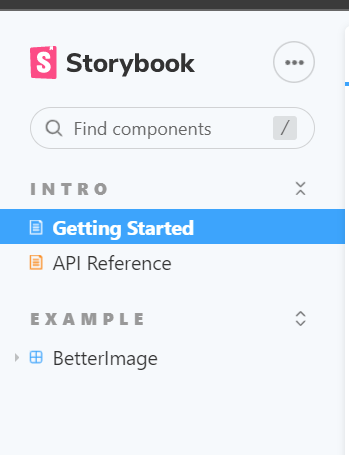
Beautiful Folder Structure
Cannot Have Headers
storiesOf('Components/Atoms/Welcome', module).add('to Storybook', () => (
  <Welcome showApp={linkTo('Button')} />
));
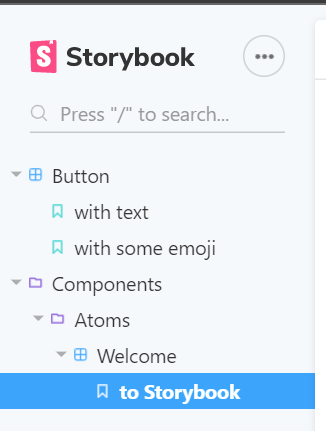

Currently this feature is not yet supported, however i believe there is already an issue covering this.
This has long been a requested feature and the plan would be to add this once v6 is stable.

@TaufanP did you applied some special configuration? Because I'm trying to do the same but it doesn't shows are yours. I'm running Storybook in the device... not in the browser...

The piece of code...
storiesOf('Design System/Button', module)
  .addDecorator(story => <StoryScreen>{story()}</StoryScreen>)
  .add('Default', () => <ButtonStories />)
I work in a mono-repo using Nx. This is the Nx versions and stuff...
❯ npx nx report

 >  NX   Report complete - copy this into the issue template

   Node : 16.17.1
   OS   : darwin arm64
   yarn : 1.22.19

   nx : 14.7.6
   @nrwl/angular : Not Found
   @nrwl/cypress : 14.7.6
   @nrwl/detox : 14.7.6
   @nrwl/devkit : 14.7.6
   @nrwl/eslint-plugin-nx : 14.7.6
   @nrwl/expo : Not Found
   @nrwl/express : Not Found
   @nrwl/jest : 14.7.6
   @nrwl/js : 14.7.6
   @nrwl/linter : 14.7.6
   @nrwl/nest : Not Found
   @nrwl/next : Not Found
   @nrwl/node : Not Found
   @nrwl/nx-cloud : 14.6.2
   @nrwl/nx-plugin : Not Found
   @nrwl/react : 14.7.6
   @nrwl/react-native : 14.7.6
   @nrwl/schematics : Not Found
   @nrwl/storybook : 14.7.6
   @nrwl/web : 14.7.6
   @nrwl/workspace : 14.7.6
   typescript : 4.8.3
   ---------------------------------------
   Local workspace plugins:
   ---------------------------------------
   Community plugins:
And this are the dev-dependencies:
{
  "@nrwl/cli": "14.7.6",
  "@nrwl/detox": "14.7.6",
  "@nrwl/eslint-plugin-nx": "14.7.6",
  "@nrwl/jest": "14.7.6",
  "@nrwl/linter": "14.7.6",
  "@nrwl/nx-cloud": "latest",
  "@nrwl/react-native": "14.7.6",
  "@nrwl/storybook": "14.7.6",
  "@nrwl/web": "14.7.6",
  "@nrwl/workspace": "14.7.6",
  "@react-native-async-storage/async-storage": "1.17.10",
  "@react-native-community/cli": "9.1.1",
  "@react-native-community/cli-platform-android": "9.1.0",
  "@react-native-community/cli-platform-ios": "9.1.0",
  "@storybook/addon-essentials": "~6.5.9",
  "@storybook/addon-ondevice-actions": "^6.0.1-beta.5",
  "@storybook/addon-ondevice-backgrounds": "^6.0.1-beta.5",
  "@storybook/addon-ondevice-controls": "^6.0.1-beta.5",
  "@storybook/addon-ondevice-notes": "^6.0.1-beta.5",
  "@storybook/core-server": "~6.5.9",
  "@storybook/react-native": "^6.0.1-beta.5",
  "@testing-library/jest-dom": "5.16.5",
  "@testing-library/jest-native": "4.0.11",
  "@testing-library/react-native": "11.0.0",
  "@types/jest": "28.1.1",
  "@types/node": "16.11.7",
  "@types/react": "18.0.18",
  "@types/react-native": "0.70.0",
  "@typescript-eslint/eslint-plugin": "^5.38.0",
  "@typescript-eslint/parser": "^5.38.0",
  "babel-jest": "28.1.1",
  "detox": "19.12.1",
  "eslint": "~8.15.0",
  "eslint-config-prettier": "^8.5.0",
  "eslint-config-standard": "^17.0.0",
  "eslint-plugin-import": "^2.26.0",
  "eslint-plugin-jsx-a11y": "6.6.1",
  "eslint-plugin-n": "^15.2.5",
  "eslint-plugin-promise": "^6.0.1",
  "eslint-plugin-react": "^7.31.8",
  "eslint-plugin-react-hooks": "^4.6.0",
  "eslint-plugin-sort-keys-fix": "^1.1.2",
  "jest": "28.1.1",
  "jest-circus": "28.1.1",
  "jest-environment-jsdom": "28.1.1",
  "jest-react-native": "18.0.0",
  "metro": "0.72.2",
  "metro-babel-register": "0.72.2",
  "metro-react-native-babel-preset": "0.72.2",
  "metro-react-native-babel-transformer": "0.72.2",
  "metro-resolver": "0.72.2",
  "nx": "14.7.6",
  "prettier": "^2.6.2",
  "react-native-config": "1.4.6",
  "react-native-storybook-loader": "^2.0.5",
  "react-native-svg": "13.1.0",
  "react-native-svg-transformer": "1.0.0",
  "react-test-renderer": "18.2.0",
  "ts-jest": "28.0.5",
  "ts-node": "10.9.1",
  "typescript": "~4.8.2"
}
Which version of the Storybook are you using?
  "@storybook/core-server": "~6.5.9",
  "@storybook/react-native": "^6.0.1-beta.5",
Both packages seems pretty updated to me...

@mtzfactory as previously mentioned the story hierarchy feature is not yet supported in the on-device storybook, the images in the issue are from the web storybook.
@mtzfactory as previously mentioned the story hierarchy feature is not yet supported in the on-device storybook, the images in the issue are from the web storybook.
Is it still not supported for on-device storybook?

please try the new alpha version 6.5.5-alpha.0 which has an implementation of this