

 stoplightio
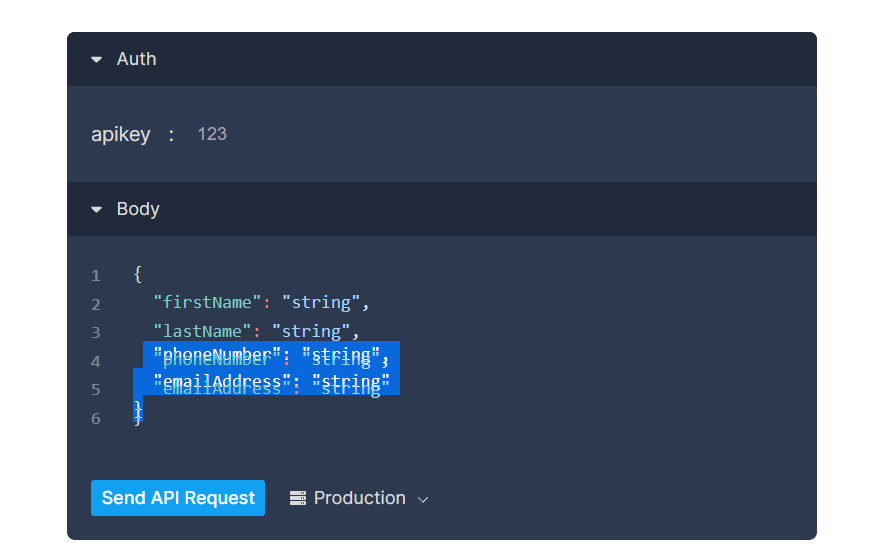
Two layer text in code editor doesn't overlapped exactly.
Describe the bug
Two layer text in code editor doesn't overlapped exactly. (Only in Chrome browser)
To Reproduce
- Open any document in Chrome browser, such as Example
- Select code in editor
- See...
Expected behavior
Two layer text should overlapped exactly.
Additional context
And in Firefox browser, the problem doesn't exists (tested in Firefox Developer 96.0b7). Tested in clean session. And edit system scale is not useful.
Environment (remove any that are not applicable):
- Library version: [email protected]
- OS: Windows 10 21H1 (zh-CN)
- Browser: Chrome 96.0.4664.110 (64 bit)
- Platform: desktop

@cpdyj I can't seem to reproduce it. Can you try again and let us know if you still see it?

@mnaumanali94 Yes I can. Something I don't know if it's useful. When I focus on the .npm__react-simple-code-editor__textarea element. Chrome develop tool shows the rendered font is Consolas. But the background pre element doesn't. BTW, my Windows locale is zh-CN. The problem has been going on for a long time.
Hello!
Our team recently took over the stewardship of the elements repo.
Due the volume of un-triaged issues that are pretty old and the time it would take us to get caught up on all of them, we kindly ask that you open up a new ticket if this is still an issue you're struggling with.
If you open a new issue please include:
- clear steps to reproduce that include example OAS specs, application setup, code, etc.
- the error or issue you are experiencing
- the expected behavior
We will be triaging any new tickets in a timely manner.
Thank you for understanding!
