

 stereum-dev
ALERT & NOTIFICATIONs COMPONENT (Node & Control Page)
FOR REFERENCE
NODE PAGE
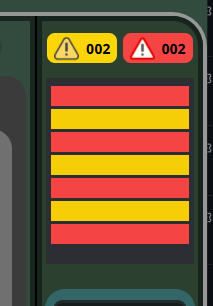
CONTROL PAGE
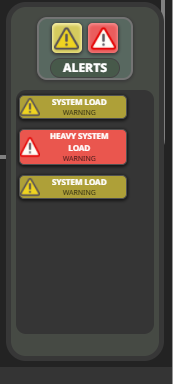
Changes to both boxes:
NODE PAGE
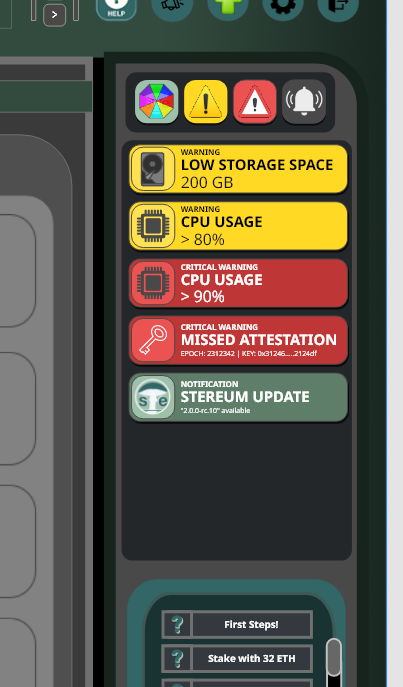
CONTROL PAGE
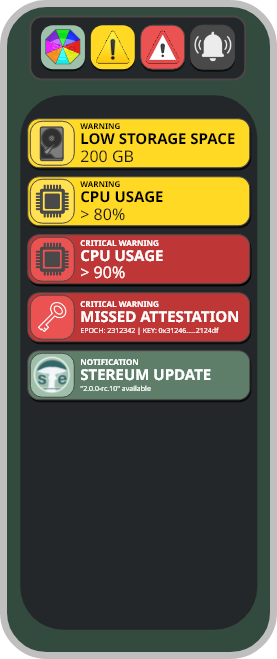
3 colored warn system:
yellow -> for things to keep in mind / reminders / security notes orange -> for things to take care of immediately preferable / or in the near future red -> Defcon - Red Alert / the node is probably not working because of this or in connection with it.
DEFAULT "STARTING ALERTS" COULD INCLUDE (updated list - including icons)
- [ ] - STEREUM UPDATE available -> GREEN [Whenever a Stereum Node Update is available]
ICON(s) = Stereum Logo

- [ ] - [SERVICE] UPDATE available -> GREEN [Whenever a Service Update is available]
ICON(s) = SERVICE DEPENDING (o.o) - Use Circle Icons for Services / Clients
- [ ] - LOW STORAGE -> ORANGE [Condition: less than 150 GB) -> RED [Condition: less than 100 GB)])
ICON(s) = STORAGE ICON
- [ ] - HIGH RAM USAGE -> ORANGE [more than 80%] -> RED [more than 90%])
ICON(s) = RAM ICON
- [ ] - Execution Client RPC Endpoint -> YELLOW | [Execution Client Condition: RPC Endpoint Open]
ICON(s) = RAM ICON OPEN PORT ICON
- [ ] - No Fee Recipient Set -> RED | [Condition: When Staking Key Imported and none set]
ICON(s) = BLOCK FEE RECIPIENT ICON
(for reference)

- [ ] - TASK MANAGER ERRORS -> RED | [Condition: When Task Manager Throws an Error with a subtask
ICON(s) = TASK MANAGER ERROR ICON
(for reference)

- [ ] - SYNCHRONISATION PROBLEMS
-> RED | [Condition: Whenever there is an error with synchronization, as specified by the widget]

Let me know what you think. I would like to start with a small set and maybe weave work of #563 & #858 into. With them I would also like to include following warnings & notifications:
-
[ ] - Validator Key: MISSED ATTESTATION -> RED | [Condition: When the Validator Client misses an attestation]
-
[ ] - Validator Key: BLOCK PRODUCED -> GREEN | [Condition: When your node adds a block to the network]
-
[ ] - Validator Key: PART OF SYNC COMMITTEE -> GREEN | [Condition: validators have been selected for sync committee duties (can be predicted as well)
OPTIONAL (MAYBE TOO LARGE FOR CURRENT SCOPE) SERVICE SPECIFIC ALERTS
-> GETH: Prunning Recommended / Required -> ORANGE | [Condition: XXX ] -> RED | [Condition: XXX]

@mabasian raised the idea that on click of certain notifications the page in question or most related should open.
F.e. for the update notification, clicking them opens the "Update Panel"
Question then arises: how the notification should behave after clicking them. Should they disappear?
@daGscheid: Question then arises: how the notification should behave after clicking them. Should they disappear?
In my opinion it should be mainly the decission of the user which notifications are triggered (possible by grafana alerts) and also when the notification will be removed (requires UI adjustment).
After a notification pops up there could be a small "X" icon visible if you move the mouse over the notification.
Something like this:
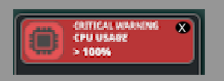 I say "mainly" because at some point the list of notifications has to be cleaned from old notifications in any case to make room for new notifications.

alert when there is no Fee Re
it's ok, tell me the bg-color , content and the icon please

alert when there is no Fee Re
it's ok, tell me the bg-color , content and the icon please
Just scroll up 😅 It is all there
With rc.19 we have access to alerts showing:
- Storage
- CPU
- RAM
- No Block Fee Recipient Set
Missing the following alerts from the list above:
- [x] Node Update available
- [x] Client / Service Update available
- [x] RPC Endpoint Open
The alert that the withdrawal address is to updated is no longer necessary, with basically having moved away from the old format. I will remove it from the above list.