

 square
Build failes or hangs when using ContributesSubcomponent and you rename the module
Basically the build failes after you rename a module and on the next build it hangs when using
ContributesSubcomponent and you rename module.
I have done 3 attemps to build the project, on all of the attempts the code is correct, I haven't changed anything.
1st: The build fails because it was trying to build the module which is renamed 2nd: The build hangs for 10 minutes 3rd: The build is successful.
Here is the minimum code with which you can reproduce it, this new file is inside the library module,
next to the God, Description & DescriptionComponent classes.
package com.squareup.anvil.sample

import com.squareup.anvil.annotations.ContributesSubcomponent
import com.squareup.anvil.annotations.ContributesTo
import com.squareup.scopes.AppScope
import com.squareup.scopes.SingleIn
import dagger.BindsInstance
import dagger.Module
import dagger.Provides

class MyComponentScope private constructor()
class Argument(val value: Int)
class MappedArgument(val value: Int)

@SingleIn(MyComponentScope::class)
@ContributesSubcomponent(
  scope = MyComponentScope::class,
  parentScope = AppScope::class,
  modules = [MyComponentModule3::class]
)
interface MyComponent  {

  @ContributesTo(AppScope::class)
  interface ParentComponent {
    fun createSettingsFactory(): MyComponent.Factory
  }

  @ContributesSubcomponent.Factory
  interface Factory {

    fun create(@BindsInstance argument: Argument): MyComponent
  }
}

@Module
object MyComponentModule3 {

  @Provides
  fun arg(argument: Argument): MappedArgument = MappedArgument(argument.value)
}
The first time that i tried to build the project it failed with the following exception:
[kokeroulis@MacBook-Pro-2:~/github/anvil on main]
% ./gradlew :sample:app:assembleDebug

> Configure project :
Versions: [Kotlin:1.6.10, Gradle:7.4, Kotlin use IR in tests:true]

> Configure project :sample:app
Unable to detect AGP versions for included builds. All projects in the build should use the same AGP version. Class name for the included build object: org.gradle.composite.internal.DefaultIncludedBuild$IncludedBuildImpl_Decorated.

The following Kotlin source sets were configured but not added to any Kotlin compilation:
 * androidAndroidTestRelease
 * androidRelease
 * androidTestRelease
You can add a source set to a target's compilation by connecting it with the compilation's default source set using 'dependsOn'.
See https://kotlinlang.org/docs/reference/building-mpp-with-gradle.html#connecting-source-sets

> Task :sample:library:compileKotlin FAILED
e: /Users/kokeroulis/github/anvil/sample/library/build/anvil/src-gen-main/com/squareup/anvil/sample/MyComponentModule2_ArgFactory.kt: (13, 34): Unresolved reference: MyComponentModule2
e: /Users/kokeroulis/github/anvil/sample/library/build/anvil/src-gen-main/com/squareup/anvil/sample/MyComponentModule2_ArgFactory.kt: (32, 36): Unresolved reference: MyComponentModule2

FAILURE: Build failed with an exception.

* What went wrong:
Execution failed for task ':sample:library:compileKotlin'.
> A failure occurred while executing org.jetbrains.kotlin.compilerRunner.GradleCompilerRunnerWithWorkers$GradleKotlinCompilerWorkAction
   > Compilation error. See log for more details

* Try:
> Run with --stacktrace option to get the stack trace.
> Run with --info or --debug option to get more log output.
> Run with --scan to get full insights.

* Get more help at https://help.gradle.org

Deprecated Gradle features were used in this build, making it incompatible with Gradle 8.0.

You can use '--warning-mode all' to show the individual deprecation warnings and determine if they come from your own scripts or plugins.

See https://docs.gradle.org/7.4/userguide/command_line_interface.html#sec:command_line_warnings

BUILD FAILED in 2s
52 actionable tasks: 1 executed, 51 up-to-date
I checked on the directory and MyComponentModule2_ArgFactory.kt is actually missing from the disk and MyComponentModule3_ArgFactory.kt is actually there.
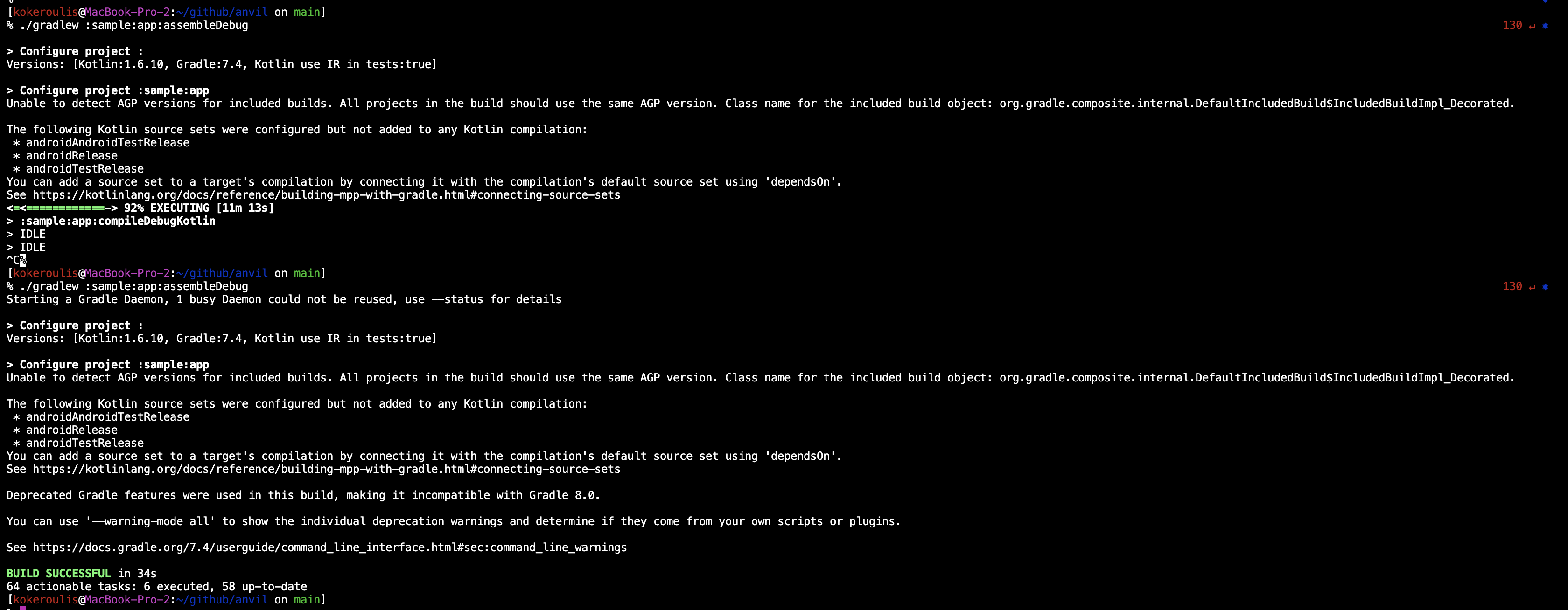
Then i tried to build the project again and the build hang. I was waiting for 10 minutes on the task :sample:app:compileDebugKotlin.
Then I killed the build (ctrl + c on terminal), i build it again and it worked.
Steps to reproduce:
- Rename
MyComponentModuleto a different name e.g. (MyComponentModule2, MyComponentModule3 etc). I was doing the rename manually on the file without using the refactor functionality from AS (right click -> refactor -> rename). - Build the project (./gradlew :sample:app:assembleDebug)
- Repeat until the build hangs or it fails to build.
Here is a screenshot of the 2nd attemp which caused the build to hang and from the 3rd attemp where the project build successfully.
I am using AS bumblebee and the java version which is bundled with it.
[kokeroulis@MacBook-Pro-2:~/github/anvil on main]
% java -version
openjdk version "11.0.11" 2021-04-20
OpenJDK Runtime Environment (build 11.0.11+0-b60-7590822)
OpenJDK 64-Bit Server VM (build 11.0.11+0-b60-7590822, mixed mode)
I am not quite sure how to debug this further. If you need anymore information, please let me know.

Can you please provide a sample project that I can check out and run to reproduce the error? Are you building from Android Studio or in the terminal?

Sure, here is the sample project.
The way that I am reproducing this, is to rename the MyComponentModule9 to another name.
I can reproduce the issue from both (terminal and AS). It only happens on incremental builds.
I tried to reproduce the issue now, but I can't. For me the build is successful. Here is a build scan: https://scans.gradle.com/s/7yjp7pjxbwk2o
This could be a JVM / Windows thing.
I am using mac os with the JVM bundled with Bumblebee. I can try the latest canary versions and see if I can reproduce it there. Is there a way to provide more useful information from my side?
Does it hang when building from the command line? This could be an IDE issue. I have a hard time to suggest what else you could provide.
I'm closing the issue for now, because I don't see clear path forward. I'm happy to reopen the issue anytime.