

 square
[Feature Request] Unlock with Apple Watch with no passcode fallback
Issue https://github.com/square/Valet/issues/253 was closed. But ...
Using accessControl: .userPresence:

Using accessControl: .watch:

Unfortunately we can't Unlock the Item with System password, and I think someone else can have the same issue.

Hi @c128128! Thank you for filing a feature request. To move this request forward, I'm going to need a bit more information from you regarding what workflow you're asking us to support. I'd also love a bit more context on the screenshots above. Direct clarifying questions below:
- Can you state exactly what you're trying to accomplish? Per https://github.com/square/Valet/issues/253#issuecomment-779391048, our existing APIs do allow for unlocking the Secure Enclave via Watch. I'd love to better understand what additional or differentiated functionality you'd like us to support. If you can, please also share the motivation for this additional or differentiated functionality.
- Can you expand on the code snippets you provided above? I'm guessing that
accessControl: .userPresenceandaccessControl: .watchare snippets of your code interacting directly with Security APIs rather than Valet APIs, but it'd be helpful if you could expand the snippet to provide a bit more context on how you're calling into Security's keychain APIs. - You said that "we can't Unlock the Item with System password": can you help me understand both what you want to happen and what API calls you were using that led to this unexpected or less-than-desired result? Or are you saying that your keychain use-case requires disabling unlock-via-password?
- What OS version are you testing the above on? And what version of Valet are you using?
Thanks again for using Valet and offering us guidance on how to improve our offerings!

@dfed Thank you for reply.
-
Issue https://github.com/square/Valet/issues/253 was closed with comment that
Valetalready is permittingUnlock with Apple Watchif you setaccessControl: .userPresence. My screenshots shows that, the behaviour is different when settingaccessControl: .userPresenceandaccessControl: .watch. In 1 case you can access the the item withmacOS(system) password, and in the second case you can't. It depends on the user case, for instance, a Password Manager or in our case for an Authenticator it is critical. -
I have modified the Valet
4.1.2to support this like:
//  Created by Dan Federman on 9/18/17.
//  Copyright © 2017 Square, Inc.
//
//  Licensed under the Apache License, Version 2.0 (the "License");
//  you may not use this file except in compliance with the License.
//  You may obtain a copy of the License at
//
//    http://www.apache.org/licenses/LICENSE-2.0
//
//  Unless required by applicable law or agreed to in writing, software
//  distributed under the License is distributed on an "AS IS" BASIS,
//  WITHOUT WARRANTIES OR CONDITIONS OF ANY KIND, either express or implied.
//  See the License for the specific language governing permissions and
//  limitations under the License.
//

import Foundation


@objc(VALSecureEnclaveAccessControl)
public enum SecureEnclaveAccessControl: Int, CustomStringConvertible, Equatable {
    /// Access to keychain elements requires user presence verification via Touch ID, Face ID, or device Passcode. On macOS 10.15 and later, this element may also be accessed via a prompt on a paired watch. Keychain elements are still accessible by Touch ID even if fingers are added or removed. Touch ID does not have to be available or enrolled.
    case userPresence = 1

    /// Access to keychain elements requires user presence verification via Face ID, or any finger enrolled in Touch ID. Keychain elements remain accessible via Face ID or Touch ID after faces or fingers are added or removed. Face ID must be enabled with at least one face enrolled, or Touch ID must be available and at least one finger must be enrolled.
    @available(macOS 10.12.1, *)
    case biometricAny

    /// Access to keychain elements requires user presence verification via the face currently enrolled in Face ID, or fingers currently enrolled in Touch ID. Previously written keychain elements become inaccessible when faces or fingers are added or removed. Face ID must be enabled with at least one face enrolled, or Touch ID must be available and at least one finger must be enrolled.
    @available(macOS 10.12.1, *)
    case biometricCurrentSet

    /// Access to keychain elements requires user presence verification via device Passcode.
    case devicePasscode

    case watch

    // MARK: CustomStringConvertible

    public var description: String {
        switch self {
        case .userPresence:
            /*
             VALSecureEnclaveValet v1.0-v2.0.7 used UserPresence without a suffix – the concept of a customizable AccessControl was added in v2.1.
             For backwards compatibility, do not append an access control suffix for UserPresence.
             */
            return ""
        case .biometricAny:
            if #available(macOS 10.12.1, *) {
                return "_AccessControlTouchIDAnyFingerprint"
            } else {
                assertionFailure(".biometricAny requires macOS 10.12.1.")
                return ""
            }
        case .biometricCurrentSet:
            if #available(macOS 10.12.1, *) {
                return "_AccessControlTouchIDCurrentFingerprintSet"
            } else {
                assertionFailure(".biometricCurrentSet requires macOS 10.12.1.")
                return ""
            }
        case .devicePasscode:
            return "_AccessControlDevicePasscode"
        case .watch:
            return "_AccessControlWatch"
        }
    }

    // MARK: Internal Properties

    internal var secAccessControl: SecAccessControlCreateFlags {
        switch self {
        case .userPresence:
            return .userPresence
        case .biometricAny:
            if #available(iOS 11.3, tvOS 11.3, watchOS 4.3, macOS 10.13.4, *) {
                return .biometryAny
            } else if #available(macOS 10.12.1, *) {
                return .touchIDAny
            } else {
                assertionFailure(".biometricAny requires macOS 10.12.1.")
                return .userPresence
            }
        case .biometricCurrentSet:
            if #available(iOS 11.3, tvOS 11.3, watchOS 4.3, macOS 10.13.4, *) {
                return .biometryCurrentSet
            } else if #available(macOS 10.12.1, *) {
                return .touchIDCurrentSet
            } else {
                assertionFailure(".biometricCurrentSet requires macOS 10.12.1.")
                return .userPresence
            }
        case .devicePasscode:
            if #available(macOS 10.11, *) {
                return .devicePasscode
            } else {
                assertionFailure(".devicePasscode requires macOS 10.11.")
                return .userPresence
            }
        case .watch:
            #if targetEnvironment(macCatalyst)
            return .watch
            #else
            assertionFailure(".watch is only available on macOS || macCatalyst")
            return .userPresence
            #endif
        }
    }

    internal static func allValues() -> [SecureEnclaveAccessControl] {
        var values: [SecureEnclaveAccessControl] = [
            .userPresence,
            .devicePasscode
        ]
        if #available(macOS 10.12.1, *) {
            values += [
                .biometricAny,
                .biometricCurrentSet,
            ]
        }
        return values
    }
}
- I am using it like this:
private static func enclave(hardware: Biometry.Hardware) throws -> SecureEnclaveValet {
    switch hardware {
        case .touch, .face:
            // swiftlint:disable:next force_unwrapping
            return SecureEnclaveValet.valet(with: Identifier(nonEmpty: Biometry.SERVICE)!, accessControl: .biometricCurrentSet)

        case .watch:
            // swiftlint:disable:next force_unwrapping
            return SecureEnclaveValet.valet(with: Identifier(nonEmpty: Biometry.SERVICE)!, accessControl: .watch)

        case .none:
            throw Error.message("Unvailable")
    }
}
P.S: I am not an English native speaker. Feel free to ask, if something is unclear.
Super helpful reply! Thank you!
So what I understand is that you'd like a Valet API to access items in the SecureEnclave without allowing a fallback to passcode. I'm not sure how this workflow is more secure than what we already provide, since the watch is ultimately unlocked with a passcode. Unlocking with watch is effectively an unlock with passcode since the watch is enabled only after you unlock it with your passcode (and watch passcodes are generally shorter and less secure than computer passwords).
That said, what do you want to happen if the customer does not have a watch? Are you hoping to fall back to another biometric?
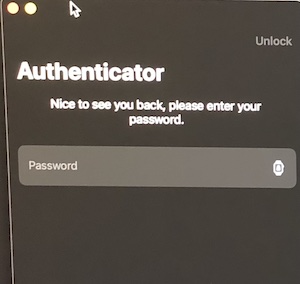
Let me add more details on this.
We have an own Password Input View where user is unlocking the Authenticator with a Password. Please note that this Password is NOT the system (macOS) password, we use a custom algorithm to derivate an encryption key. That key is then stored in SecureEnclave. (there are more steps to get the encryption key but it is not important for our issue). We expect user to introduce the Password and if some Biometric device is available (TouchId, FaceId, Watch) let them store the encryption key in SecureEnclave.
So what I understand is that you'd like a Valet API to access items in the SecureEnclave without allowing a fallback to passcode.
User can be confused about what Password should he use, system (macOS) or our custom Password.
I'm not sure how this workflow is more secure than what we already provide, since the watch is ultimately unlocked with a passcode.
For me Unlock with Apple Watch is like one more Biometrics hardware.
Our custom Password Input View
Got it. So the issue at-hand isn't "more secure" or "less secure".
I think I need to dive deeper into how to accomplish "or" logic with the SecureEnclave – see https://github.com/square/Valet/issues/253#issuecomment-1100209853 for more details. If I can get that working then we can pick #253 back up. That said, I'm not convinced that we need to support this use case within Valet.
It's entirely possible to accomplish your desired UI and security by using a LAContext to guard access to the lookup within your application (we also have a TODO to make this kind of workflow easier, see #265). That's likely a less error-prone approach than storing items in different Valet objects based on the customer's current hardware.
This issue has been sitting open for awhile, and if I'm being honest I don't think I'm going to have time to invest in this functionality. Per my comment above – I believe utilizing a LAContext is the best approach for this use case.
I'm going to close this issue out, but I do appreciate the suggestion and discussion above.