

 sqlitebrowser
[Bug]: Database cell type not updated properly when copy/pasting blob data
What did you do?
When copying BLOB data into cells in the database which contain TEXT data, the BLOB will be copied into the cell and DB4S will display the type as BLOB, but when the database is read through the sqlite3 command line or python library it will be read as an empty TEXT field.
Steps to Reproduce:
- Create a new database and initialize as follows
CREATE TABLE "test_table" ( "field" BLOB );
INSERT INTO "test_table" ("field") VALUES (X'DEADBEEF');
INSERT INTO "test_table" ("field") VALUES ("String");
- Open the database in DB4S and go to the "Browse Data" tab
- Use
ctrl+candctrl+vto copy theBLOBvalue over theTEXTvalue - Write the changes to the database
Verifying through sqlite3 cli
- Open the database
sqlite3 /path/to/database.db - Dump raw data with
.dump
-- Output abridged
INSERT INTO test_table VALUES(X'deadbeef');
INSERT INTO test_table VALUES('ޭ��');  -- BLOB field is output as corrupt TEXT
Verifying through python's sqlite3 module
Using the following script
import sqlite3

conn = sqlite3.connect('/path/to/database.db')
cursor = sqlite3.Cursor(conn)
cursor.execute("SELECT field FROM test_table")
for row in cursor.fetchall():
    print(type(row[0]), row[0])
Depending on the exact binary data in the BLOB field the script will either crash with sqlite3.OperationalError: Could not decode to UTF-8 column 'field' with text'����' or will output the bytes field directly interpreted as UTF-8.
What did you expect to see?
I expected the BLOB value to be exactly copied over the text cell so that the two output lines of the .dump command would be identical.
What did you see instead?
The BLOB data was saved as corrupt text. Depending on how this data is retrieved, it either comes out as garbled text or crashes the program due to invalid UTF-8 encoding.
DB4S Version
3.12.2
What OS are you seeing the problem on?
Linux
OS version
Arch Linux
Relevant log output
No response
Prevention against duplicate issues
- [X] I have searched for similar issues

Interesting. As a thought, would you be ok to try our very latest "continuous" AppImage and see if the problem still shows up?
https://github.com/sqlitebrowser/sqlitebrowser/releases/tag/continuous
Not saying that it's definitely fixed in that, it's more that we've made a lot of improvements since the 3.12.2 release, including some that might address this.

I'm seeing the same behaviour here, creating the table with the above steps.
sqlite> .dump
PRAGMA foreign_keys=OFF;
BEGIN TRANSACTION;
CREATE TABLE IF NOT EXISTS "test_table" (
        "field" BLOB
);
INSERT INTO test_table VALUES(X'deadbeef');
INSERT INTO test_table VALUES('ޭ��');
COMMIT;
When opening the database in DB4S, it thinks both of the cells have identical contents and seems to display them as such in the Browse Data tab.
They're clearly not stored in the database in the same format though, which is causing interoperability problems with other programs.
@MKleusberg @mgrojo @scottfurry @lucydodo Anyone have time/interest to investigate this? :smile:
Doesn't sqlite3 store the data type at the cell level?
In SQLite, the datatype of a value is associated with the value itself, not with its container.
When you insert a TEXT value to a cell, it will be of type TEXT. Then, it looks like when DB4S inserts a new value in the same cell using the Browser, it keeps the original data type. This may very well be the desired behavior (it is for me).
To override the cell type to BLOB you have two options:
- UPDATE statement:
UPDATE test_table SET "field" = X'deadbeef' FROM test_table WHERE rowid = 2; - In the
Edit Database Celldock, clear the existing data, then switch to BLOB mode, then paste the hex representation of your data: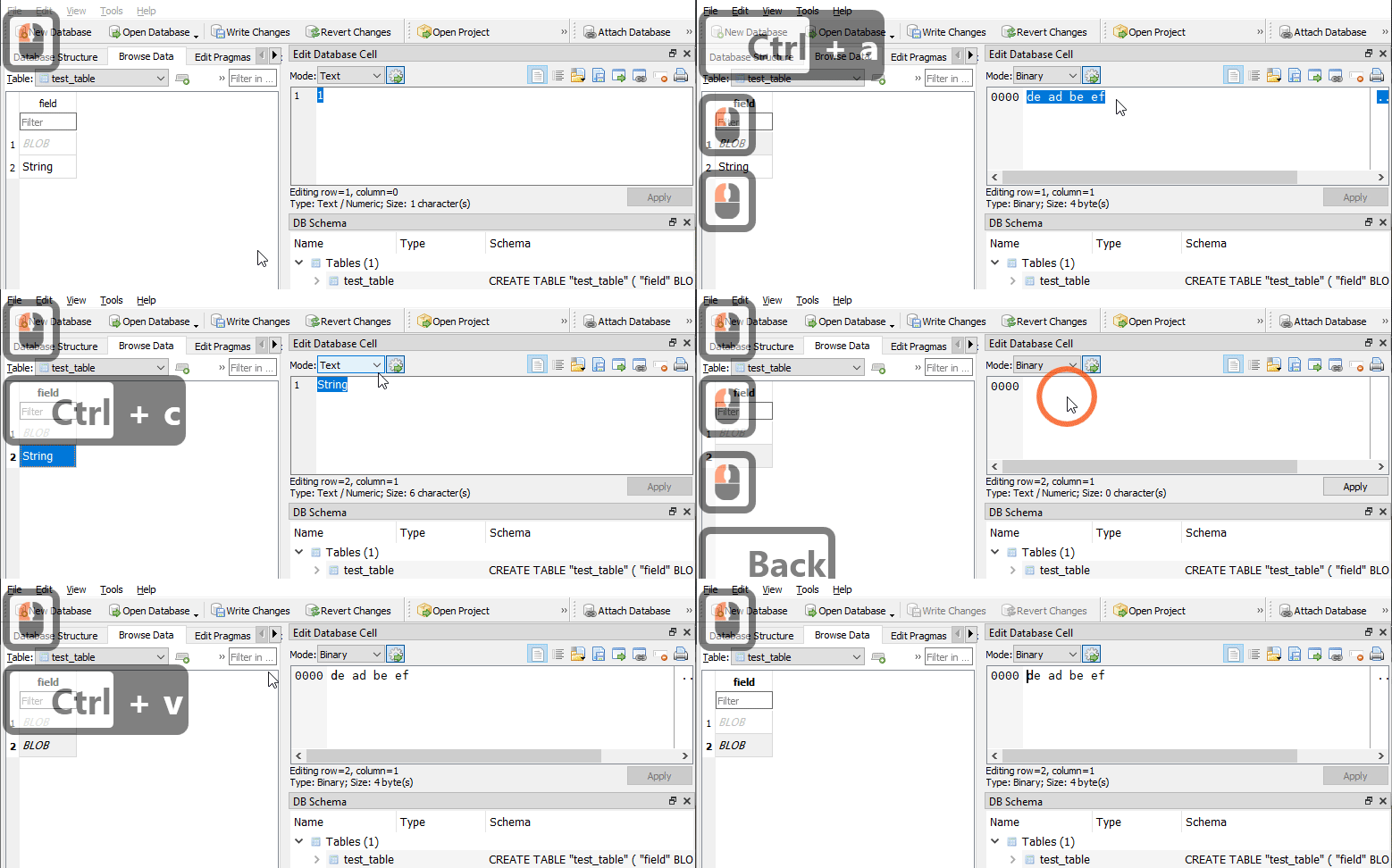

Doesn't sqlite3 store the data type at the cell level?
Yep.
Though, doesn't it seem sensible that if you copy one cell to another, then DB4S should make sure the destination cell ends up "the same" as the source?
I'm trying to think of a scenario where that's not the expected behaviour, but nothing is springing to mind. (Am actually very, very tired though)
Thoughts?
I'm seeing the same behaviour here
In the same database, if you click 'File' and 'Export' and 'Database to SQL file', does the SQL show two 'blob' lines?
Mine does... 🤔
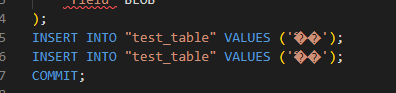
(this is on Windows, just to muddy the waters...)

Editing the edited field afterwards and writing changes then 'corrects' the issue. (ie, so DB4S shows the binary data 'de ad be ef' .. change the field by changing it to something else, applying, then changing it again to 'de ad be ef' again).

(short way round of what @i-s-o did...)
When you insert a TEXT value to a cell, it will be of type TEXT. Then, it looks like when DB4S inserts a new value in the same cell using the Browser, it keeps the original data type. This may very well be the desired behavior (it is for me).
Since the actual type of a cell in sqlite is directly associated with the value of the cell, I would expect that it is also copied over, especially when the data types are incompatible. There could be situations where you want to copy values but retain the destination cell type, but that feels like it should be an alternative behavior (maybe with a different key combination, like alt+ctrl+v or shift+ctrl+v).
As far as overriding the type by pasting into the "Edit Database Cell" field, that does work but you can only update cells one at at time that way, vs selecting multiple cells in the "Browse Data" view and pressing ctrl+v to overwrite all of them at once. That's what I was doing when I initially encountered this issue.
In the same database, if you click 'File' and 'Export' and 'Database to SQL file', does the SQL show two 'blob' lines?
If you execute that query as shown the cells retain the TEXT type and X'deadbeef' becomes X'deadefbfbdefbfbd. I think this is because 0xdeadbeef is not a valid utf-8 string and when exporting it to a sql file it has to forcibly adjust the value or crash.
I've made an improvement. Now, if we paste non-text data, we set it as BLOB datatype in the DB. That is, If we detect it as BLOB for display, we set the data as BLOB in the DB.
Ideally, if we are copying internally, we should preserve the data type of the original cell(s), but with this workaround, at least we are not inserting binary data as if it were text. This will avoid crashing other applications like sqlite3 if the data cannot be parsed as text.
The ideal solution is difficult, because the current codebase doesn't take data types into account, relaying always in SQLite type affinity. But this approach has some holes:
A column with affinity BLOB does not prefer one storage class over another and no attempt is made to coerce data from one storage class into another.
We were always pasting as text and then the data affinity converted it to INTEGER, REAL or TEXT according to the column type. But if the column is BLOB, the result is TEXT, even if that didn't make sense. You could paste an image, and although we said BLOB in the cell, it was actually TEXT. You could see it using the mentioned trick with .dump. Now if we copy data which we say it's BLOB, it's inserted as BLOB type in the DB.
I don't know if you think this solves the issue, but at least I will remove the release-blocker label.

And thanks for the detailed report, @nhhollander. Could you test the next nightly build to see if this has some undesired side effect?
I cannot edit a BLOB field containing only text with the latest nightly. :( The text is viewable in the Cell Editor, but all attempts to Apply changes are blocked with:
Error changing data:
cannot store TEXT value in BLOB column DOC.file
EDIT: I can make changes if I switch to HEX in the Cell Editor. Not very convenient but a workaround.

Could you previously? And why have you raised this in an issue about pasting BLOB data?
Yes, I believe I could always edit a blob with the Cell editor in text mode. I post here because pasting large buffers of text are treated as a blob in SQLite or at the least, should be allowed since it is just binary data anyway.