

 spdx
spdx
Move json converters into subpackage
The jsonschema package is currently rather full and incomprehensible. Introducing a new subpackage conversion can change that.

So we have to introduce the conversion subpackage inside the jsonschema package or at another place? and what I should do after that, thanks :)

I would suggest moving every file in the jsonschema package ending in converter.py into a subpackage conversion and everything ending in properties.py into a subpackage properties.
Both of these subpackages can be direct children of the jsonschema package.
But after doing that I will also have to change the dependencies ( from spdx.jsonschema import annotation_converter.py -> from spdx.jsonschema.converter import annotation_converter.py ) in each file.
Yes, but this should be handled automatically by your IDE, which should scan the whole code for these imports and adapt them accordingly when you move modules to another place.
yes, so all I have to do is transfer files and that's it? ( init and optional_utils will remain in jsonschema only) .How should I test the changes (pytest n all)
Yeah, it's not really a big issue, just a minor refactoring, which is why there are no new tests to write for this.
The optional_utils module is only used in the converters, so I suggest moving it to conversion, too.
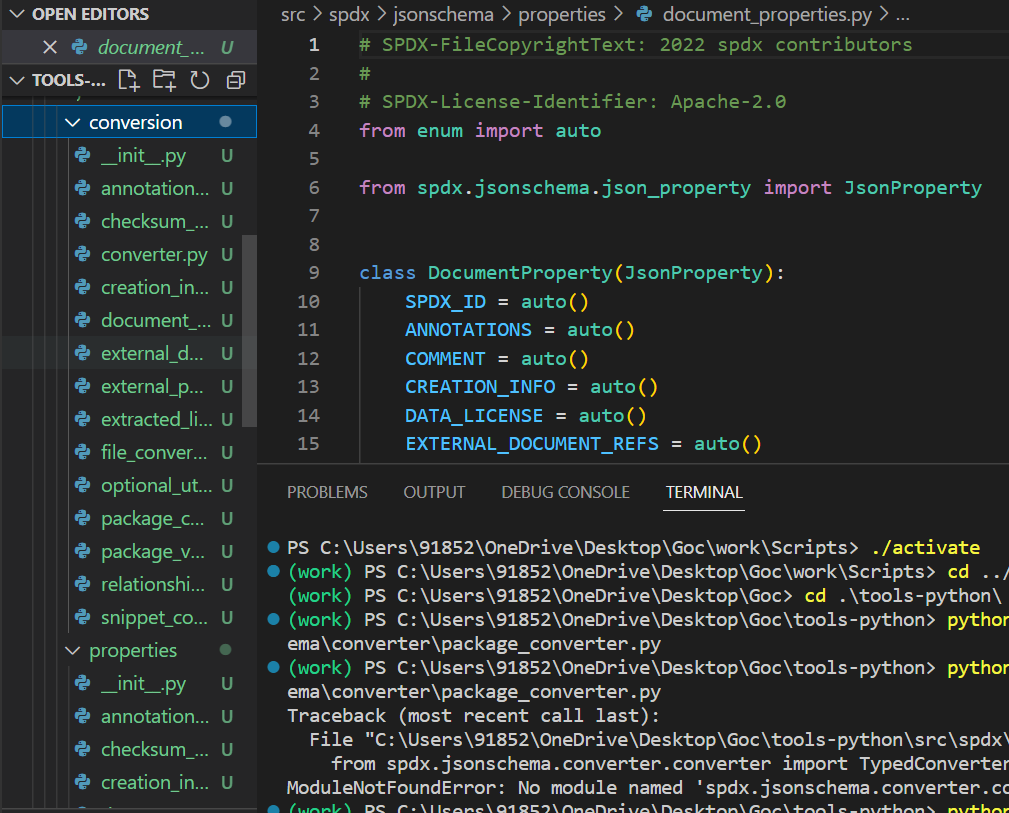 Is the structure right? I am opening a PR
Looks good, don't hesitate to open a PR (you can always adapt it if necessary)! :)
I have opened it #575 but it seems all the install_and_test tests were failed, what could be the reason behind it? could it be that my remote repo is behind the spdx:main
The error occurs because you did not commit the changes to the imports that we discussed earlier.
Have look the contribution guideline, especially at points 6 and 7 under the heading "Development process". There you find the commands to test your local code without the need to have to wait for the GitHub Action run.
Have you tried running pytest on your local machine? This will give you an overview of all the failing tests, which you can then have a look at separately to figure out what's going wrong.
It looks like your IDE did not recognize the mock paths, like for example here. Those have to be adapted, too.
edit: changed the link
yes, I am researching some way to solve this problem otherwise I will have to do it by hard way(manually)