

 sparkfun
Arduino BLE with watchdog interrupt deep sleep
Hello
I have a project I'm working on that I want to turn on BLE for a quick interval and connect to my phone. If there is no connection after a short time then it should just go back into deep sleep. After this, I wanted watchdog to wake the system back up after 10 seconds and repeat this process. So far, I have used the Arduino BLE library and watchdog deep sleep examples for waking up the system after 10 seconds and that works fine but when I bring in BLE to it, the system constantly goes into deep sleep and immediately wakes up after around half a second instead of 10 seconds. If I comment out the BLE.begin lines, the problem goes away, but obviously BLE is not on anymore.
I'm not sure if there is a bug between using BLE.begin and watchdog timers together.
This was the deep sleep watchdog example I started with: [https://github.com/sparkfun/Arduino_Apollo3/blob/main/libraries/WDT/examples/Example3_WDT_LowPower/Example3_WDT_LowPower.ino]
I have already talked about this issue on sparkfun's forum
How do you utilize watchdog with BLE to wake up from deep sleep every some user-defined interval?
Perhaps there could be a dedicated WDT with BLE example to showcase this. I am very new to this, so I don't know if I'm missing something simple.

Could you post the sketch you are using that has the issue? It would be great to have that as reference point.
If I could try to summarize your issue, it would be that you cannot get the device to enter sleep when the sketch uses BLE?

Well I think something other than watchdog is waking up the system from deep sleep immediately. I don't know what that is exactly. It could be BLE waking up the system?(even though I think I turned it off before going into deep sleep).
It's not that I can't go into deep sleep. That part works. It's that the system wakes from deep sleep way earlier than the 10 seconds that I had set with the watchdog.
My code is basically just an edited version of the Example3_WDT_LowPower.ino in arduino_apollo3 repository where I attempted to turn BLE on and off after deep sleep cycles.
Here is my arduino code:
#include "RTC.h"
#include "WDT.h"
#include <ArduinoBLE.h>

BLEService motorService("19B10000-E8F2-537E-4F6C-D104768A1214"); // create service

// create motor characteristic and allow remote device to write
BLEByteCharacteristic motorCharacteristic("19B10001-E8F2-537E-4F6C-D104768A1214", BLEWrite);
int flag = 0;

volatile bool alarmFlag = false; // RTC ISR flag
volatile bool watchdogFlag = true; // Watchdog Timer ISR flag
volatile int watchdogInterrupt = 0; // Watchdog interrupt counter

void setup()
{
  Serial.begin(115200);

  Serial.println("Artemis Watchdog Low Power Example");

  // Set the RTC time using UNIX Epoch time
  rtc.setEpoch(1596240000); // Saturday, August 1, 2020 00:00:00

  // Set the RTC's alarm
  //rtc.setAlarm(0, 0, 0, 0, 0, 0); // Set alarm (hund, ss, mm, hh, dd, mm)
  //rtc.setAlarmMode(6); // Set the RTC alarm to trigger every minute
  //rtc.attachInterrupt(); // Attach RTC alarm interrupt

//  Serial.print("Before BLE: ");
//  BLEsetup();
//  Serial.print("After BLE: ");
//  printDateTime();
  am_hal_ble_state_t *pBle = pHandle;
  am_hal_ble_wakeup_set(pBle, 0);
  // Configure the watchdog timer
  // See Example2_WDT_Config for more information on how to configure the watchdog
  wdt.configure(WDT_16HZ, 160, 240); // 16 Hz clock, 10-second interrupt period, 15-second reset period

  // Start the watchdog
  wdt.start();
}
/////////////Start Bluetooth and start advertising
void BLEsetup() {
  //Serial.begin(9600);
  //while(!Serial);

  pinMode(0, OUTPUT);
  pinMode(1, OUTPUT);

  if (!BLE.begin()) {
    //Serial.println("starting BLE failed!");
    while(1);
  }
  Serial.println("BLE Begun");
  BLE.setLocalName("MotorCallback");
  BLE.setAdvertisedService(motorService);
  motorService.addCharacteristic(motorCharacteristic);
  BLE.addService(motorService);

  //BLE.setEventHandler(BLEConnected, blePeripheralConnectHandler);
  //BLE.setEventHandler(BLEDisconnected, blePeripheralDisconnectHandler);

  // assign event handlers for characteristic
  //motorCharacteristic.setEventHandler(BLEWritten, motorCharacteristicFunc);
  // set an initial value for the characteristic
  motorCharacteristic.setValue(0);

  // start advertising
  BLE.advertise();

  //Serial.println(("Bluetooth device active, waiting for connections..."));
}

void loop()
{
  // Check for alarm interrupt
//  if (alarmFlag)
//  {
//    Serial.print("Alarm interrupt: ");
//    printDateTime(); // Print RTC's date and time
//    alarmFlag = false;
//
//    wdt.restart(); // "Pet" the dog
//    watchdogInterrupt = 0; // Reset watchdog interrupt counter
//  }

  // Check for watchdog interrupt
  if (watchdogFlag)
  {
    Serial.print("Watchdog interrupt: ");
    printDateTime(); // Print RTC's date and time
    //watchdogFlag = false; // Clear watchdog flag


  }


  Serial.print("Before BLE Setup: ");
  BLEsetup();
  Serial.print("After BLE Setup: ");
  printDateTime();

  BLE.poll();
  delay(1000);

  Serial.println("Need to handle BLE event here!");

  //wdt.restart();

  BLE.end();

  goToSleep(); // Enter deep sleep
}

// Print the RTC's current date and time
void printDateTime()
{
  rtc.getTime();
  Serial.printf("20%02d-%02d-%02d %02d:%02d:%02d.%02d\n",
                rtc.year, rtc.month, rtc.dayOfMonth,
                rtc.hour, rtc.minute, rtc.seconds, rtc.hundredths);
  Serial.println();
}

// Power down gracefully
void goToSleep()
{
  Serial.println("Going to Sleep!");
  printDateTime();
  // Disable UART
  Serial.end();

  // Disable ADC
  powerControlADC(false);

  // Force the peripherals off
  am_hal_pwrctrl_periph_disable(AM_HAL_PWRCTRL_PERIPH_IOM0);
  am_hal_pwrctrl_periph_disable(AM_HAL_PWRCTRL_PERIPH_IOM1);
  am_hal_pwrctrl_periph_disable(AM_HAL_PWRCTRL_PERIPH_IOM2);
  am_hal_pwrctrl_periph_disable(AM_HAL_PWRCTRL_PERIPH_IOM3);
  am_hal_pwrctrl_periph_disable(AM_HAL_PWRCTRL_PERIPH_IOM4);
  am_hal_pwrctrl_periph_disable(AM_HAL_PWRCTRL_PERIPH_IOM5);
  am_hal_pwrctrl_periph_disable(AM_HAL_PWRCTRL_PERIPH_ADC);
  am_hal_pwrctrl_periph_disable(AM_HAL_PWRCTRL_PERIPH_UART0);
  am_hal_pwrctrl_periph_disable(AM_HAL_PWRCTRL_PERIPH_UART1);
  am_hal_pwrctrl_periph_disable(AM_HAL_PWRCTRL_PERIPH_BLEL);
  // Disable all pads (except UART TX/RX)
  for (int x = 0 ; x < 50 ; x++)
    am_hal_gpio_pinconfig(x, g_AM_HAL_GPIO_DISABLE);

  //Power down CACHE, flashand SRAM
  am_hal_pwrctrl_memory_deepsleep_powerdown(AM_HAL_PWRCTRL_MEM_ALL); // Turn off CACHE and flash
  am_hal_pwrctrl_memory_deepsleep_retain(AM_HAL_PWRCTRL_MEM_SRAM_384K); // Retain all SRAM (0.6 uA)

  // Keep the 32kHz clock running for RTC
  am_hal_stimer_config(AM_HAL_STIMER_CFG_CLEAR | AM_HAL_STIMER_CFG_FREEZE);
  am_hal_stimer_config(AM_HAL_STIMER_XTAL_32KHZ);

  am_hal_sysctrl_sleep(AM_HAL_SYSCTRL_SLEEP_DEEP); // Sleep forever

  // And we're back!
  wakeUp();
}

// Power up gracefully
void wakeUp()
{
  // Go back to using the main clock
  am_hal_stimer_config(AM_HAL_STIMER_CFG_CLEAR | AM_HAL_STIMER_CFG_FREEZE);
  am_hal_stimer_config(AM_HAL_STIMER_HFRC_3MHZ);

  // Renable UART0 pins
  am_hal_gpio_pinconfig(48, g_AM_BSP_GPIO_COM_UART_TX);
  am_hal_gpio_pinconfig(49, g_AM_BSP_GPIO_COM_UART_RX);

  // Renable power to UART0
  am_hal_pwrctrl_periph_enable(AM_HAL_PWRCTRL_PERIPH_UART0);

  // Enable ADC
  initializeADC();

  // Enable Serial
  Serial.begin(115200);
  Serial.println("Woke Up!");
  printDateTime();
}

// Interrupt handler for the watchdog.
extern "C" void am_watchdog_isr(void)
{
  // Clear the watchdog interrupt
  wdt.clear();

  // Perform system reset after 10 watchdog interrupts (should not occur)
//  if ( watchdogInterrupt < 10 )
//  {
//    //wdt.restart(); // "Pet" the dog
//  }
//  else {
//    while (1); // Wait for reset to occur
//  }

//  watchdogFlag = true; // Set the watchdog flag
//  watchdogInterrupt++; // Increment watchdog interrupt counter
}
Greetings @blasteroid297 and @Wenn0101,
I too have run into the issue of the BLE stack breaking my deep sleep.
For the initial proof of concept I am using Arduino 1.8.13 and sparkfun/Arduino_Apollo3 2.2.1 on Ubuntu 20.04.4 LTS and run on a SparkFun RedBoard Artemis ATP
I started with Example6_LowPower_Alarm.ino and made the following changes:
--- Example6_LowPower_Alarm.ino.orig	2022-07-12 16:17:06.394151957 +1000
+++ Example6_LowPower_Alarm.ino	2022-07-13 11:16:04.112499202 +1000
@@ -17,12 +17,20 @@
 */

 #include "RTC.h"
+#include "ArduinoBLE.h"
+
+bool ble = false;

 void setup()
 {
   Serial.begin(115200);
   Serial.println("SparkFun RTC Low-power Alarm Example");

+  if(ble){
+    BLE.begin();
+    BLE.end();
+  }
+
   // // Easily set RTC using the system __DATE__ and __TIME__ macros from compiler
   // RTC.setToCompilerTime();
to arrive at the following:
/*
  Author: Adam Garbo and Nathan Seidle
  Created: June 3rd, 2020

  This example demonstrates how to set an RTC alarm and enter deep sleep.

  The code is configured to set an RTC alarm every minute and enter
  deep sleep between interrupts. The RTC interrupt service routine will
  wake the board and print the date and time upon each alarm interrupt.

  Tested with a SparkFun Edge 2. Confirmed sleep current of 2.5 uA.
*/

/*
// This file is subject to the terms and conditions defined in
// file 'LICENSE.md', which is part of this source code package.
*/

#include "RTC.h"
#include "ArduinoBLE.h"

bool ble = false;

void setup()
{
  Serial.begin(115200);
  Serial.println("SparkFun RTC Low-power Alarm Example");

  if(ble){
    BLE.begin();
    BLE.end();
  }

  // // Easily set RTC using the system __DATE__ and __TIME__ macros from compiler
  // RTC.setToCompilerTime();

  // Manually set RTC date and time
  rtc.setTime(0, 50, 59, 12, 3, 6, 20); // 12:59:50.000, June 3rd, 2020 (hund, ss, mm, hh, dd, mm, yy)

  // Set the RTC's alarm
  rtc.setAlarm(0, 0, 0, 13, 3, 6); // 13:00:00.000, June 3rd (hund, ss, mm, hh, dd, mm). Note: No year alarm register

  // Set the RTC alarm mode
  /*
    0: Alarm interrupt disabled
    1: Alarm match every year   (hundredths, seconds, minutes, hour, day, month)
    2: Alarm match every month  (hundredths, seconds, minutes, hours, day)
    3: Alarm match every week   (hundredths, seconds, minutes, hours, weekday)
    4: Alarm match every day    (hundredths, seconds, minute, hours)
    5: Alarm match every hour   (hundredths, seconds, minutes)
    6: Alarm match every minute (hundredths, seconds)
    7: Alarm match every second (hundredths)
  */
  rtc.setAlarmMode(6); // Set the RTC alarm to match on minutes rollover
  rtc.attachInterrupt(); // Attach RTC alarm interrupt
}

void loop()
{
  // Print date and time of RTC alarm trigger
  Serial.print("Alarm interrupt: "); printDateTime();

  // Enter deep sleep and await RTC alarm interrupt
  goToSleep();
}

// Print the RTC's current date and time
void printDateTime()
{
  rtc.getTime();

  Serial.printf("20%02d-%02d-%02d %02d:%02d:%02d.%03d\n",
          rtc.year, rtc.month, rtc.dayOfMonth,
          rtc.hour, rtc.minute, rtc.seconds, rtc.hundredths);
  Serial.println();
}

// Power down gracefully
void goToSleep()
{
  // Disable UART
  Serial.end();

  // Disable ADC
  powerControlADC(false);

  // Force the peripherals off
  am_hal_pwrctrl_periph_disable(AM_HAL_PWRCTRL_PERIPH_IOM0);
  am_hal_pwrctrl_periph_disable(AM_HAL_PWRCTRL_PERIPH_IOM1);
  am_hal_pwrctrl_periph_disable(AM_HAL_PWRCTRL_PERIPH_IOM2);
  am_hal_pwrctrl_periph_disable(AM_HAL_PWRCTRL_PERIPH_IOM3);
  am_hal_pwrctrl_periph_disable(AM_HAL_PWRCTRL_PERIPH_IOM4);
  am_hal_pwrctrl_periph_disable(AM_HAL_PWRCTRL_PERIPH_IOM5);
  am_hal_pwrctrl_periph_disable(AM_HAL_PWRCTRL_PERIPH_ADC);
  am_hal_pwrctrl_periph_disable(AM_HAL_PWRCTRL_PERIPH_UART0);
  am_hal_pwrctrl_periph_disable(AM_HAL_PWRCTRL_PERIPH_UART1);

  // Disable all pads (except UART TX/RX)
  for (int x = 0 ; x < 50 ; x++)
    am_hal_gpio_pinconfig(x, g_AM_HAL_GPIO_DISABLE);

  //Power down CACHE, flashand SRAM
  am_hal_pwrctrl_memory_deepsleep_powerdown(AM_HAL_PWRCTRL_MEM_ALL); // Turn off CACHE and flash
  am_hal_pwrctrl_memory_deepsleep_retain(AM_HAL_PWRCTRL_MEM_SRAM_384K); // Retain all SRAM (0.6 uA)

  // Keep the 32kHz clock running for RTC
  am_hal_stimer_config(AM_HAL_STIMER_CFG_CLEAR | AM_HAL_STIMER_CFG_FREEZE);
  am_hal_stimer_config(AM_HAL_STIMER_XTAL_32KHZ);

  am_hal_sysctrl_sleep(AM_HAL_SYSCTRL_SLEEP_DEEP); // Sleep forever

  // And we're back!
  wakeUp();
}

// Power up gracefully
void wakeUp()
{
  // Go back to using the main clock
  am_hal_stimer_config(AM_HAL_STIMER_CFG_CLEAR | AM_HAL_STIMER_CFG_FREEZE);
  am_hal_stimer_config(AM_HAL_STIMER_HFRC_3MHZ);

  // Power up SRAM, turn on entire Flash
  am_hal_pwrctrl_memory_deepsleep_powerdown(AM_HAL_PWRCTRL_MEM_MAX);

  // Go back to using the main clock
  am_hal_stimer_config(AM_HAL_STIMER_CFG_CLEAR | AM_HAL_STIMER_CFG_FREEZE);
  am_hal_stimer_config(AM_HAL_STIMER_HFRC_3MHZ);

  // Renable UART0 pins
  am_hal_gpio_pinconfig(48, g_AM_BSP_GPIO_COM_UART_TX);
  am_hal_gpio_pinconfig(49, g_AM_BSP_GPIO_COM_UART_RX);

  // Renable power to UART0
  am_hal_pwrctrl_periph_enable(AM_HAL_PWRCTRL_PERIPH_UART0);

  // Enable ADC
  initializeADC();

  // Enable Serial
  Serial.begin(115200);
}

// Interrupt handler for the RTC
extern "C" void am_rtc_isr(void)
{
  // Clear the RTC alarm interrupt
  rtc.clearInterrupt();
}
The output of this when run is:
SparkFun RTC Low-power Alarm Example
Alarm interrupt: 2020-6-3 12:59:50.0
⸮Alarm interrupt: 2020-6-3 13:0:0.1
With a power trace:
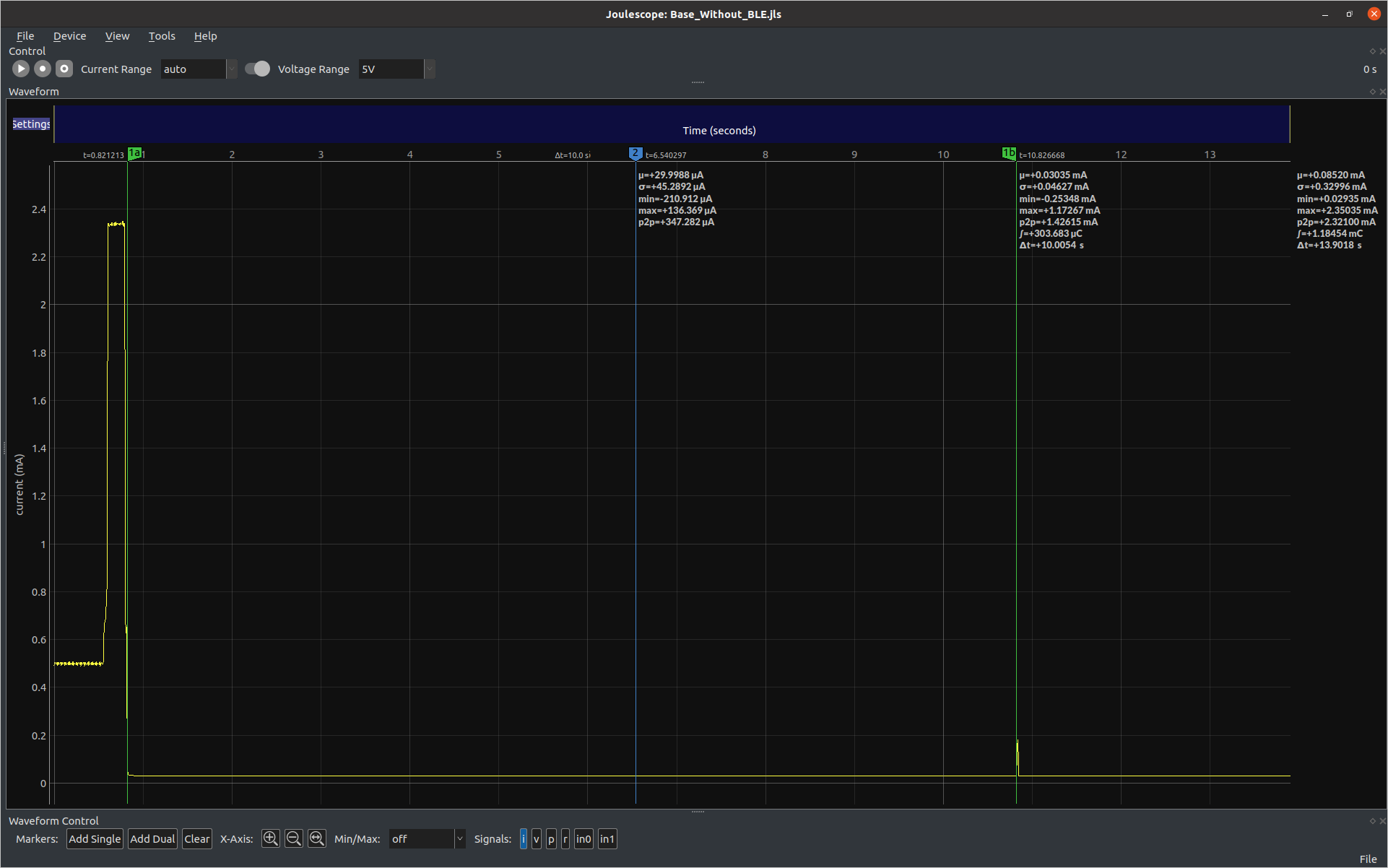
We can see in both the UART output and the power trace that the MCU wakes up after 10 seconds asleep. However when I change line 22 from:
bool ble = false;
to:
bool ble = true;
I get the following output:
SparkFun RTC Low-power Alarm Example
Alarm interrupt: 2020-6-3 12:59:52.91
?Alarm interrupt: 2020-6-3 12:59:53.51
?Alarm interrupt: 2020-6-3 12:59:54.38
?Alarm interrupt: 2020-6-3 12:59:55.26
?Alarm interrupt: 2020-6-3 12:59:56.13
?Alarm interrupt: 2020-6-3 12:59:57.1
?Alarm interrupt: 2020-6-3 12:59:57.88
?Alarm interrupt: 2020-6-3 12:59:58.76
?Alarm interrupt: 2020-6-3 12:59:59.63
?Alarm interrupt: 2020-6-3 13:0:0.1
?Alarm interrupt: 2020-6-3 13:0:0.51
?Alarm interrupt: 2020-6-3 13:0:1.38
?Alarm interrupt: 2020-6-3 13:0:2.26
?Alarm interrupt: 2020-6-3 13:0:3.13
?Alarm interrupt: 2020-6-3 13:0:4.1
and a power trace of:
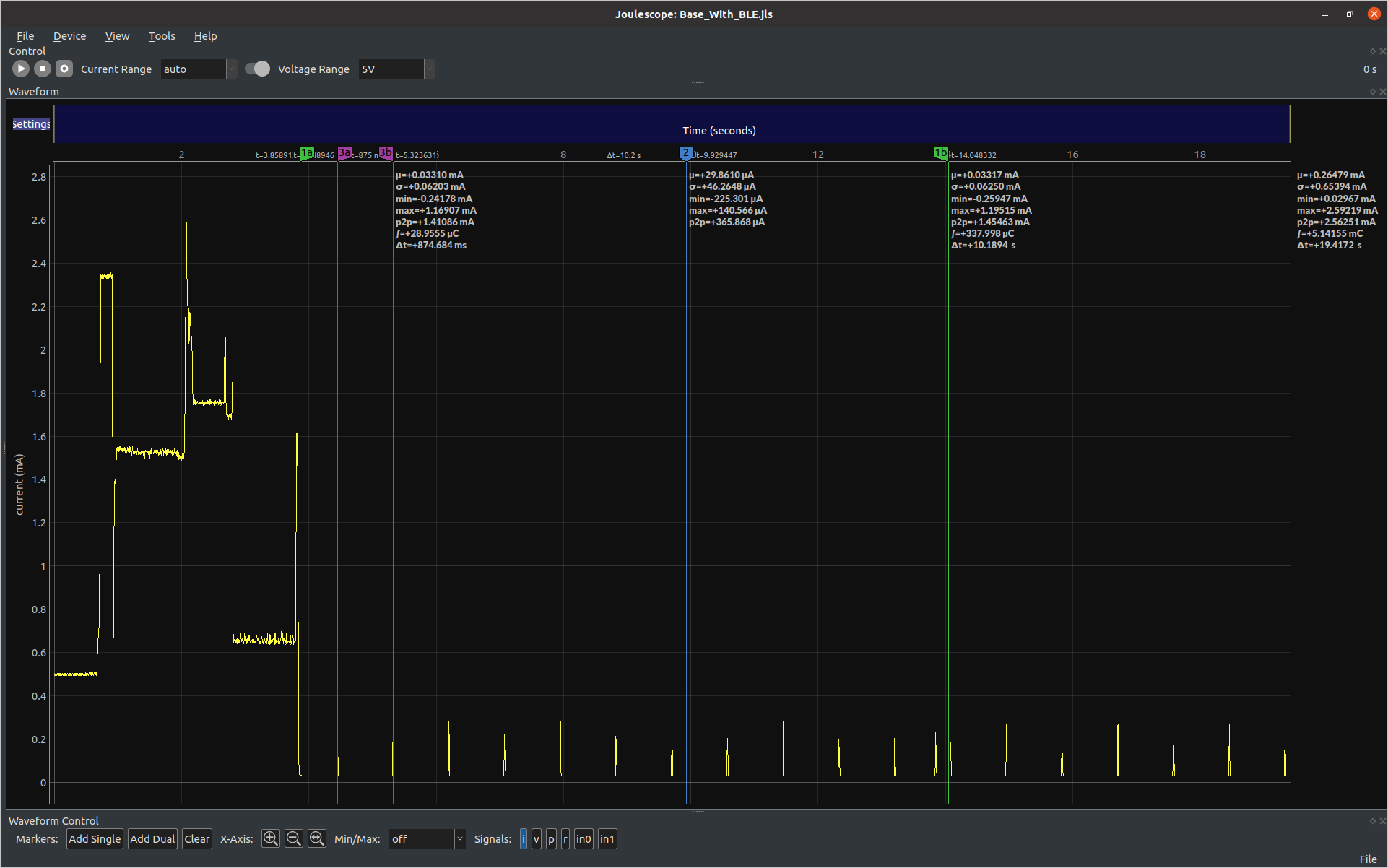
We see that the MCU is waking up way more often, once every 874ms (markers 3a and 3b) and then we see it wake up for the 10 second RTC interrupt as well (markers 1a and 1b).
My initial thought was that the Bluetooth module had not been powered down and was waking the MCU up, so I replaced:
  if(ble){
    BLE.begin();
    BLE.end();
  }
with
  if(ble){
    Serial.printf("PWRCTRL->DEVPWRSTATUS_b.BLEL: %i\r\n", PWRCTRL->DEVPWRSTATUS_b.BLEL);
    BLE.begin();
    Serial.printf("PWRCTRL->DEVPWRSTATUS_b.BLEL: %i\r\n", PWRCTRL->DEVPWRSTATUS_b.BLEL);
    BLE.end();
    Serial.printf("PWRCTRL->DEVPWRSTATUS_b.BLEL: %i\r\n", PWRCTRL->DEVPWRSTATUS_b.BLEL);
  }
But the output was:
⸮Alarm interrupt: 2020-6⸮SparkFun RTC Low-power Alarm Example
PWRCTRL->DEVPWRSTATUS_b.BLEL: 0
PWRCTRL->DEVPWRSTATUS_b.BLEL: 1
PWRCTRL->DEVPWRSTATUS_b.BLEL: 0
Alarm interrupt: 2020-6-3 12:59:50.0
⸮Alarm interrupt: 2020-6-3 12:59:50.59
So the it appears that the bluetooth module is in fact powered down. I removed the added Serial.printf("PWRCTRL->DEVPWRSTATUS_b.BLEL: %i\r\n", PWRCTRL->DEVPWRSTATUS_b.BLEL); lines.
Next I thought the counter timer module may be the issue so I switched over to VSCode and Platformio so that I can use a debugger to help examine the relevant registers.
The CTIMER registers start at 0x40008000 and is 528 bytes in total.
Using the debugger I extracted the all of the CTIMER module registers.
Before the BLE.begin();:
  Offset: 00 01 02 03 04 05 06 07 08 09 0A 0B 0C 0D 0E 0F
40008000: 00 00 00 00 00 00 00 00 00 00 00 00 00 00 00 00   ................
40008010: 00 00 00 00 00 00 00 00 00 00 00 00 00 00 00 00   ................
40008020: 00 00 00 00 00 00 00 00 00 00 00 00 00 00 00 00   ................
40008030: 00 00 00 00 00 00 00 00 00 00 00 00 00 00 00 00   ................
40008040: 00 00 00 00 00 00 00 00 00 00 00 00 00 00 00 00   ................
40008050: 00 00 00 00 00 00 00 00 00 00 00 00 00 00 00 00   ................
40008060: 00 00 00 00 00 00 00 00 00 00 00 00 00 00 00 00   ................
40008070: 00 00 00 00 00 00 00 00 00 00 00 00 00 00 00 00   ................
40008080: 00 00 00 00 00 00 00 00 00 00 00 00 00 00 00 00   ................
40008090: 00 00 00 00 00 00 00 00 00 00 00 00 00 00 00 00   ................
400080a0: 00 00 00 00 00 00 00 00 00 00 00 00 00 00 00 00   ................
400080b0: 00 00 00 00 00 00 00 00 00 00 00 00 00 00 00 00   ................
400080c0: 00 00 00 00 00 00 00 00 00 00 00 00 00 00 00 00   ................
400080d0: 00 00 00 00 00 00 00 00 00 00 00 00 00 00 00 00   ................
400080e0: 00 00 00 00 00 00 00 00 00 00 00 00 00 00 00 00   ................
400080f0: 00 00 00 00 00 00 00 00 00 00 00 00 00 00 00 00   ................
40008100: FF FF 00 00 92 22 92 24 92 22 92 24 92 22 92 24   ÿÿ...".$.".$.".$
40008110: 00 00 00 00 12 00 00 00 00 00 00 00 00 00 00 00   ................
40008120: 00 00 00 00 00 00 00 00 00 00 00 00 00 00 00 00   ................
40008130: 00 00 00 00 00 00 00 00 00 00 00 00 00 00 00 00   ................
40008140: 01 01 00 00 FF BA F2 33 00 00 00 00 00 00 00 00   ....ÿºò3........
40008150: 78 00 00 70 00 00 00 00 00 00 00 00 00 00 00 00   x..p............
40008160: 00 00 00 00 00 00 00 00 00 00 00 00 00 00 00 00   ................
40008170: 00 00 00 00 00 00 00 00 00 00 00 00 01 00 00 00   ................
40008180: 00 00 00 00 00 00 00 00 00 00 00 00 00 00 00 00   ................
40008190: 00 00 00 00 00 00 00 00 00 00 00 00 00 00 00 00   ................
400081a0: 00 00 00 00 00 00 00 00 00 00 00 00 00 00 00 00   ................
400081b0: 00 00 00 00 00 00 00 00 00 00 00 00 00 00 00 00   ................
400081c0: 00 00 00 00 00 00 00 00 00 00 00 00 00 00 00 00   ................
400081d0: 00 00 00 00 00 00 00 00 00 00 00 00 00 00 00 00   ................
400081e0: 00 00 00 00 00 00 00 00 00 00 00 00 00 00 00 00   ................
400081f0: 00 00 00 00 00 00 00 00 00 00 00 00 00 00 00 00   ................
40008200: 00 00 00 00 00 00 00 00 00 00 00 00 00 00 00 00   ................
And after the BLE.end();:
  Offset: 00 01 02 03 04 05 06 07 08 09 0A 0B 0C 0D 0E 0F
40008000: 00 00 00 00 00 00 00 00 00 00 00 00 00 00 00 00   ................
40008010: 00 00 00 00 00 00 00 00 00 00 00 00 00 00 00 00   ................
40008020: 00 00 00 00 00 00 00 00 00 00 00 00 00 00 00 00   ................
40008030: 00 00 00 00 00 00 00 00 00 00 00 00 00 00 00 00   ................
40008040: 00 00 00 00 00 00 00 00 00 00 00 00 00 00 00 00   ................
40008050: 00 00 00 00 00 00 00 00 00 00 00 00 00 00 00 00   ................
40008060: 00 00 00 00 00 00 00 00 00 00 00 00 00 00 00 00   ................
40008070: 00 00 00 00 00 00 00 00 00 00 00 00 00 00 00 00   ................
40008080: 00 00 00 00 00 00 00 00 00 00 00 00 00 00 00 00   ................
40008090: 00 00 00 00 00 00 00 00 00 00 00 00 00 00 00 00   ................
400080a0: 00 00 00 00 00 00 00 00 00 00 00 00 00 00 00 00   ................
400080b0: 00 00 00 00 00 00 00 00 00 00 00 00 00 00 00 00   ................
400080c0: 00 00 00 00 00 00 00 00 00 00 00 00 00 00 00 00   ................
400080d0: 00 00 00 00 00 00 00 00 00 00 00 00 00 00 00 00   ................
400080e0: 00 B4 00 00 00 00 00 00 FF 6F 00 00 8D 01 0D 02   .´......ÿo......
400080f0: 00 00 00 00 00 00 00 00 00 00 00 00 00 00 00 00   ................
40008100: FF FF 00 00 92 22 92 24 92 22 92 24 92 22 92 24   ÿÿ...".$.".$.".$
40008110: 00 00 00 00 12 00 00 00 00 00 00 00 00 00 00 00   ................
40008120: 00 00 00 00 00 00 00 00 00 00 00 00 00 00 00 00   ................
40008130: 00 00 00 00 00 00 00 00 00 00 00 00 00 00 00 00   ................
40008140: 01 01 00 00 A2 45 0F 48 00 00 00 00 00 00 00 00   ....¢E.H........
40008150: 78 00 00 70 00 00 00 00 00 00 00 00 00 00 00 00   x..p............
40008160: 00 00 00 00 00 00 00 00 00 00 00 00 00 00 00 00   ................
40008170: 00 00 00 00 00 00 00 00 00 00 00 00 01 00 00 00   ................
40008180: 00 00 00 00 00 00 00 00 00 00 00 00 00 00 00 00   ................
40008190: 00 00 00 00 00 00 00 00 00 00 00 00 00 00 00 00   ................
400081a0: 00 00 00 00 00 00 00 00 00 00 00 00 00 00 00 00   ................
400081b0: 00 00 00 00 00 00 00 00 00 00 00 00 00 00 00 00   ................
400081c0: 00 00 00 00 00 00 00 00 00 00 00 00 00 00 00 00   ................
400081d0: 00 00 00 00 00 00 00 00 00 00 00 00 00 00 00 00   ................
400081e0: 00 00 00 00 00 00 00 00 00 00 00 00 00 00 00 00   ................
400081f0: 00 00 00 00 00 00 00 00 00 00 00 00 00 00 00 00   ................
40008200: 00 80 00 00 00 80 00 00 00 00 00 00 00 00 00 00   ................
Then diff these:
--- Before_BLE.txt	2022-07-13 09:59:10.454545196 +1000
+++ After_BLE.txt	2022-07-13 09:59:44.962856425 +1000
@@ -13,13 +13,13 @@
 400080b0: 00 00 00 00 00 00 00 00 00 00 00 00 00 00 00 00   ................
 400080c0: 00 00 00 00 00 00 00 00 00 00 00 00 00 00 00 00   ................
 400080d0: 00 00 00 00 00 00 00 00 00 00 00 00 00 00 00 00   ................
-400080e0: 00 00 00 00 00 00 00 00 00 00 00 00 00 00 00 00   ................
+400080e0: 00 B4 00 00 00 00 00 00 FF 6F 00 00 8D 01 0D 02   .´......ÿo......
 400080f0: 00 00 00 00 00 00 00 00 00 00 00 00 00 00 00 00   ................
 40008100: FF FF 00 00 92 22 92 24 92 22 92 24 92 22 92 24   ÿÿ...".$.".$.".$
 40008110: 00 00 00 00 12 00 00 00 00 00 00 00 00 00 00 00   ................
 40008120: 00 00 00 00 00 00 00 00 00 00 00 00 00 00 00 00   ................
 40008130: 00 00 00 00 00 00 00 00 00 00 00 00 00 00 00 00   ................
-40008140: 01 01 00 00 FF BA F2 33 00 00 00 00 00 00 00 00   ....ÿºò3........
+40008140: 01 01 00 00 A2 45 0F 48 00 00 00 00 00 00 00 00   ....¢E.H........
 40008150: 78 00 00 70 00 00 00 00 00 00 00 00 00 00 00 00   x..p............
 40008160: 00 00 00 00 00 00 00 00 00 00 00 00 00 00 00 00   ................
 40008170: 00 00 00 00 00 00 00 00 00 00 00 00 01 00 00 00   ................
@@ -31,5 +31,5 @@
 400081d0: 00 00 00 00 00 00 00 00 00 00 00 00 00 00 00 00   ................
 400081e0: 00 00 00 00 00 00 00 00 00 00 00 00 00 00 00 00   ................
 400081f0: 00 00 00 00 00 00 00 00 00 00 00 00 00 00 00 00   ................
-40008200: 00 00 00 00 00 00 00 00 00 00 00 00 00 00 00 00   ................
+40008200: 00 80 00 00 00 80 00 00 00 00 00 00 00 00 00 00   ................
Lets use VScode to help decode the registers:
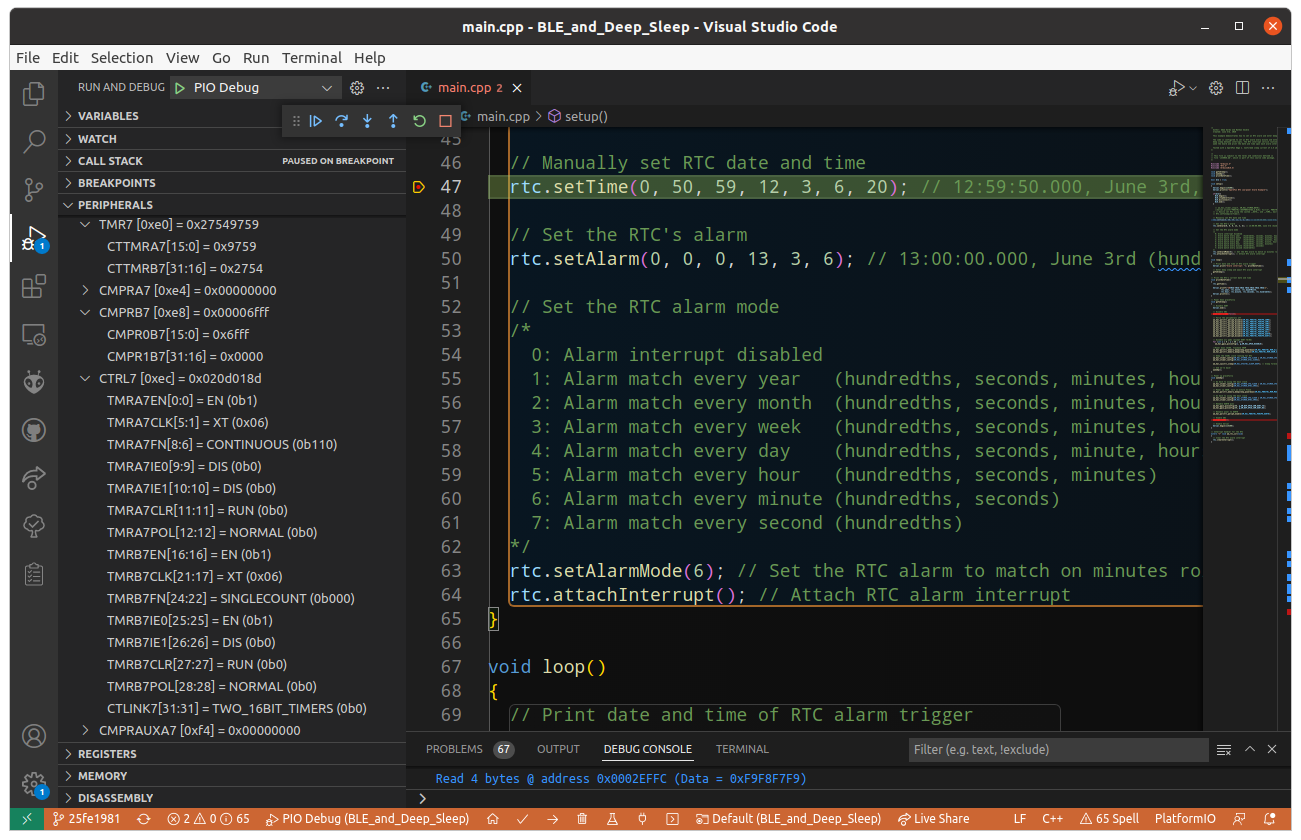
In our diff we see the first changes at 0x400080e0 and we can see in the screenshot above that we have TMR7 [0xe0] (which is the register at 0x400080e0).
From the datasheet for the the TMRx registers: "This register holds the running time or event count", so it look like Timer7 is active.
Our next change in the diff occurs at 0x400080e8 which is register CMPRB7 (datasheet description "This contains the Compare limits for timer 7 B half.") with the decoded values of CMPROB7 = 0x6fff and CMPR1B7 = 0x0000. If we look at the next register CTRL7 we can see that the clock source (for both) is set to XT which has a frequency of 32768 Hz. So if we take the value in CMPROB7 and divide it by our clock frequency we get 0.874 which happens to be the same frequency that the MCU is waking up at. Yay! it looks like TIMER7B is responsible for waking our MCU up.
So all we need to do is disable TIMER7 B so we replace this:
  if(ble){
    BLE.begin();
    BLE.end();
  }
with this:
  if(ble){
    BLE.begin();
    BLE.end();
    am_hal_ctimer_stop(7, AM_HAL_CTIMER_TIMERB);
  }
then compile and run this and the output is:
SparkFun RTC Low-power Alarm Example
Alarm interrupt: 2020-6-3 12:59:50.0
⸮Alarm interrupt: 2020-6-3 13:0:0.1
and a power trace of:
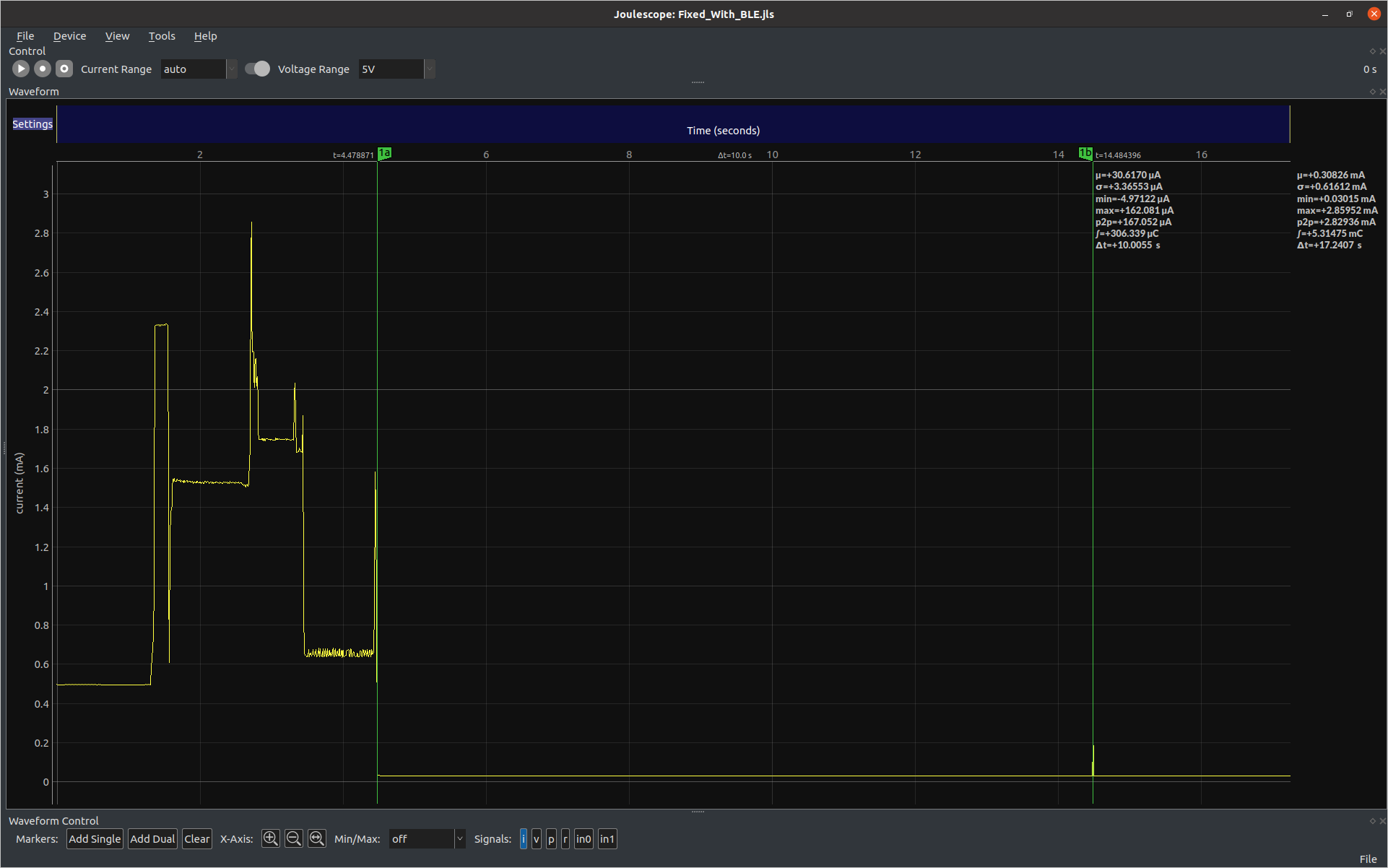
In summary, it seems that the code called by BLE.begin(); starts Timer 7B and then BLE.end(); fails to stop it once everything is done. I am unsure if shutting town Timer 7B will break anything else in the system but it does fix my MCU sleep issue.
