sourcefrog
More colors for function paths in terminal output
Right now, the entire function path is highlighted with a single color in the terminal output. This makes it difficult to read, especially when the path is deeply nested or contains complex <impl Trait for T> parts.
I propose using the basic set of ANSI escape code colors to highlight different parts of the path, similar to how an IDE would. I believe the most important parts to distinguish by color are the brackets (<>) and double colons (::). Nice "could haves" would be different colors for keywords (impl, for), module names, type names and function names.
As far as I know, it should be possible to identify these parts of the path context-free, with the exception of type names and function names (here its possible to make some pretty good guesses though).

We should have enough data from the AST to discern the different types in most cases. We probably don't need to start from the string form.
It might be especially helpful to highlight or bold the name of the type on which the function is implemented, and the name of the function, as they can be lost in long strings.
This could be added here https://github.com/sourcefrog/cargo-mutants/blob/93a26a0d5468b552f6a58a12e2a98ca6881dff1f/src/console.rs#L324-L338 probably by splitting out a style_function_name.
It might help if you post some especially long examples.

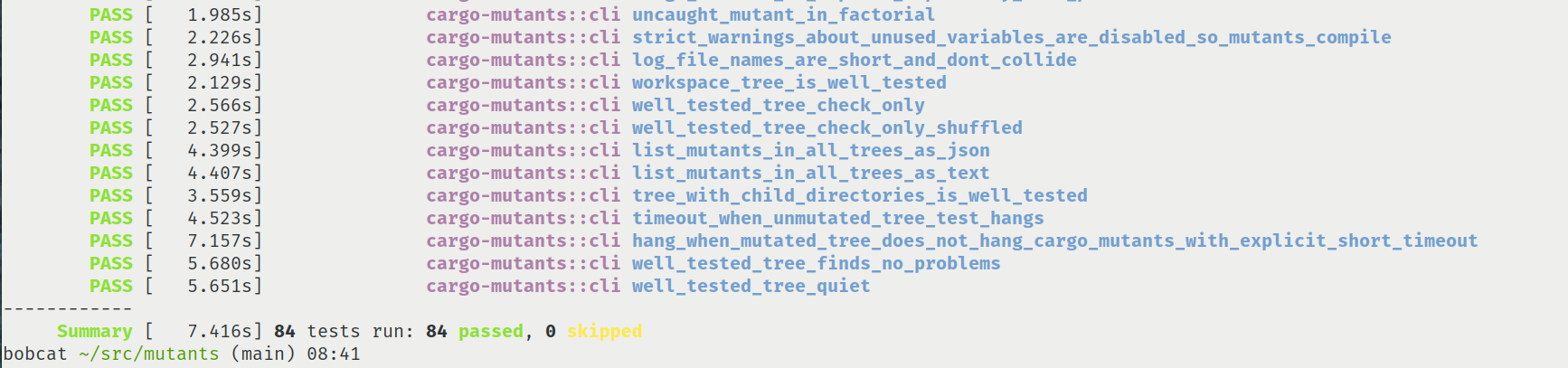
cargo-nextest has an interesting output format that can also be inspiration: in particular the pass/fail and the timing is all vertically aligned to the left of the screen. I do think we probably want the file/line at the far left so that it can be understood by editors though.