

 solvespace
Multiple "Message" dialogs when deleting elements with dependant constraints (minor, UI)
Deleting elements that other elements are constrained to, this message is shown:
---------------------------
SolveSpace - Message
---------------------------
Additional sketch elements were deleted, because they depend on the element that was just deleted explicitly.

These include:
     0 requests
     2 constraints
     0 groups

Choose Edit -> Undo to undelete all elements.
---------------------------
OK
---------------------------
Unfortunately I can't provide a minimal example of this, but sometimes this automatic deletion appears to cause another automatic deletion and a corresponding message dialog. I've only noticed because the second message takes the focus, so hitting Return to accept with OK does not work and I have to use the mouse...
This could be resolved by restoring focus to the other dialogs, or by catching all automatic deletions/dependencies before showing the dialog.

@gnbl what OS is this on? I thought those message boxes were modal so there couldn't be 2 at the same time. An example could be helpful.

windows-openmp 3.0~b334996c on Windows 10 64 bit.
Sorry, I tried to come up with an example, but unsuccessful so far. Next time it happens, I'll take a closer look and will attempt to reproduce in minimal example file.
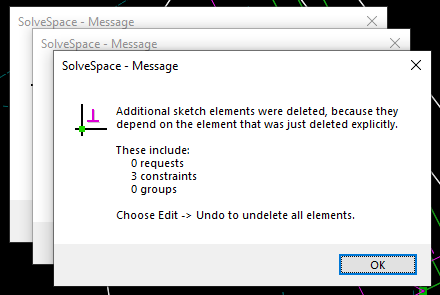
Here's what it looks like, even three dialogs:
 Cannot reproduce in example sketch.