

 snipe
snipe
Added Components information: Print "Checkout to" user (through Assets), for faster find of the Location of the component
Description
Add several features to simplify navigation and search of checked-out components.
-
On the Component page, inside assets grid show "Checkout to" column, where you can see current user of this asset.
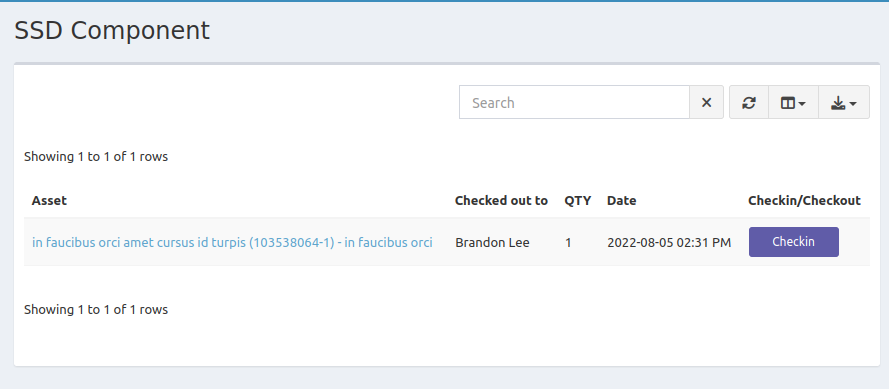
-
On the User details page, adds new tab, which shows all Components, which checkout to his current assets.
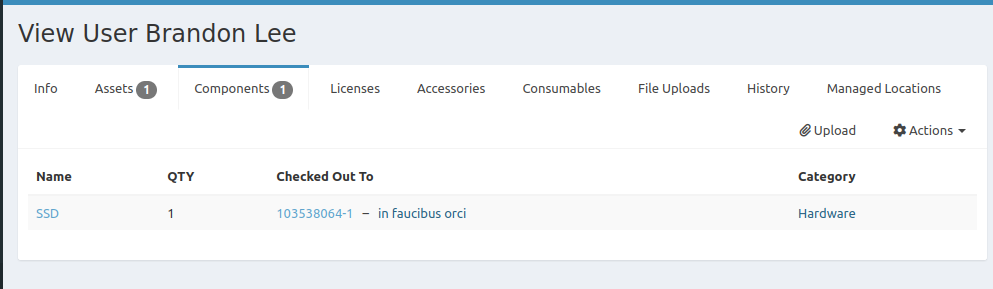
Type of change
- [x] New feature (non-breaking change which adds functionality)
How Has This Been Tested?
Please describe the tests that you ran to verify your changes. Provide instructions so we can reproduce. Please also list any relevant details for your test configuration
- [x] Import mock users and assets. Created 2 components. Checkout 1 component to an Asset, which belongs to a User, Checkout second item on Assets, which doesn't belongs to a User - all is displayed correclty.
- [x] Open User with assets without components - see "No results" in Components tab, no counter
- [x] Open User with assets with components - see Components tab counter and a table with information inside
Test Configuration:
- PHP version: 8.0
- MySQL version: MariaDB from docker-compose stack provided
- Webserver version: nginx 1.23 (docker image)
- OS version: PHP was from docker image, based on PHP-fpm debian. My OS is Ubuntu 22.04
Checklist:
- [x] I have read the Contributing documentation available here: https://snipe-it.readme.io/docs/contributing-overview
- [x] I have formatted this PR according to the project guidelines: https://snipe-it.readme.io/docs/contributing-overview#pull-request-guidelines
- [x] My code follows the style guidelines of this project
- [x] I have performed a self-review of my own code
- [x] I have commented my code, particularly in hard-to-understand areas - Nope, everything is super simple
- [ ] I have made corresponding changes to the documentation - Not required as for me
- [ ] My changes generate no new warnings - Nope
- [ ] I have added tests that prove my fix is effective or that my feature works - Nope
- [ ] New and existing unit tests pass locally with my changes - Didn't try

💖 Thanks for this pull request! 💖
We use semantic commit messages to streamline the release process and easily generate changelogs between versions. Before your pull request can be merged, you should update your pull request title to start with a semantic prefix if it doesn't have one already.
Examples of commit messages with semantic prefixes:
-
Fixed #<issue number>: don't overwrite prevent_default if default wasn't prevented -
Added #<issue number>: add checkout functionality to assets -
Improved Asset Checkout: use new notification method for checkout
Things that will help get your PR across the finish line:
- Document any user-facing changes you've made.
- Include tests when adding/changing behavior.
- Include screenshots and animated GIFs whenever possible.
We get a lot of pull requests on this repo, so please be patient and we will get back to you as soon as we can.
![welcome[bot] avatar](https://avatars.githubusercontent.com/in/4141?v=4 "Published by a pub.dev verified publisher")
I'm a little unclear here - components cannot be checked out to users. Sorry if I'm misunderstanding :(

Hi @snipe ,
I'm a little unclear here - components cannot be checked out to users. Sorry if I'm misunderstanding :( Let me explain a bit more than.
Imagine the case:
- You have some outdated component (for example old HDD drives), which has to be replaced to new SSD
- They are already installed somewhere. All you can see - related assets.
- These assets are already checked out to real users.
- So you need to find out all users, which has outdated components, notify them and plan the replacement
So we added a column, which shows users who own the assets of that component, if there are such users. And opposite operation - we add a tab on the User page to showcase which additional components have been installed in the assets he used.
This is very useful, when you open a User page - you can see all his assets AND you can check additional components installed inside, without leaving the page