

 snapappointments
Removing the focus border from the select box when clicking....
Hello, I am aware that this might not be the place to ask, but not yet having found a solution, asking here.
Essentially, I am trying to remove the ugly black focus border that surrounds my select listbox when clicking or putting focus on it :

This jsfiddle shows my issue, with my version jQuery / Bootstrap*
https://jsfiddle.net/toheyr8c/
Ive tried placing the outline:0 or none, etc on either .selectpicker and .customSelect selectors, but nothing will remove that black focus border!
Thanks for any inputs. Much appreciated. Pat

I ran into a similar issue and was able to solve it with a combination of tweaks.
- Move the form-control class from class attribute to the data-style-base attribute.
- Define the data-style attribute as empty string.
- Add the following styles:
.bootstrap-select .form-control:focus {
	outline: 0px none #fff !important;
}

.bootstrap-select .form-control > div.filter-option:focus {
	outline: 0px none #fff !important;
}

.bootstrap-select .form-control > div.filter-option > div.filter-option-inner:focus {
	outline: 0px none #fff !important;
}

.bootstrap-select .form-control > div.filter-option > div.filter-option-inner > div.filter-option-inner-inner:focus {
	outline: 0px none #fff !important;
}
Updated example: https://jsfiddle.net/3Lgx6fe0/

@jarretttaylor YES!! Thank you for this ! It solved my issue :)
Small notes however :
-
You don't HAVE to define the data-style attribute as empty string.: it just needs to be defined. Personally, I have a "customSelect" class in there that styles the text color.
-
Also, removing the form-control class broken the width of my select input. Had to also leave the form-control class in there, otherwise :
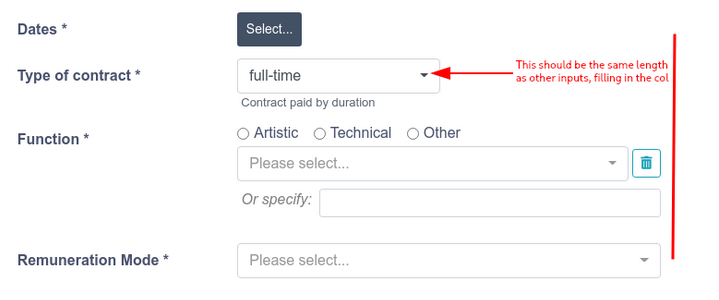
Regards, Patrick
@ravenlost Glad that worked for you. And thank you for updating this post with corrections. I suspect others have faced the same issue that we did and could benefit from this post.
When I was facing the issue originally, I stopped working on it when the outline disappeared. As a result. my version may contain some unnecessary changes as you noted (e.g. styleBase and maybe !important on CSS properties).
Any updates on removing the outline in the new version? It looks very bad and the default dropdowns of Bootstrap also don't have them.
