
KamaliDebug
 KamaliDebug copied to clipboard
 smkplus
Easy way to Debug Colorful texts in Unity Console
KamaliDebug
Easy way to Debug Colorful Texts in Unity Console
Example 1

    private void Start()
    {
    DebugX.Log(@"I:orange:b; love:red:b; Unity:yellow:b;
    ColorfullllllllllllllllText:rainbow:b;");

    DebugX.Log("sniper:orange:b; bug:green:b;");

    }
Example 2
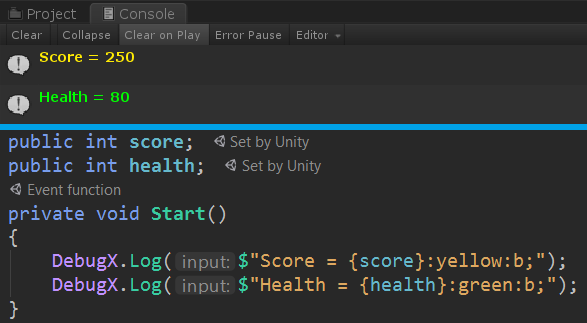
using UnityEngine;
using KamaliDebug;
public class Example : MonoBehaviour
{
    public int score;
    public int health;
    private void Start()
    {
        DebugX.Log($"Score = {score}:yellow:b;");
        DebugX.Log($"Health = {health}:green:b;");
    }
}
Syntax
(Text or Emoji):Color:TextStyle;
Font Color
DebugX.Log("Hello world:green;");

Font Style
- b = Bold
- i = Italic
DebugX.Log("Hello:b; World:i;");

Emoji
DebugX.Log("love:red:b; love:red:b; love:red:b;");

Complex
DebugX.Log("Hello:yellow:b; world:red:b;");

ToDo:
1.optimization ( I call a regex per Debug.LogX I should prevent this in build).
2.Add more fontstyles , colors and emojis
3.Make ScriptableObject for Colors
 smkplus