

 smallstep
step.exe breaks Windows 10 console control key functionality
step.exe breaks Windows 10 console control key functionality
Windows 10 console control keys functionality is broken after executing step.exe
History access is broken as a result <Up arrow> prints ^[[A instead of the last command
Executing doskey command restores original functionality
step/cli v0.14.0-rc.3 Windows 10 Version 1903 (OS Build 18362.657)
To reproduce:
step.exe certificate inspect any.crt
<Up Arrow>

Hi @dpaolino,
We weren't able to reproduce the issue using the same step/cli version on the Windows release listed below. What terminal were you using @dpaolino?
Name             : ConsoleHost
Version          : 5.1.18362.628
InstanceId       : d83ceddc-0c5a-43d4-b3c6-63d8f1b40610
UI               : System.Management.Automation.Internal.Host.InternalHostUserInterface
CurrentCulture   : en-US
CurrentUICulture : en-US
PrivateData      : Microsoft.PowerShell.ConsoleHost+ConsoleColorProxy
DebuggerEnabled  : True
IsRunspacePushed : False
Runspace         : System.Management.Automation.Runspaces.LocalRunspace

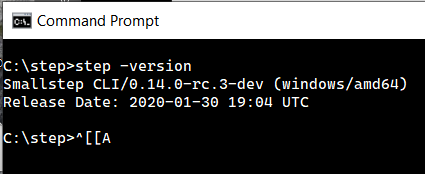
Hi @dpaolino. Thanks for the info. step.exe on Windows is currently experimental. We do not support cmd.exe as it's lacking unicode support and has other shortcomings. We recommend to either use PowerShell or the upcoming Windows Terminal.
The same issue is seen from python interpreter when running from powershell. The only recourse is to close powershell.
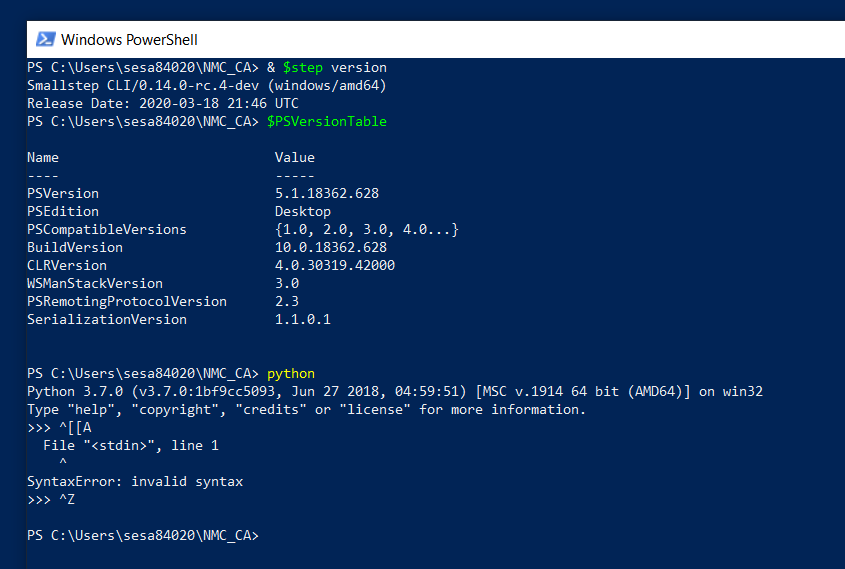
^[[A appears when <Up Arrow> is typed
Is this still wontfix?
The issue is present, even if using windows terminal.


I'm going to reopen this because there is definitely something fishy going on with control characters in Windows. I suspect this is either character encoding issues (I believe we assume UTF8) or something related to terminal highlighting. My guess is it's the latter. That code is complex, and... not great... it lives in https://github.com/smallstep/cli/blob/master/usage/renderer.go. We use this library for color codes, but it looks like there are other control characters sprinkled in for things like tabling.
Minimally, I'd like to try reproducing this again. Looks like we weren't able to last time.

Using version 0.15.16 of step cli for windows both cmd and windows terminal have the described problem. PowerShell however does not experience any problems with the up or down arrows after running any step ... commands. Using PowerShell seems to be a viable work around to this issue. Tested on: Windows Version: 20H2 OS Build: OS build: 19042.1052

This is the code that made windows, perhaps only PowerShell to work with control characters: https://github.com/smallstep/cli/blob/8b893628b28e1e66b7b83d60b025f5cfa1474adc/utils/sysutils/sysutils_windows.go#L11-L25
It's very possible that the new windows terminal supports them by default and we need to detect it and ignore this code.

Related windows docs https://docs.microsoft.com/en-us/windows/console/setconsolemode