

 sleuthkit
Failure importing image file
Hi, I am trying to import an E01 image from a Windows pc inside Autopsy 4.19 The import dialog completes successfully, but the main window of the application remains completely gray: the data sources and content viewer part of the application doesn't appear at all. When i try to close the application, it gets stuck on the "Saving case" dialog, and i need to force close the application using task manager. I've found this error in the logs:
SEVERE [global]
java.lang.NumberFormatException: For input string: "S"
	at java.lang.NumberFormatException.forInputString(NumberFormatException.java:65)
	at java.lang.Integer.parseInt(Integer.java:580)
	at java.lang.Integer.valueOf(Integer.java:766)
	at java.util.Optional.map(Optional.java:215)
	at org.sleuthkit.datamodel.WindowsAccountUtils.isWindowsSpecialSid(WindowsAccountUtils.java:156)
	at org.sleuthkit.datamodel.WindowsAccountUtils.getWindowsRealmAddress(WindowsAccountUtils.java:241)
	at org.sleuthkit.datamodel.OsAccountRealmManager.getWindowsRealm(OsAccountRealmManager.java:206)
	at org.sleuthkit.datamodel.OsAccountRealmManager.getWindowsRealm(OsAccountRealmManager.java:169)
	at org.sleuthkit.datamodel.OsAccountManager.getWindowsOsAccount(OsAccountManager.java:1013)
	at org.sleuthkit.datamodel.TskCaseDbBridge.addBatchedFilesToDb(TskCaseDbBridge.java:380)
	at org.sleuthkit.datamodel.TskCaseDbBridge.finish(TskCaseDbBridge.java:114)
	at org.sleuthkit.datamodel.SleuthkitJNI$CaseDbHandle$AddImageProcess.finishAddImageProcess(SleuthkitJNI.java:631)
	at org.sleuthkit.datamodel.SleuthkitJNI$CaseDbHandle$AddImageProcess.run(SleuthkitJNI.java:587)
	at org.sleuthkit.autopsy.casemodule.AddImageTask.runAddImageProcess(AddImageTask.java:167)
	at org.sleuthkit.autopsy.casemodule.AddImageTask.run(AddImageTask.java:117)
[catch] at java.lang.Thread.run(Thread.java:748)
If i try to reload the case, the data source and content sections will be shown, but the structure of the filesystem is missing a lot of items:
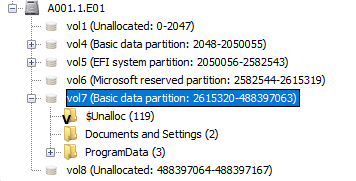
Since the error seems related to the "OS Accounts" section, here's another screenshot:

I also experience another problem on this image, I don't know if this last problem is related to the first one.
While running the photorec ingest module will fail almost immediately reporting a log of errors:
 If i try to "Extract unallocated space to single files" the progressbar gets immediately to 100%, and only a single empty file gets created.

Looks like the java exception has already been addressed here: https://github.com/sleuthkit/sleuthkit/commit/ea8ebdb7e816abec3dfae15b5cc0f8e1707745b2
I have experienced exactly the same error and problem (importing the E01). Reproducible with the MUS2019CTF E01 file - https://drive.google.com/drive/u/0/folders/1KUlZUl4Sy2JzgbuRW-oHjIGFClY2bl75

Yeah I was successful using 4.19.0.
On Wed, 13 Apr 2022, 18:40 ctrlaltca, @.***> wrote:
A temporary workaround is to import the image using Autopsy 4.17
— Reply to this email directly, view it on GitHub https://github.com/sleuthkit/autopsy/issues/7595#issuecomment-1097718008, or unsubscribe https://github.com/notifications/unsubscribe-auth/ABNYEQIP6WHL7XTZLDHS4B3VE2B7FANCNFSM5S43NZWA . You are receiving this because you are subscribed to this thread.Message ID: @.***>