

 sleuthkit
Linux: Library not found in jar (libtsk_jni) for RPI
Hello, Having an Issue with loading the Modules within Autopsy. I am have installed and compiler the Sleuthkit 4.9.0 and Autopsy 4.15.0 onto RaspiOS on the 64 bit version of this OS. I am able to get Autopsy to load, but this error appearing in the terminal:
$ ./bin/autopsy
Library not found in jar (libtsk_jni)
SleuthkitJNI: failed to load libtsk_jni
None of the modules load. Attempting to load the Autopsy-Core module this error displays each time:
Activation failed: Not all requested modules can be enabled: [StandardModule:org.sleuthkit.autopsy.core jarFile: /home/pi/autopsy-4.15.0/autopsy/modules/org-sleuthkit-autopsy-core.jar]
I have attempted to research this error, but was not able to locate a soltuion. Only similar solution was from the Issue:3829 in this GitHub:
https://github.com/sleuthkit/autopsy/issues/3829
This solution only works for Arch based linux distrubtions. As RaspiOS is debian based, and would like to ask for some help with this issue.
(Autopsy on ARM64 - Java issues)
https://sourceforge.net/p/sleuthkit/mailman/sleuthkit-users/thread/CAMDiSGTh-qfbmLJgkZDQV8C5zE2y7K-Y1M3%3DSEwMH-GXaaTdiA%40mail.gmail.com/#msg37045547

This is likely caused by there being no TSK JNI library (libtsk_jni) in the JAR file for your architecture. What does 'uname -a' produce on your system?
You can check the contents of the TSK JAR file with 'unzip -l sleuthkit-4.9.0.jar'. Here is what the NATIVELIBS folder looks like for a Linux build.


I just wanted to add to this as I have done some testing myself...it appears the package available for arm64 is called bellsoft-java8 and NOT bellsoft-java8-full. I suspect the difference between the full and non-full version is the culprit here. Can anyone advise on the difference between the 2 packages and whether it is posisble to manually install some extra libraries/packages to get around this issue?

@teescdf You may be right but I'm not convinced it's the difference between the full and non-full version that's causing the issue reported here. The difference between the 2 is that the full version contains JavaFX and the non-full version doesn't. If it were an issue related to JavaFX being missing I would expect to see a different error message.
@esaunders Thanks for the quick response!
OK, so I get the exact same error as @fisherd80 and the reason I'm suggesting Java packages are the culprit is that I followed the same procedure to install on both an ARM64 RPi and an x64 VM. The only real difference in what I did was the Bellsoft repositories, as shown below (differences highlihgted in bold for convenience)...
On ARM64 the commands were:
- wget -q -O - https://download.bell-sw.com/pki/GPG-KEY-bellsoft | sudo apt-key add -
- echo "deb [arch=arm64] https://apt.bell-sw.com/ stable main" | sudo tee /etc/apt/sources.list.d/bellsoft.list
- sudo apt update
- sudo apt install bellsoft-java8
No bellsoft-java8-full package exists in the ARM64 repos.
on x64 (VM), the commands were:
- wget -q -O - https://download.bell-sw.com/pki/GPG-KEY-bellsoft | sudo apt-key add -
- echo "deb [arch=amd64] https://apt.bell-sw.com/ stable main" | sudo tee /etc/apt/sources.list.d/bellsoft.list
- sudo apt update
- sudo apt install bellsoft-java8-full
Autopsy runs fine in my x64 VM, but not on the ARM architecture.
The rest of the commands (derived from https://github.com/sleuthkit/autopsy/blob/develop/Running_Linux_OSX.txt) are common to both routes. One other thing is that I also had to install the "ant" package to get the JNI bindings to be recognised during ./configure of sleuthkit but this was required on both and it works fine in the x64 VM, so I suspect this is not the issue?
Thanks again!
@teescdf What do the contents of your sleuthkit-4.9.0.jar file look like? In particular what does the NATIVELIBS directory look like?
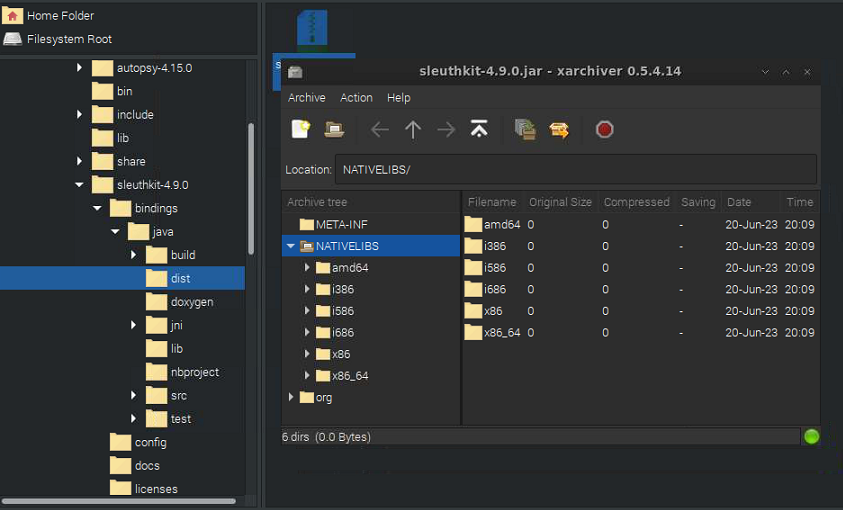
Yeah, I believe that is the root of the problem. The TSK Java bindings build process does not handle arm64.
OK, so is there a way round this? I've looked at the libtsk_jni.so file in each architecture and it appears identical (extracted each one and hashed to check identical).
So I tried creating an ARM64 folder in the NATIVELIBS folder within the JAR file containing the appropriate files and dropped this back into the right place (plus I reran the unix_setup.sh step) but with no luck - still get the same error.
Anyone have any ideas?
Afternoon,
Here is the results for uname -a.
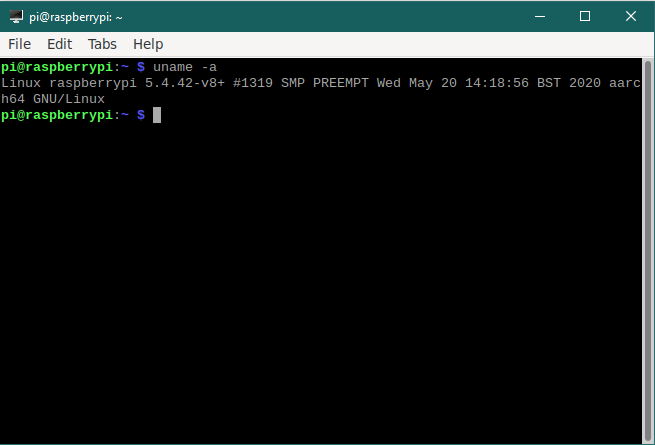
I did the same steps done by @teescdf before posting to see if it was just missing the files for this JAR file. I am currently attempting to find alterative to bellsoft to see if another java runtime will contain the neccessary files. No such luck a this time. I have attempted to run using OpenJDK but thhis failed.
OK! By way of an update, I renamed the arm64 folder to aarch64 (within the NATIVELIBS) folder and we have some progress!
On launch, my Terminal now shows:
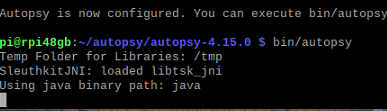
And Autopsy opens successfully but doesn't prompt to create new/open case like normal:

When creating a case (via the file menu) I get this error:
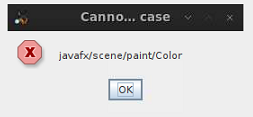
And it then prompts to create a new case as it would normally do when opened for the first time. Going through the wizard then produces this error:
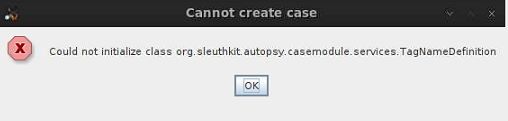
I'm wondering if my kludge of creating the folder inside the JAR file is to blame? I did notice that it has attributes different from the others folders present:
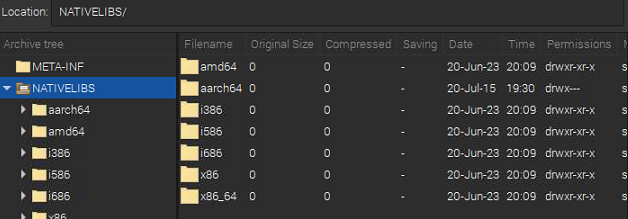
Does anyone know how I can go about changing the attributes within the JAR file?
And there's also mention of JavaFX in the errors above, which leads me back to the previous discussion of bellsoft-java8 vs bellsoft-java8-full.
Any thoughts?
EDITED: for clarity and to fix typos!
@teescdf Yes, you are now seeing the messages I would expect to see for a missing JavaFX. You will need to find a version of OpenJFX 8 for ARM. I know that earlier versions of the BellSoft OpenJDK distribution (prior to 1.8.0.242) didn't distinguish between "full" and "not full", i.e. those earlier distributions came with Java FX. Maybe you can track down an earlier version for ARM.
@esaunders thanks for the reply. So, there are older versions in the repos:
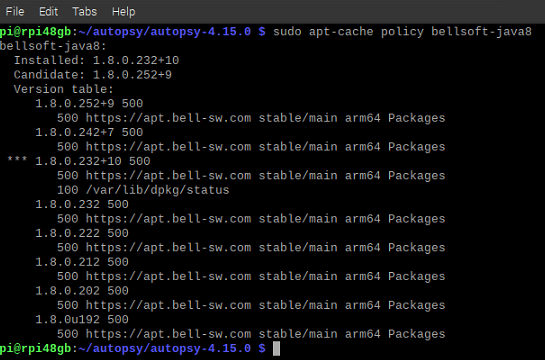
If I manually installed an earlier version, such as v 1.8.0.232+10 that should work? I tried a rollback which was unsuccessful, but I'm still seeing references to v1.8.0.252 in java -version and javac -version
I'm going to reinstall the OS and try from scratch. Thanks again for all your help!
After installing an earlier version I believe you can confirm that it includes JavaFX by looking for the jfxrt.jar file under $JAVA_HOME/jre/lib/ext
OK. so by way of an update, I installed v1.8.0.232 with the command:
sudo apt install bellsoft-java8=1.8.0.232 bellsoftjava8-runtime=1.8.0.232
and then locked them at this version using:
sudo apt-mark hold bellsoft-java8 bellsoft-java8-runtime
but it's still not working - same errors as before.
java -version give me: $ java -version openjdk version "1.8.0_232" OpenJDK Runtime Environment (build 1.8.0_232-BellSoft-b09) OpenJDK 64-Bit Server VM (build 25.232-b09, mixed mode)
javac -version gives me: $ javac -version javac 1.8.0_232
No mention of JavaFX, and no sign of the jfxrt.jar in the folder you mentioned:
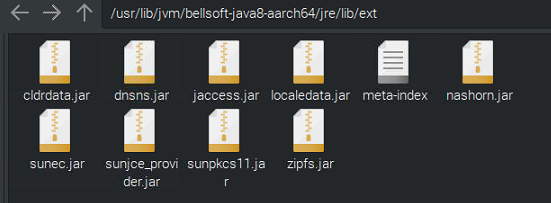
Indeed, no sign of it anywahere on my system (I ran find . -name jfxrt* from / and got nothing back)
so it looks like a manual install will be required?
Thanks for the ongoing help!
Yeah, I guess they didn't include it in earlier versions for ARM. Don't know if any of the following Ubuntu packages at https://launchpad.net/ubuntu/bionic/arm64/openjfx will do the trick for you. Just remember to get a Java 8 version. Good luck.
@esaunders thanks for this! Alas, I've been wading through dependency nightmares so have given up on that particular package.
I've downloaded JavaFX for ARM from gluon (https://gluonhq.com/products/mobile/javafxports/get/) and tried copying the files into the relevant folders within JAVA_HOME. Autopsy launched properly, prompted for central repository creation and then presented me with the expected case menu:
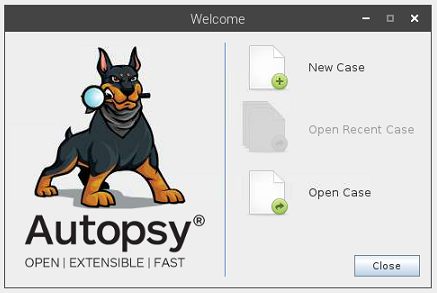
However I'm getting some errors in Terminal:
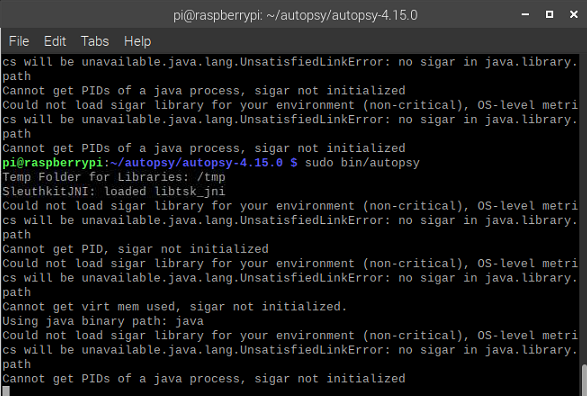
And the case creation failed anyway:
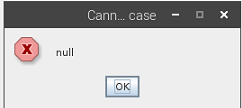
Any thoughts?
EDIT: fixed typos!
Regarding sigar not loading: Autopsy has a dependency on SIGAR (https://github.com/hyperic/sigar) which it bundles and distributes in the 'modules/lib' directory. Maybe if you find an ARM64 version of libsigar.so and drop it into an 'aarch64' directory you might get past that issue. You realize you may be fighting a losing battle here right? :-)
Right, so I found the file on ARM64 (there's a package called libhyperic-sigar-java) and installed, copied to the modules/lib folder, but stil not working. I think you may be righ tabout it being a losing battle.
So next step, is it maybe worth requesting ARM64 support be added to Autopsy officially? if so, what's the best way to go about this?
Thanks again for all your help!
You can open a feature request issue here but personally I think there would need to be a good deal of demand for it to become a priority. Feels to me like the kind of project that would be a nice student assignment :-)
What was the original motivation for running Autopsy on Raspberry Pi?
Combination of student project, and getting an ultra-cheap, lightweight, portable scene-going triage box off the ground. The idea was to create a pre-built image for RPi with lots of tools and features ready to go. Tools like guymager, regripper etc. are easy enough to install and use, but having Autopsy in there for live preview of discs over write-blocker would have been the icing on the cake.
I'll keep chipping away at things, and se ehwer eI go, but I think a feature request may be inevitable. I understand that it won't necesarily be a priority.
Thanks for all your help nonetheless!
Hello there,
Even though this problem seems to be rather old, I ran into the same Problem on Kali Linux (arm64) running on a Macbook M1. After investing about 6 hours trying , I gave up for now.
But in case, that somebody else might have the same problem, this is what I found out so far:
- you have to build TSK from source, but as pointed out in this thread, you'll probably run into the same error as me:
WARNING: Unknown module: javafx.base specified to --add-exports WARNING: Unknown module: javafx.controls specified to --add-exports WARNING: Unknown module: javafx.controls specified to --add-opens Library not found in jar (libtsk_jni) SleuthkitJNI: failed to load libtsk_jni(missing both JavaFX and the libtsk_jni for arm64/aarch64) - as opposed to the proposed solution to get the application started at least, renaming the sleuthkit-4.12.1.jar's /NATIVELIBS/ folders to both arm64 and aarch64 didn't help
- There is an early access version of JavaFX for aarch64 based linux (though unsupported), but either I moved the contents in the wrong place or installing it also doesn't help much
- There is a bellsoft-java11-full for arm64 now, but installing it and rebuilding everything also didn't change much
For now I'll just use another PC, but maybe it helps someone who runs into the same problem!

i have same probleme on kali linux on my hp victus cannot run autopsy
here is the error i have : ──(maliki㉿Maliki-club)-[/opt/autopsy-4.10.0] └─$ /home/maliki/hack/autopsy-4.21.0/bin/autopsy Picked up _JAVA_OPTIONS: -Dawt.useSystemAAFontSettings=on -Dswing.aatext=true WARNING: Unknown module: javafx.base specified to --add-exports WARNING: Unknown module: javafx.controls specified to --add-exports WARNING: Unknown module: javafx.controls specified to --add-opens Library not found in jar (libtsk_jni) SleuthkitJNI: failed to load libtsk_jni
