

 sjgray
PRGs not copying over with ZoomFloppy
For some reason when I use CBM Transfer to create a new Dnn, i enter the d64 name and add a label & ID and then.....nothing. No d64 gets created in the directory. If I leave the Dnn settings the same (new.d64) and don't set a title,id its the same.
Conversely, if I create a d64 with D64Editor, select that in the disk image of CBM Transfer and select a PRG to copy, hit the green arrow, it shows me the copy progress and, nothing.
Cant figure it out, I can read the disk contents after setting up the ZoomFloppy but just cant get it over to a d64

It sounds like the directory you are using may be write protected. Can you create other files in that directory? Are there any messages in the error log? What Windows are you using? Can you take an existing D64 and view it and copy files from inside to a local directory?

Directory is writeable, I've also tried the C root, desktop etc
I can create files fine in those
Error log attached cbmxferlog.txt
Windows 10 x64
If I try and view a D64 (used Aliens86.D64), nothing appears in the image column other than the path
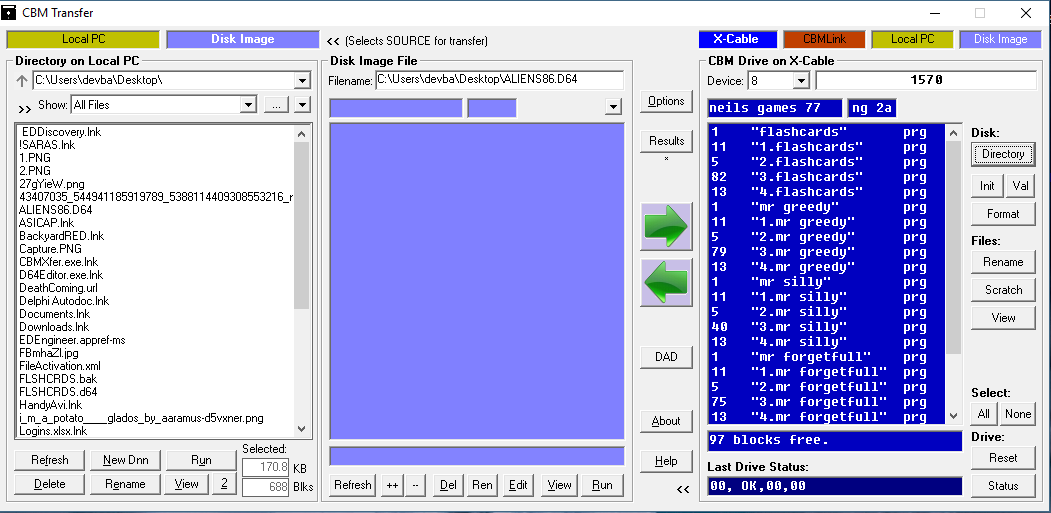
What version of C1541.EXE are you using? Is it from the latest VICE? If so, try using an older one. The new version seems to be broken. There are two log files... the command log (which you sent) and the error log "cbmxfererr.txt". Can you check the error log after each operation? Can you send me the D64 file to look at? Also remember that when transferring from left to right you need to specify the source using the gold or blue button at the top, beside the text "<< (selects source for transfer)" .
Sorry for the delay in replying
I was using the 1541.exe from vice 3.3, tried with 3.0 and that will extract to a .d64 that loads in Vice OK
For some reason however I still can't create a new file with the new Dnn button, nothing gets created and I cant view any contents of d64 files in the Disk Image file centre column
Attached the 2 log files and the extracted D64 (zipped)
neils games 77.zip cbmxfererr.txt cbmxferout.txt
The log files don't show enough info. Can you enable "log all commands" option, Then do the one operation that is not working then send me the logs again? Are you using a very long path where you are trying to create a new D64 file? If so try creating in somewhere closer to the root of the drive.
Hi,I will try with log all commands shortly. I have tried creating a new D64 in the root of C as well as other folders and still no joy
On Thu, 21 Mar 2019 at 18:06, Steve Gray [email protected] wrote:
The log files don't show enough info. Can you enable "log all commands" option, Then do the one operation that is not working then send me the logs again? Are you using a very long path where you are trying to create a new D64 file? If so try creating in somewhere closer to the root of the drive.
— You are receiving this because you authored the thread. Reply to this email directly, view it on GitHub https://github.com/sjgray/cbm-transfer/issues/3#issuecomment-475342476, or mute the thread https://github.com/notifications/unsubscribe-auth/ALVzeeFIPHC6JqsUupA67yJPu7pqDqtzks5vY8o4gaJpZM4bsHE3 .