

 sitespeedio
tpdump fails to write to NFS since version 8.6.0
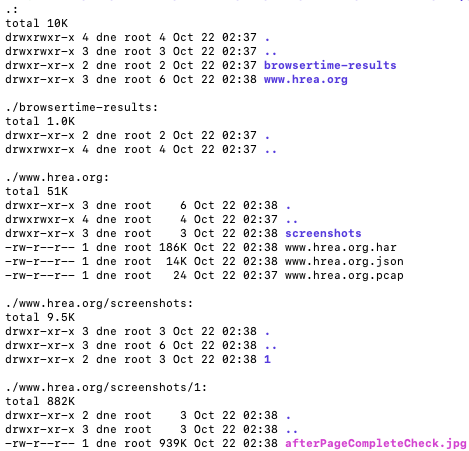
tcpdump doesn't seem to work from version 8.6.0. The captured pcap is only 24Bytes when running this command. tcpdump will successfully export the pcap when changing back to version 8.5.0 and earlier version.
docker run --rm --shm-size 2g -v /tmp/output:/browsertime sitespeedio/browsertime:8.6.0 --timeouts.browserStart 120000 --timeouts.script 170000 --firefox.includeResponseBodies all --screenshotParams.jpg.quality 100 --screenshotParams.maxSize 2000 --viewPort=1366x768 --video false --visualMetrics false --browser firefox --iterations 1 --resultDir /browsertime/en.m.wikipedia.org --output en.m.wikipedia.org --har en.m.wikipedia.org --useSameDir true --xvfb true --xvfbParams.display 3 --tcpdumpPacketBuffered --tcpdump http://wikipedia.org

Hi @phongiswindy thanks for the report. That was when we upgraded to Ubuntu 20, let me have a look.

For me it seems to work?
docker run --rm --shm-size 2g -v "$(pwd)":/browsertime sitespeedio/browsertime:8.6.0 --timeouts.browserStart 120000 --timeouts.script 170000 --firefox.includeResponseBodies all --screenshotParams.jpg.quality 100 --screenshotParams.maxSize 2000 --viewPort=1366x768 --video false --visualMetrics false --browser firefox --iterations 1 --resultDir /browsertime/en.m.wikipedia.org --output en.m.wikipedia.org --har en.m.wikipedia.org --useSameDir true --xvfb true --xvfbParams.display 3 --tcpdumpPacketBuffered --tcpdump http://wikipedia.org

Also tried with the latest version:
docker run --rm --shm-size 2g -v "$(pwd)":/browsertime sitespeedio/browsertime:10.6.1 --browser firefox --iterations 1 --tcpdumpPacketBuffered --tcpdump https://www.wikipedia.org and it works too.

24b = the file is just created and nothing written to it, I wonder what it can be? You don't get other errors? In your example you test with a redirect, if you try a non redirect URL does it work?
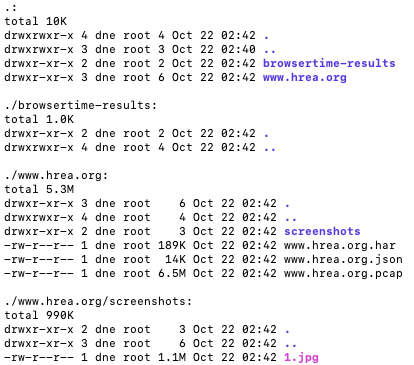
Oh, I think I found the reason. The linux permission on NFS seems to be the cause. So my -v mounting point is actually an NFS. Somehow the version 8.5.0 and earlier versions could manage to obtain proper permission to write the pcap file, while versions from 8.6.0 don't seem to obtain the proper permission to chown, thus failing to write.
This one are files generated with 8.5.0
This one are files generated with 10.6.1
If I run the two commands above with mounting point on the local disk.
8.5.0 will give this file description -rw-r--r-- 1 root root 14M Oct 22 07:41 www.hrea.org.pcap
while, 10.6.1 will give this file description -rw-r--r-- 1 systemd-resolve rdma 13M Oct 22 07:38 www.hrea.org.pcap
Which hints that NFS permission is the cause that makes 10.6.1 fails to write, because by default NFS doesn't allow chown
The change between 8.5 and 8.6 was the upgrade to Ubuntu 20.04 in the Docker container.