

 simonbengtsson
colSpan columns width problem
Using version 3.3.1 consider you have a table like this:
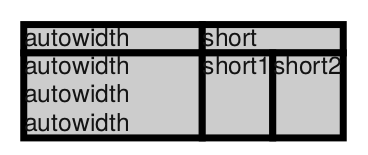
First column has specified cellWidth: 'auto' all other have cellWidth: 'wrap'
Result is as expected, the first column gets as much space as possible.
However if the text of the colSpan cell gets longer you get this:

Which introduces unnecessary space in the second column.
See also https://jsfiddle.net/7bqewL2r/
This is caused by: https://github.com/simonbengtsson/jsPDF-AutoTable/blob/8a976d2ecf18d296a037a6d6fc7977a021a1ca88/src/inputParser.ts#L246-L255
which acutally applies the width of the colSpan cell to the first column the cell spans. I found a workaround though for the example above by using the didParseCell hook:
didParseCell(data) {
   if(data.cell.colSpan > 1) {
      data.column.minWidth = 0;
      data.column.wrappedWidth = 0;
    }
}
however this does not work if the colSpan cell wants to use cellWidth: 'wrap' and maybe also in other situations.
A first idea for a proper solution goes like this:
- Store all columns a colSpan cell spans while parsing the input instead of just the first
- When calculating the necessary minimum needed space for the columns and encounter a colSpan cell, one needs to check if the colSpan cell is larger than the sum of all columns spanning and if so widen the columns. This could be done similar to the distribution of width currently applied to deal with extra space introduced by the total width of the table.
However, I probably have no time to implement this, hence the issue.
kind regards Martin
PS: thanks so much for this excellent plugin

Addendum: When dealing with colSpan cells, maybe it is also desireable to be able to define styles on the cell level instead of the column level? Otherwise, how to interpret column cellWidth styles for a colSpan cell? It spans across multiple columns, so it is not clear which to use.
colspans and rowspans didn't get much support when it comes to width distribution, currently we are working on improving the width distribution for the table to be smarter and not cut in the middle of words .. after that is implemented we will take a round with spans to improve its width distribution.


Found a work around:
fixColspanBug(): RowInput {
    const cells: RowInput = Array(12)
      .fill(null)
      .map(() => ({
        content: "",
        styles: {
          cellPadding: -2, // make it hidden
        },
      }));

    return cells;
  }
We use 12 columns to make a more precise split, similar to Bootstrap Grid components.
then in autoTable: 👇
autoTable(doc, {
      theme: "grid",
      head: [
        [
          {
            content: "Address",
            colSpan: 12, // 12 columns
          },
        ],
      ],
      body: [
        this.fixColspanBug(),
        [
          {
            colSpan: 6,
            content: `state: ${faker.address.state()}`,
          },
          {
            colSpan: 6,
            content: `zip: ${faker.random.numeric(5)}`,
          },
        ],
      ],
    });
This makes an empty row with 12 individual columns that are of equal size, this in turn allows us to get perfect columns for all the other rows.