

 shiftkey
unable to launch AppImage after browser completes oauth flow
Operating System/Distribution
Which distribution of Linux are you using? Kubuntu 21.04
Installer
Which version of the app? Which installer type? Linux 2.9.0-linux RC2 App image.
What happened?
I can't login. It opens the brave browser and I can login in brave, but after clicking return to app, It's just stuck in loading and doesn't seem to load my account. I already revoked my oath permission but can't login.


@ca3games could you also check the Help | Show logs in your file manager location and include a log file when this occurred? I want to confirm whether the app responds to the protocol handler request from the browser, and whether there's an error internally to Desktop (e.g. couldn't access the keychain)...

odd question can you try if it works on firefox
Just copy pasted the login URL into firefox, same issue, is stuck on github loading, but nothing happens.
@ca3games could you also check the Help | Show logs in your file manager location and include a log file when this occurred? I want to confirm whether the app responds to the protocol handler request from the browser, and whether there's an error internally to Desktop (e.g. couldn't access the keychain)...
2021-06-30.desktop.production.log
Just copy pasted the login URL into firefox, same issue, is stuck on github loading, but nothing happens.
would it be possible if you could revoked the current oath permission and do the whole process though firefox ?
EDIT : when you get to the white page you need to click the 'click here' link and then you have to manually choose the appimage in the next window and then open with
Just copy pasted the login URL into firefox, same issue, is stuck on github loading, but nothing happens.
would it be possible if you could revoked the current oath permission and do the whole process though firefox ?
EDIT : when you get to the white page you need to click the 'click here' link and then you have to manually choose the appimage in the next window and then open with
Did that and same issue, it's stuck loading the account.
Linux 2.9.0-linux RC2 App image.
Oops, I should have noticed the AppImage bit sooner. Apologies.
This feels like #416 and this workaround https://github.com/shiftkey/desktop/issues/416#issuecomment-841655667 might work for your case if your browser supports it. But before I close it out in favour of #416 I see in the log this sequence of messages:
2021-06-30T19:00:47.179Z - info: [main] opening in browser: https://github.com/login/oauth/authorize?client_id=3a723b10ac5575cc5bb9&scope=repo%20user%20workflow&state=c5fc1ec0-ec5f-4d3d-b22d-999ba7f4f7b3
...
2021-06-30T19:01:02.994Z - info: [main] Received possible protocol arguments: 3
2021-06-30T19:01:02.994Z - info: [main] Processing protocol url
2021-06-30T19:01:03.001Z - warn: [ui] Unknown URL action: unknown - payload: {"name":"unknown","url":"--no-sandbox"}
This feels like something is launching the app, but it's only with a --no-sandbox parameter. Is this something you've set on your machine? This could be interfering with the app, but I fear you're trying to workaround #383 in which case I'm not sure how to reconcile the two...
Similar issue: Ubuntu 20.04; Firefox 89.0.2; GitHubDesktop-linux-2.9.0-linux2.AppImage The browser never redirects: clicking link does nothing. Log:
2021-07-08T09:44:07.582Z - info: [main] opening in browser: https://github.com/login/oauth/authorize?client_id=3a723b10ac5575cc5bb9&scope=repo%20user%20workflow&state=08bcaf70-cb49-400e-b931-eb7445043fe4
2021-07-08T09:44:07.583Z - info: [ui] [Welcome] current sign in state not found. ignoring...
2021-07-08T09:44:10.678Z - info: [ui] [Welcome] kind Authentication is the same as Authentication. ignoring...
2021-07-08T09:44:10.687Z - info: [ui] [Welcome] kind Authentication is the same as Authentication. ignoring...

@slebedeva what dose page dose Firefox bring up?
EDIT: do you get a prompt to open in Github Desktop ?

Having the same issue, managed to fix by opening in Firefox but then pointing directly to the .AppImage file instead of github-desktop for launching the xdg-open link.
Edit: similar solution here https://github.com/shiftkey/desktop/issues/416#issuecomment-843569823
Ubuntu 20.04 GitHub Desktop 2.9.0-linux2 (x64) (2.9.0 Linux RC2 AppImage) - Installed with AppImageLauncher

Hi ,
For my github.com account this worked straight forward using .deb setup and google chrome.
For enterprise account I had to create a separate oauth app in my developer settings with Authorization callback URL pointing to
x-github-desktop-auth://oauth ,
Client ID was harder part as i had to hard code the client Id and Secret into Source Code & Then compile it to a .deb file again otherwise it was populating some other client ID. How ever the Github Desktop in Windows/MAC some how uses the inbuilt Github Desktop app in github and authenticates seamlessly.
@shiftkey
Is there an easier way to pass on the client id , client secret instead of hard coding and re packaging.

@shiftkey
Hello having the same issue using GitHubDesktop-linux-2.9.0-linux4.AppImage. Hangs when doing oauth.
Also if you close Firefox, and retry the sign in process, you get the below.
The address wasn’t understood An error occurred during a connection to github.com. You might need to install other software to open this address.
One cane revoke authorization and it will attempt the Oauth again.
Operating system: Ubuntu 20.04.2 LTS, 64bit , Wayland Browser: 90.0.2 (64-bit)
Thoughts?
If you need more info let me know.

Having the same issue, managed to fix by opening in Firefox but then pointing directly to the
.AppImagefile instead ofgithub-desktopfor launching thexdg-openlink.Edit: similar solution here #416 (comment)
Ubuntu 20.04 GitHub Desktop 2.9.0-linux2 (x64) (2.9.0 Linux RC2 AppImage) - Installed with AppImageLauncher
@JMaio
Can you provide more detail on how you did this?
Having the same issue, managed to fix by opening in Firefox but then pointing directly to the
.AppImagefile instead ofgithub-desktopfor launching thexdg-openlink. Edit: similar solution here #416 (comment) Ubuntu 20.04 GitHub Desktop 2.9.0-linux2 (x64) (2.9.0 Linux RC2 AppImage) - Installed with AppImageLauncher@JMaio
Can you provide more detail on how you did this?
When you've completed the verification in Firefox, it'll ask you how you want to open the x-github-desktop-dev-auth link.
Under that should be Choose a different application - click here, then Choose other Application, and browse to and select the GitHubDesktop-linux-[x.x.x].AppImage file.
After selecting, click Open link on the selection dialog in Firefox and GitHub Desktop should pop up and sign you in.
Having the same issue, managed to fix by opening in Firefox but then pointing directly to the
.AppImagefile instead ofgithub-desktopfor launching thexdg-openlink. Edit: similar solution here #416 (comment) Ubuntu 20.04 GitHub Desktop 2.9.0-linux2 (x64) (2.9.0 Linux RC2 AppImage) - Installed with AppImageLauncher@JMaio Can you provide more detail on how you did this?
When you've completed the verification in Firefox, it'll ask you how you want to open the
x-github-desktop-dev-authlink. Under that should beChoose a different application- click here, thenChoose other Application, and browse to and select theGitHubDesktop-linux-[x.x.x].AppImagefile. After selecting, clickOpen linkon the selection dialog in Firefox and GitHub Desktop should pop up and sign you in.
Slight problem for me here -- Firefox did not ask me how I want to open the x-github-desktop-dev-auth link, it just did nothing. When I click on "If your browser doesn't redirect you, click here" it does nothing either, but if I open that link in a new tab, it gives me this:
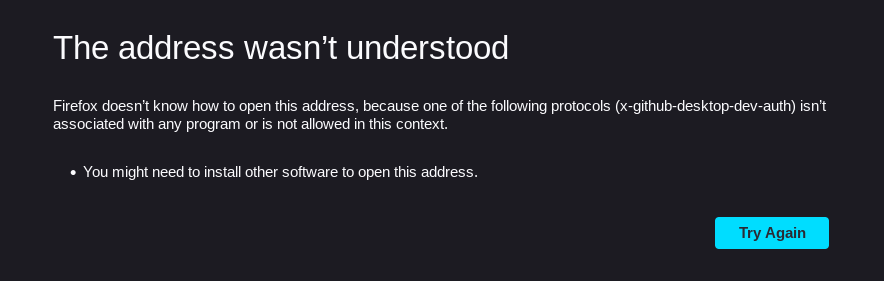
but still doesn't give me a chance to get it associated with the right program.

Having the same issue, managed to fix by opening in Firefox but then pointing directly to the
.AppImagefile instead ofgithub-desktopfor launching thexdg-openlink. Edit: similar solution here #416 (comment) Ubuntu 20.04 GitHub Desktop 2.9.0-linux2 (x64) (2.9.0 Linux RC2 AppImage) - Installed with AppImageLauncher@JMaio Can you provide more detail on how you did this?
When you've completed the verification in Firefox, it'll ask you how you want to open the
x-github-desktop-dev-authlink. Under that should beChoose a different application- click here, thenChoose other Application, and browse to and select theGitHubDesktop-linux-[x.x.x].AppImagefile. After selecting, clickOpen linkon the selection dialog in Firefox and GitHub Desktop should pop up and sign you in.Slight problem for me here -- Firefox did not ask me how I want to open the
x-github-desktop-dev-authlink, it just did nothing. When I click on "If your browser doesn't redirect you, click here" it does nothing either, but if I open that link in a new tab, it gives me this:
but still doesn't give me a chance to get it associated with the right program.
The same thing happens for me, with no way to choose how to open the protocol

After a day of messing around with this - this solution worked for me.
In Firefox address bar enter 'about:config' Then search for 'XDG'. It'll show 'widget.use-xdg-desktop-portal' - change it to TRUE (it's probably false). On GitHub, revoke any previously granted OAuth for the GitHub app (Settings->Applications->Authorized OAuth Apps) and then try it all again. Firefox will ask you what it should do with the redirect. See https://github.com/shiftkey/desktop/issues/542#issuecomment-895269081 if you are using the desktop AppImage - if a deb install then point Firefox to /usr/bin/github-desktop.
Seems to be two issues (at least!) here. Firefox defaults to disabling xdg-open AND xdg-open doesn't understand the redirect uri.

@HoverClub doing that fixes the initial issue I was having, but the GitHub Desktop app pops up with this:
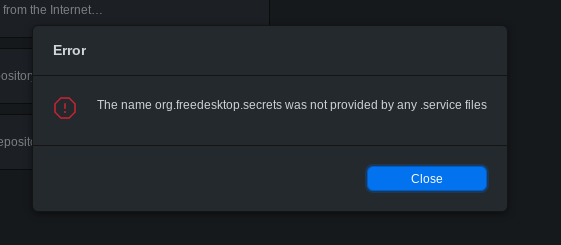

In Firefox address bar enter 'about:config' Then search for 'XDG'. It'll show 'widget.use-xdg-desktop-portal' - change it to TRUE (it's probably false). On GitHub, revoke any previously granted OAuth for the GitHub app (Settings->Applications->Authorized OAuth Apps) and then try it all again. Firefox will ask you what it should do with the redirect. See #542 (comment) if you are using the desktop AppImage - if a deb install then point Firefox to /usr/bin/github-desktop.
It doesn't show widget.use-xdg-desktop-portal, it only shows widget.use-kdg-desktop-portal.file-picker, …location, …mime-handler and …settings, all set to the number 2. If I'm adding it manually and set it to true, it still doesn't ask me how to open the link.
I've just added
"x-github-desktop-dev-auth":{"action":2,"handlers":[{"name":"GitHubDesktop-linux-3.0.1-linux1.AppImage","path":"/home/<name>/Downloads/GitHubDesktop-linux-3.0.1-linux1.AppImage"}]}
to the handler.json. It apparently didn't like the name or the path but it did ask me for it at least.
